
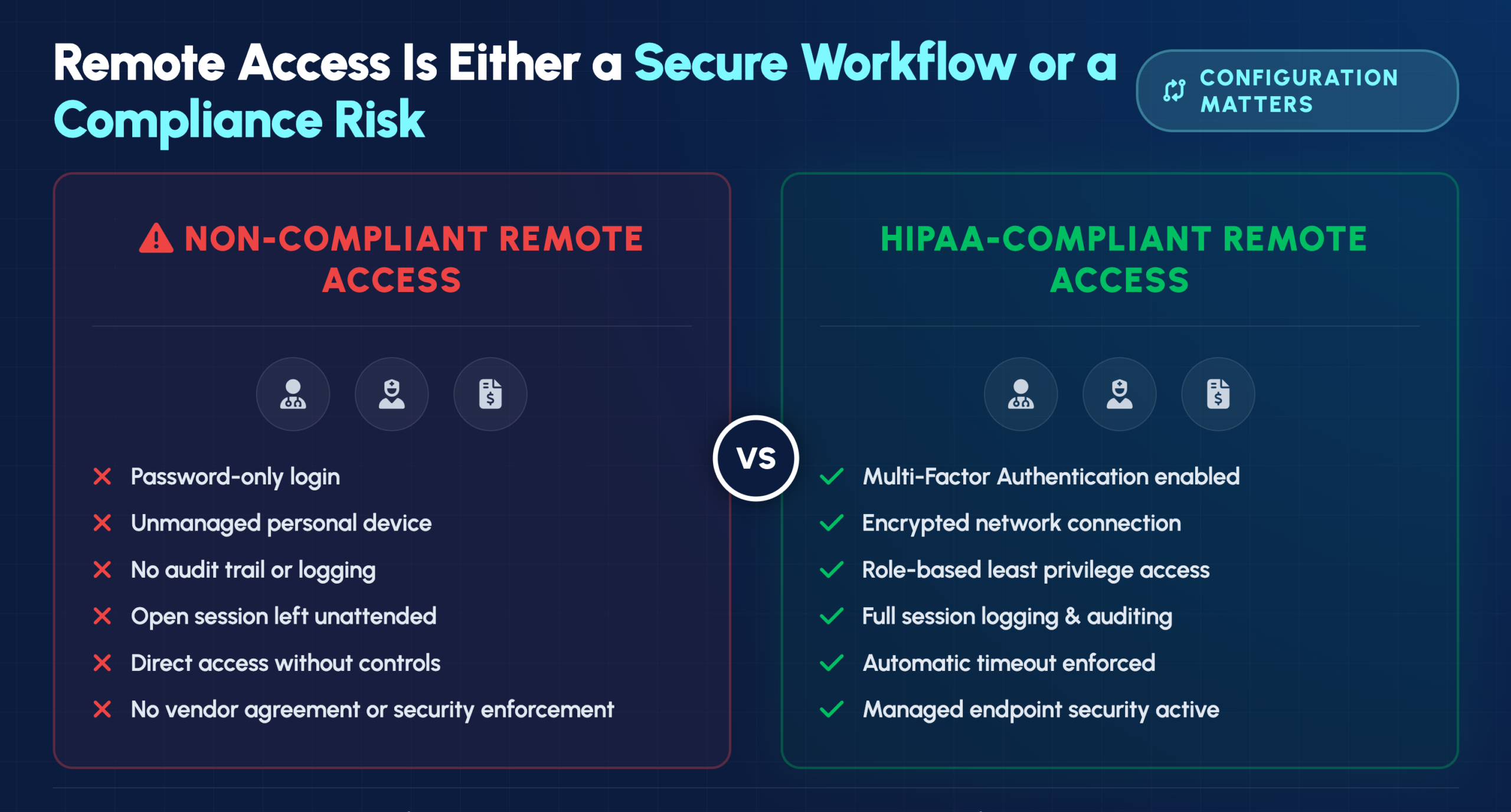
A physician reviewing patient records from home. A nurse checking lab results on a tablet between shifts. A billing specialist processing claims from a remote office. Each of these scenarios represents a potential compliance violation—or a secure, HIPAA-compliant workflow—depending entirely on how your organization has configured remote access.
Healthcare organizations face a difficult balance: staff need flexible access to patient information, but every remote connection creates exposure that cybercriminals actively target. This guide covers the technical safeguards, best practices, and access control solutions that enable secure remote access while maintaining full HIPAA compliance.
Secure remote access for healthcare staff requires strict adherence to HIPAA regulations, with a focus on encrypted, audited, and authenticated connections that protect electronic protected health information (ePHI). The HIPAA Security Rule establishes specific technical safeguards for any remote access solution, including access controls, encryption, and comprehensive audit trails.
ePHI covers any patient health information transmitted or stored electronically—medical records, lab results, billing details, and appointment histories all fall under this umbrella. When staff access patient data from home or on the go, every connection point becomes a potential vulnerability that attackers can exploit.
The consequences of non-compliance go well beyond regulatory fines. A breach damages patient trust, harms your organization’s reputation, and often leads to costly litigation. More importantly, compromised patient data can directly harm the people your organization exists to serve.
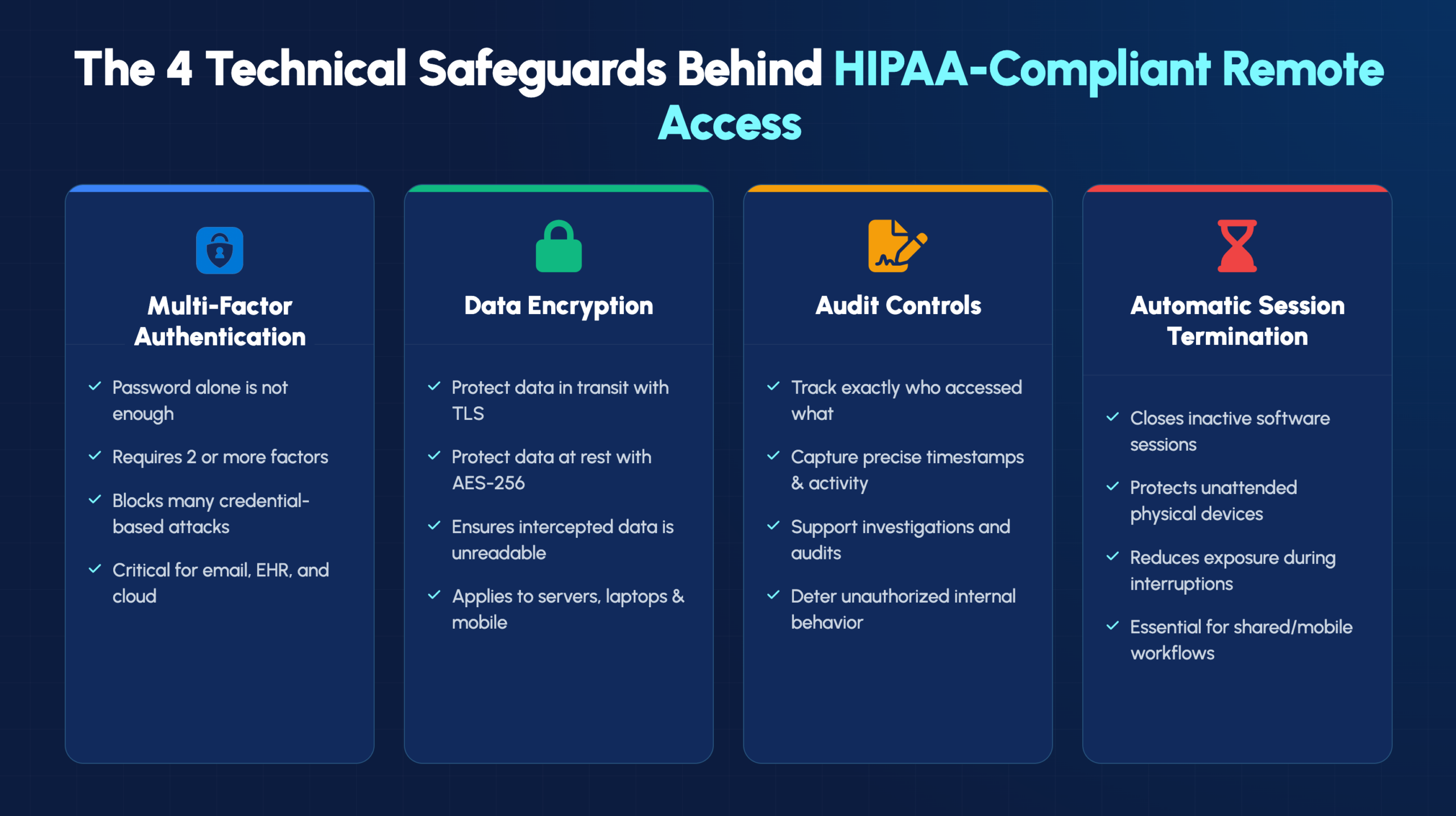
The HIPAA Security Rule defines technical safeguards as the technology and related policies that protect ePHI and control access to it. These requirements form the foundation of any compliant remote access strategy.
Multi-factor authentication (MFA) requires users to verify their identity through two or more independent methods before gaining access. Passwords alone no longer provide adequate protection for sensitive healthcare data, given how frequently credentials are compromised through phishing attacks and data breaches.
MFA combines different authentication factors:
Encryption transforms readable data into scrambled code that only authorized parties can decode. Data “in transit” refers to information moving across networks, like when a physician accesses patient records from home. Data “at rest” means information stored on servers, laptops, or other devices.
Healthcare organizations typically implement AES-256 encryption for stored data and TLS protocols for data transmission. Even if data is intercepted, encryption ensures it remains unreadable to unauthorized parties.
HIPAA mandates the ability to track who accessed what data, when, and what actions they took. Audit trails create a detailed record of every interaction with ePHI, which proves essential during compliance audits and breach investigations.
Audit logs also serve as a deterrent. When staff know their access is being monitored, they’re more likely to follow proper protocols and less likely to access records outside their job responsibilities.
Automatic logoff features terminate remote sessions after a period of inactivity. This safeguard prevents unauthorized access when a staff member steps away from their computer without manually logging out.
Picture a nurse who accesses patient records on a laptop, then gets called away for an emergency. Without automatic session termination, that open session could expose ePHI to anyone who walks by the unattended device.
Implementing HIPAA-compliant remote access involves more than selecting the right technology. The following practices help healthcare IT teams build a comprehensive security framework.
Virtual Private Networks (VPNs) create an encrypted tunnel between a user’s device and the organization’s network. Once authenticated, users typically have broad access to network resources. Zero Trust Network Access (ZTNA) takes a different approach, operating on a “never trust, always verify” principle that authenticates every access request to specific applications.
| Feature | VPN | Zero Trust Network Access |
|---|---|---|
| Access model | Network-wide after login | Per-application verification |
| Security approach | Perimeter-based | Identity-based |
| Best for | Small teams, simple setups | Large organizations, granular control |
Role-Based Access Controls (RBAC) ensure staff can only access the specific data and systems required for their job function. The principle of least privilege means granting the minimum access necessary—nothing more.
For example, billing staff might access insurance and payment information but not clinical notes. Nurses might view records only for patients currently under their care. Limiting access this way reduces exposure if any single account is compromised.
Every device connecting to your network remotely—laptops, smartphones, tablets—becomes a potential entry point for threats. Endpoint security includes antivirus software, anti-malware protection, and full-disk encryption.
Endpoint detection and response (EDR) tools provide continuous monitoring and can automatically isolate compromised devices before threats spread to the broader network.
Outdated software contains known vulnerabilities that cybercriminals actively exploit. Healthcare environments often run complex systems that make manual patching impractical, which is why automated patch management becomes essential.
Regular updates to operating systems, applications, and security tools close security gaps before attackers can take advantage of them.
Certifications like HITRUST and SOC 2 indicate that a cloud platform has undergone rigorous security assessments. However, certification alone isn’t enough—any vendor handling ePHI requires a signed Business Associate Agreement (BAA).
A BAA is a legal contract required under HIPAA that establishes the vendor’s responsibilities for protecting patient data. Without a signed BAA, using that vendor for ePHI puts your organization at significant compliance risk.
Remote wipe capability allows IT teams to erase all data from a device that’s been lost, stolen, or compromised. This feature can prevent a misplaced laptop from becoming a full-scale data breach.
Mobile device management (MDM) solutions typically include remote wipe functionality along with other security controls for devices accessing organizational resources.
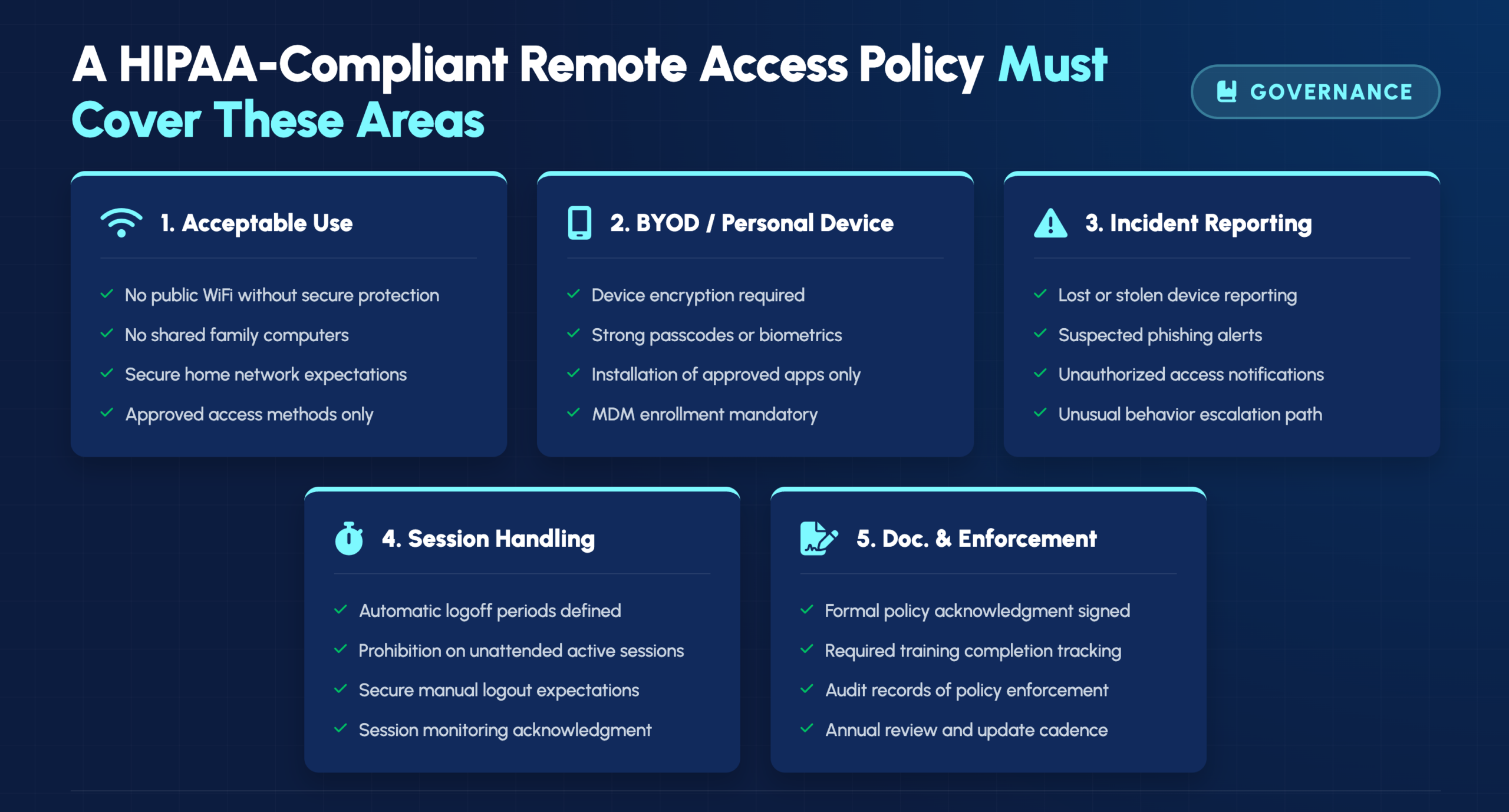
Written policies aren’t just good practice—they’re a HIPAA requirement. A comprehensive remote access policy establishes clear expectations and provides documentation that demonstrates compliance efforts.
Your policy defines what activities are permitted and prohibited during remote sessions. Common restrictions include prohibiting access from public WiFi without aVPN, banning the use of shared family computers for work, and requiring secure home network configurations.
Bring Your Own Device (BYOD) programs allow staff to use personal devices for work, but only with appropriate safeguards in place:
Every staff member has an obligation to report suspected security incidents immediately. Your policy defines what constitutes a reportable incident—a lost device, suspicious file access, phishing attempts, or unusual system behavior.
Clear reporting procedures ensure that potential breaches are investigated quickly, minimizing damage and meeting HIPAA’s breach notification requirements.
Several categories of access control solutions help healthcare organizations meet regulatory requirements while enabling secure remote work.
Identity and Access Management (IAM) platforms centralize user authentication and access permissions across all applications. Single Sign-On (SSO) capabilities improve both security and workflow efficiency by reducing password fatigue while maintaining strong authentication.
Privileged Access Management (PAM) solutions provide extra protection for accounts with elevated access—IT administrators, database managers, and others with “super-user” credentials. Attackers target high-privilege accounts specifically, so additional monitoring and controls are warranted.
MDM tools enforce security policies on mobile devices, whether corporate-owned or personal. Key capabilities include app restrictions, remote device locking, compliance monitoring, and remote wipe functionality.
HIPAA-compliant remote desktop solutions allow staff to access their office workstations securely from remote locations. When evaluating remote desktop tools, verify that the vendor will sign a BAA and that the solution includes encryption, MFA support, and audit logging.
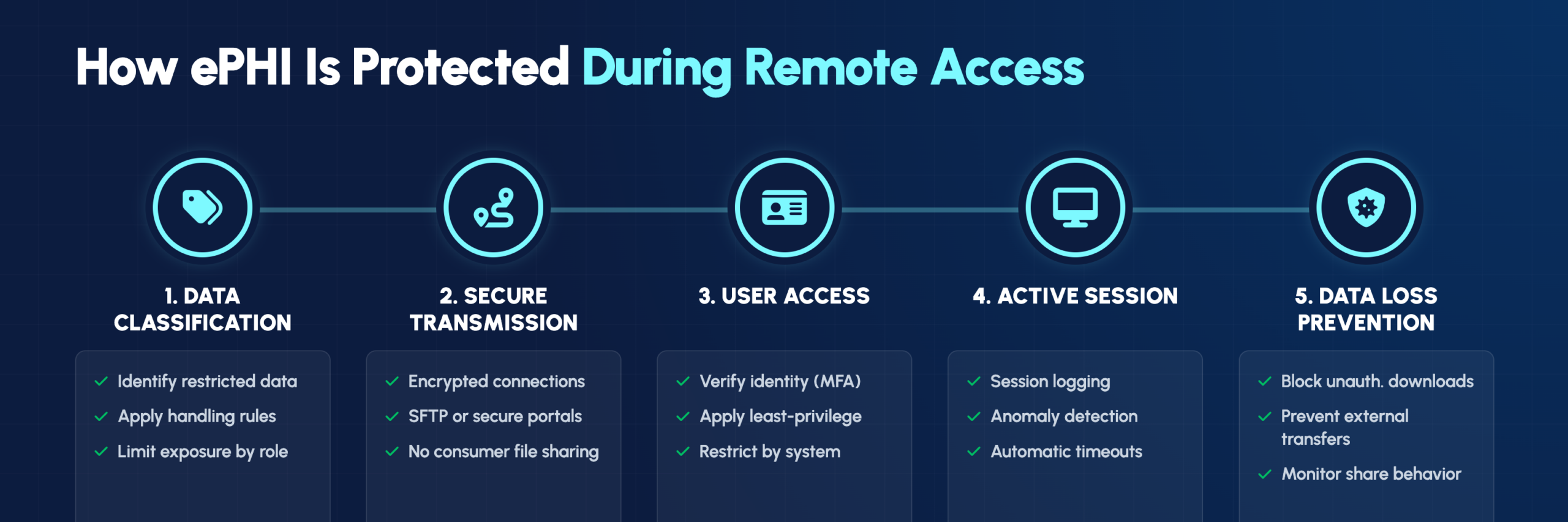
Understanding which processes protect restricted data helps organizations build comprehensive security programs. In healthcare, restricted data primarily means ePHI and other sensitive patient information.
Organizations categorize data by sensitivity level—public, internal, restricted, and confidential. Each classification carries specific handling rules that dictate how data can be stored, transmitted, and accessed remotely.
Secure File Transfer Protocol (SFTP) and similar encrypted methods protect data during transmission. Standard email attachments and consumer-grade file-sharing services like personal Dropbox accounts don’t meet HIPAA requirements and create significant compliance risks.
Data Loss Prevention (DLP) tools detect and block unauthorized data transfers. DLP systems monitor data in use, in motion, and at rest—preventing both accidental disclosures and intentional data theft.
HIPAA compliance requires ongoing vigilance, not just initial implementation. Continuous monitoring helps identify threats and demonstrates compliance during audits.
IT teams can observe active remote sessions to identify suspicious behavior. Unusual access times, abnormal data downloads, or access to records outside a user’s normal scope might indicate a compromised account or insider threat.
Modern security tools generate audit-ready reports automatically, documenting access controls, user activity, and security events. Automated reporting simplifies audit preparation and supports ongoing risk assessments.
AI-powered anomaly detection learns baseline user behavior and flags deviations from normal patterns. This technology proves particularly effective at catching compromised credentials or detecting malicious insider activity that might otherwise go unnoticed.
Technology alone can’t ensure security—staff education is both a HIPAA requirement and a practical necessity. Training programs cover essential topics:
All training activities require documentation, and regular refresher courses help maintain awareness as threats evolve.
Building and maintaining HIPAA-compliant remote access infrastructure requires specialized expertise that many healthcare organizations lack internally. The complexity of healthcare IT environments—with their mix of EHR systems, medical devices, and regulatory requirements—makes this particularly challenging.
IT GOAT provides healthcare-focused managed IT services with deep expertise in HIPAA compliance, security architecture, and remote access solutions. Our U.S.-based team understands the unique challenges healthcare organizations face and can help you implement secure remote access without disrupting clinical workflows.
Book a consultation to discuss your organization’s remote access security needs.


