
Law firms handle some of the most sensitive information in any industry—merger details, litigation strategy, medical records, financial disclosures—yet many still rely on email attachments and consumer file sharing tools that offer little real protection. A single breach can trigger malpractice claims, bar complaints, and irreparable damage to client relationships built over decades.
This guide covers what makes file sharing truly secure for legal practices, compares the leading platforms designed for law firms, and walks through the compliance requirements and security features that protect attorney-client privilege in an increasingly digital practice environment.
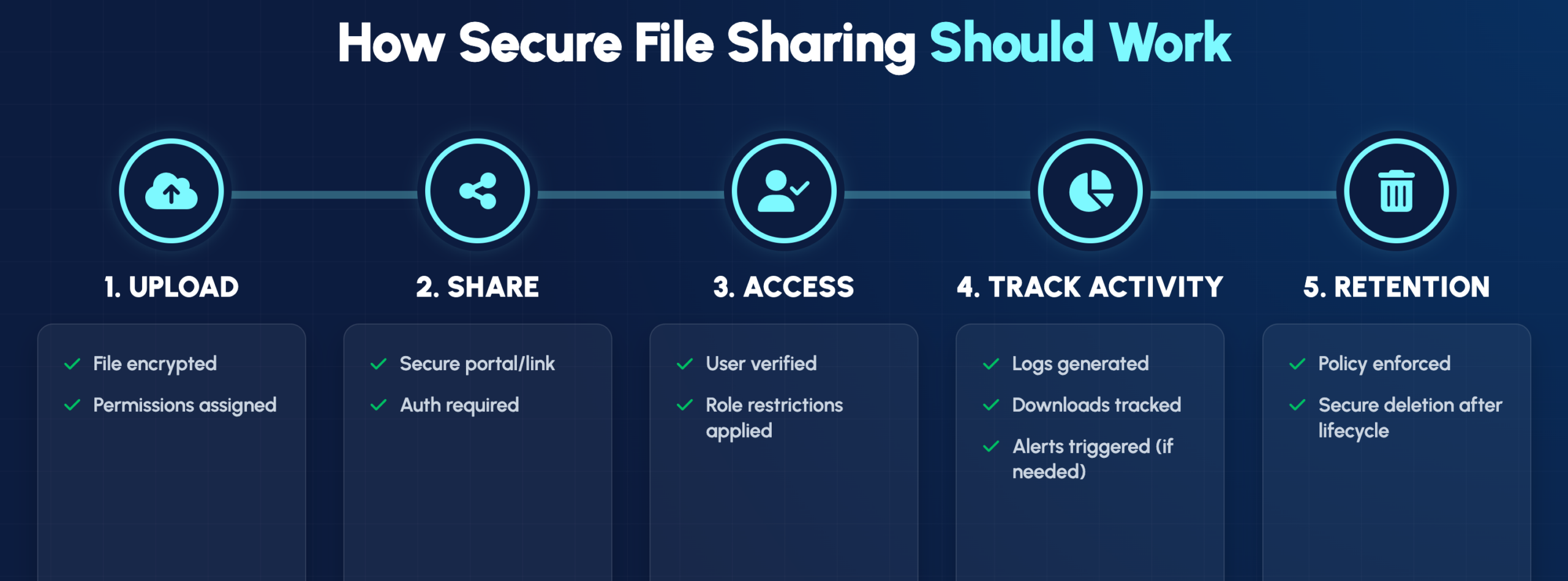
Secure file sharing for law firms involves robust encryption (AES-256 is the standard), detailed audit trails, and strict access controls that protect attorney-client privilege while meeting regulatory requirements. Consumer tools like personal Dropbox or email attachments simply weren’t built for this purpose. The right platform encrypts files during transfer and storage, logs every access event, and lets you control exactly who can view, download, or share each document.
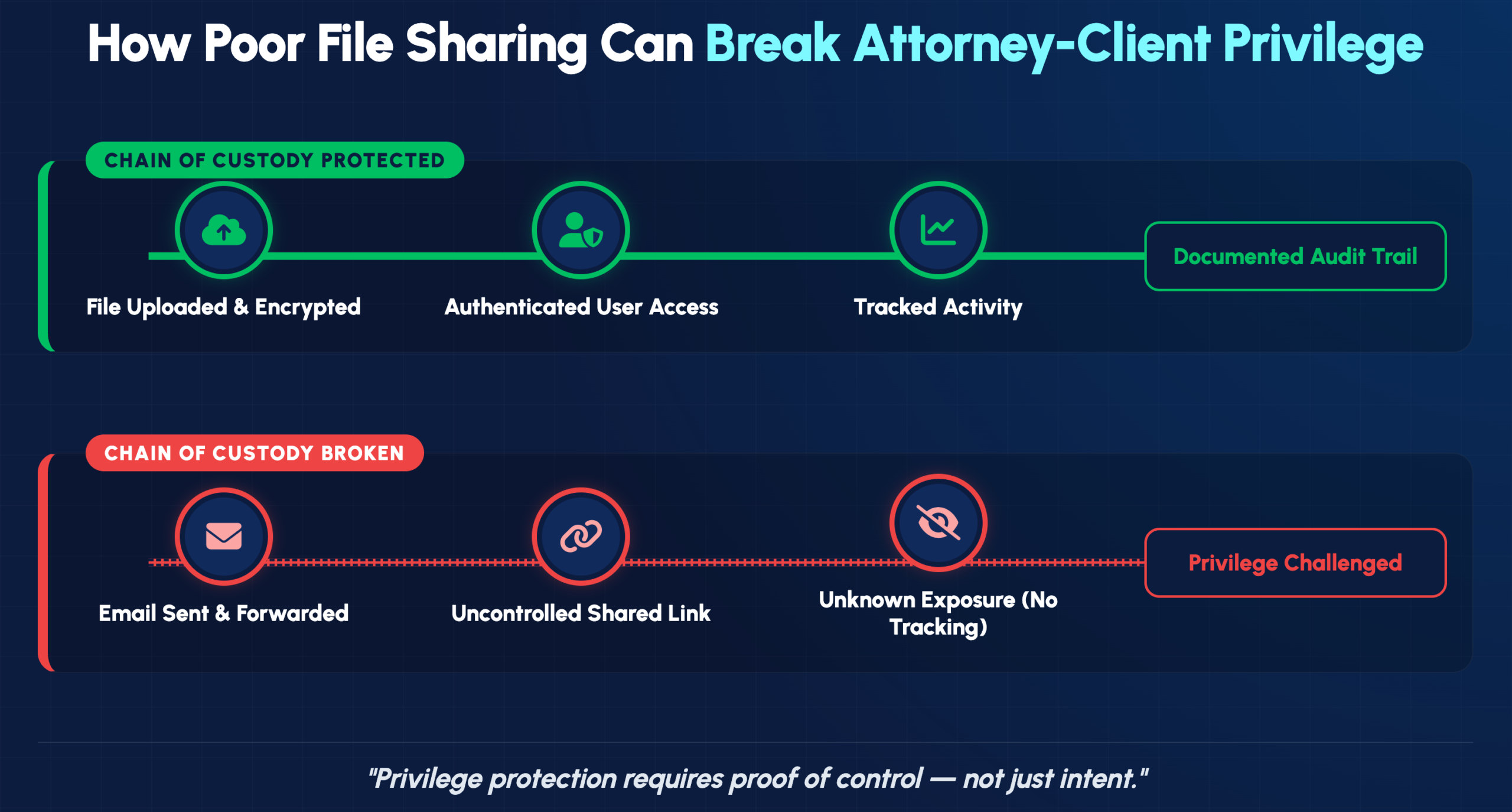
Attorney-client privilege covers every document you exchange with clients, whether it’s a contract draft or sensitive litigation strategy. When files travel through unsecured channels, proving that privilege remained intact becomes much harder if a breach occurs.
Secure platforms create what’s essentially a chain of custody for your documents. You can show exactly who accessed a file, when they opened it, and whether they downloaded or modified anything. That kind of documentation matters if privilege is ever challenged in court.
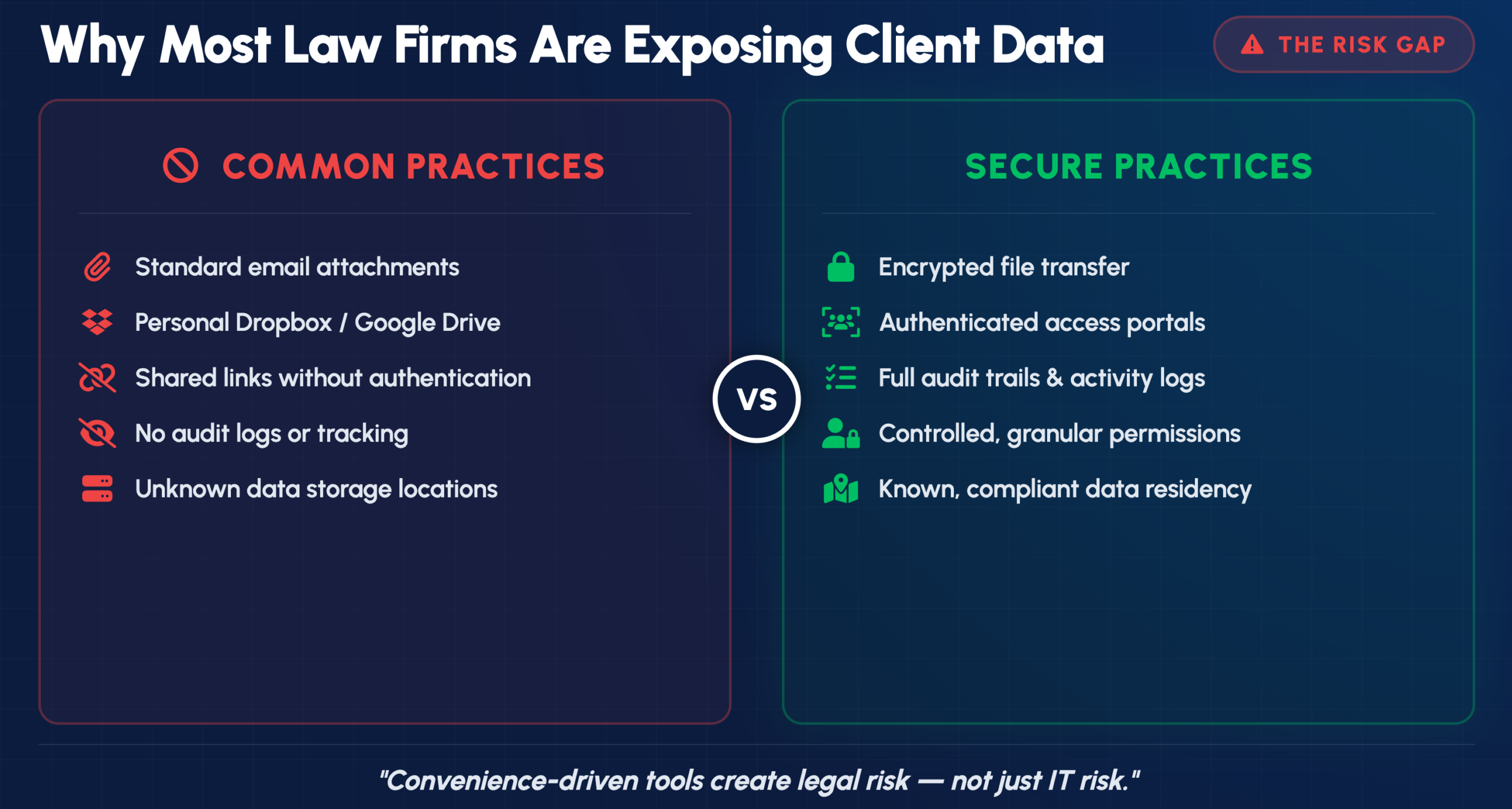
Many attorneys still use personal file sharing accounts or email attachments because they’re convenient. However, convenience comes with real exposure.
ABA Model Rule 1.6 requires attorneys to make “reasonable efforts” to prevent unauthorized disclosure of client information. Since 2012, the ABA has also expected technology competence as part of professional obligations.
What counts as “reasonable” depends on the sensitivity of the matter and available technology. Using consumer-grade sharing tools for confidential litigation documents would likely fall short in most jurisdictions. State bars have increasingly issued ethics opinions making clear that attorneys bear responsibility for understanding the security implications of their technology choices.
Evaluating platforms involves looking at several core capabilities that directly affect your ability to protect client data and stay compliant.
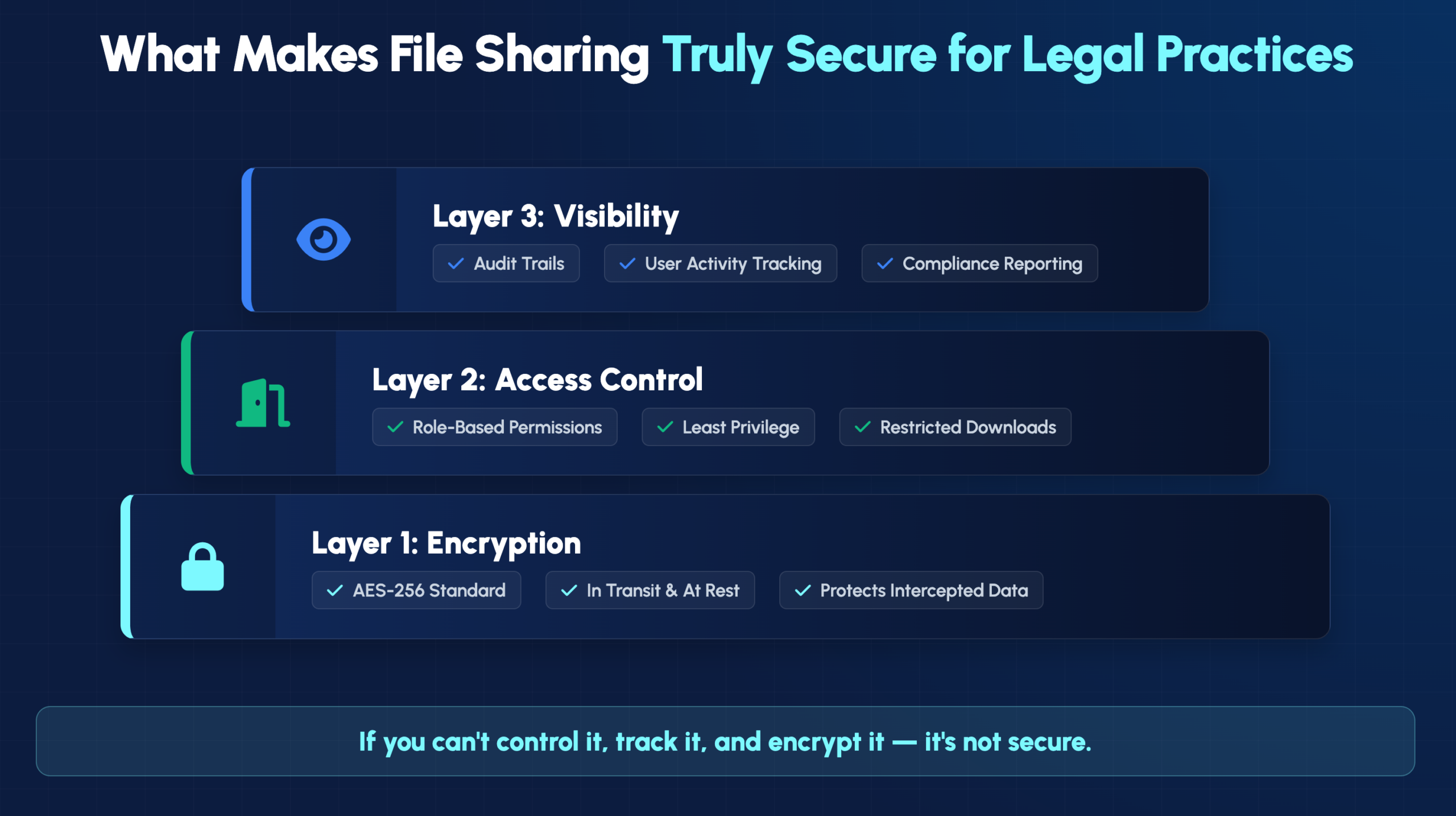
End-to-end encryption scrambles your files into unreadable code before they leave your device. The files stay encrypted until the intended recipient decrypts them, meaning even the service provider can’t read your documents.
Look for platforms that encrypt data both “in transit” (while moving between devices) and “at rest” (while stored on servers). AES-256 encryption is the current industry standard.
Granular permissions let you control exactly who can view, edit, download, or share specific documents. You might allow a client to view a settlement agreement while preventing them from downloading or forwarding it.
Role-based access assigns permission levels based on job function. Partners, associates, paralegals, and clients each see only what they need. This “least privilege” approach limits exposure if any single account is compromised.
An audit trail is a chronological record of every action taken on a document: who opened it, when, from what device, and whether they downloaded or printed it. These logs demonstrate your security diligence and can protect against malpractice claims.
A client portal is a secure online space where clients upload and download documents without using email. Portals replace risky email attachments with encrypted links that require authentication before access.
The best portals are intuitive enough that clients can use them without technical support while still providing the security controls your practice requires.
Litigation often involves massive document productions, video depositions, and multimedia evidence. Standard email systems typically limit attachments to 25MB or less, which doesn’t work for discovery.
Effective legal file sharing platforms handle files measured in gigabytes without compression or quality loss—essential for maintaining evidence integrity.
Your file sharing solution works best when it connects with tools you already use. Integration with platforms like Clio, MyCase, or PracticePanther eliminates duplicate data entry and keeps documents organized by matter.
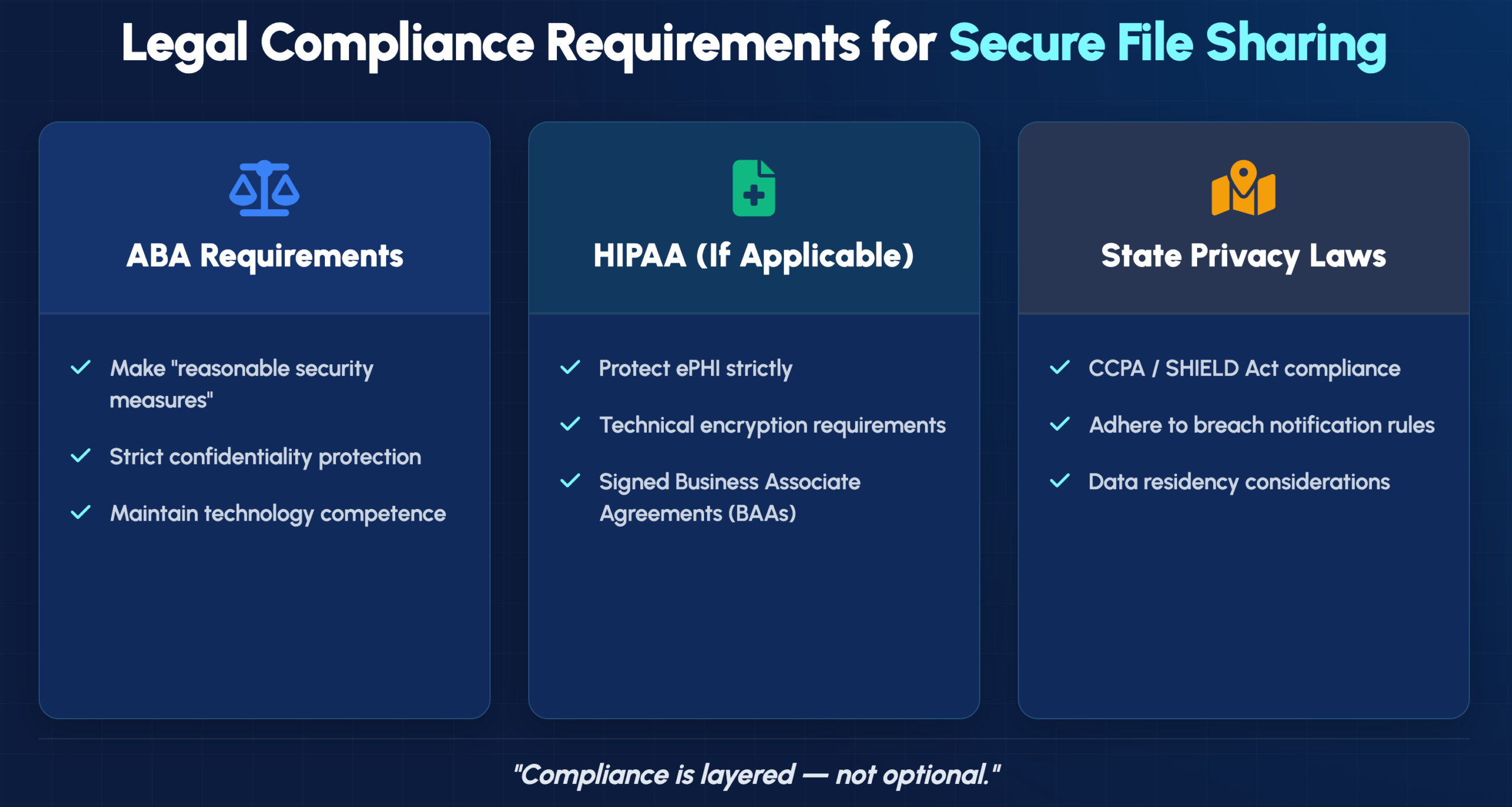
Beyond ethics rules, law firms often handle data subject to specific regulatory frameworks depending on their practice areas.
Rule 1.6’s “reasonable efforts” standard has evolved alongside technology. Comment 18 to the rule specifically addresses electronic communications, noting that attorneys may need special precautions for highly sensitive matters.
The 2012 amendment adding technology competence to Rule 1.1 means attorneys can’t claim ignorance of security risks as a defense. You’re expected to understand—or consult someone who understands—the security implications of your technology choices.
Firms handling medical records, personal injury cases, or healthcare litigation often receive protected health information (PHI) subject to HIPAA requirements. Using a HIPAA-compliant platform typically requires a Business Associate Agreement (BAA) with your vendor.
A BAA is a contract making the vendor legally responsible for protecting PHI according to HIPAA standards. Not all file sharing platforms will sign BAAs, so verify this before sharing any medical records.
California’s CCPA, New York’s SHIELD Act, and similar state laws impose additional requirements on how you handle personal information. These regulations may affect document retention, breach notification procedures, and client consent requirements.
Some matters—particularly those involving government contracts or international clients—require files to remain within specific geographic boundaries. Data residency refers to the physical location where your files are stored. Certain platforms offer options to specify storage regions, which can be essential for cross-border compliance.
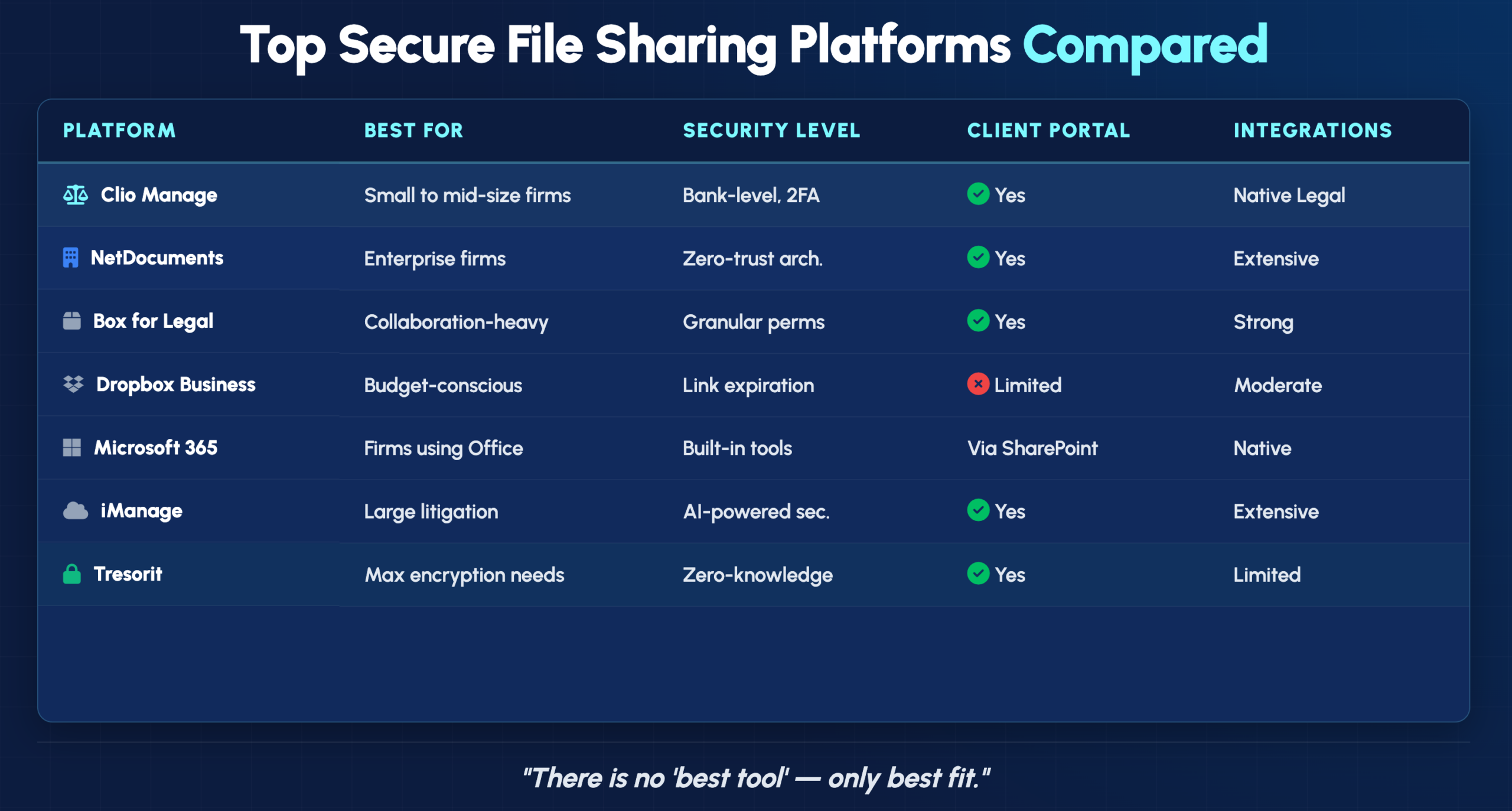
Different platforms serve different firm sizes and practice needs. Here’s how the leading options compare:
| Solution | Best For | Key Security Features | Client Portal | Legal Integrations |
|---|---|---|---|---|
| Clio Manage | Small to mid-size firms | Bank-level encryption, 2FA | Yes | Native |
| NetDocuments | Enterprise firms | Zero-trust architecture | Yes | Extensive |
| Box for Legal | Collaboration-heavy firms | Granular permissions | Yes | Strong |
| Dropbox Business | Budget-conscious firms | Link expiration, passwords | Limited | Moderate |
| Microsoft 365 | Firms using Office ecosystem | Compliance tools built-in | Via SharePoint | Native |
| iManage | Large litigation practices | AI-powered security | Yes | Extensive |
| FileCloud | Self-hosted requirements | On-premise option | Yes | Moderate |
| Tresorit | Maximum encryption needs | Zero-knowledge encryption | Yes | Limited |
Clio has become the most widely adopted practice management platform among small to mid-size firms. Its built-in secure sharing eliminates the need for separate file sharing subscriptions, and the client portal integrates directly with matter management.
NetDocuments was built specifically for legal document management and offers enterprise-grade security with a zero-trust architecture. Large firms appreciate its sophisticated permission structures and extensive integration ecosystem.
Box provides legal-specific features including legal holds, matter-centric organization, and strong collaboration tools. It’s particularly well-suited for firms that frequently collaborate with external parties on document-intensive matters.
Dropbox Business differs significantly from consumer Dropbox, offering admin controls, audit logs, and compliance features. While it lacks some legal-specific functionality, its familiar interface can ease adoption for staff already comfortable with the consumer version.
Firms already invested in the Microsoft ecosystem can leverage SharePoint and OneDrive with sensitivity labels and the Microsoft Compliance Center. This approach works well when your team primarily works in Word, Excel, and Outlook.
iManage serves many large firms with AI-driven security features that detect unusual access patterns. Its robust document management capabilities make it suitable for practices with complex organizational needs.
FileCloud offers a self-hosted option for firms requiring complete control over their infrastructure. This approach appeals to practices with strict data sovereignty requirements or those handling particularly sensitive matters.
Tresorit uses zero-knowledge encryption, meaning even Tresorit’s own employees cannot access your files. This maximum-security approach suits firms handling the most sensitive matters where any potential access point represents unacceptable risk.
Beyond the basics, several technical features distinguish truly secure platforms from those offering only surface-level protection.
Multi-factor authentication (MFA) requires users to verify their identity through something they know (password) plus something they have (phone or security key). Single sign-on (SSO) allows one secure login to access multiple applications. Together, these features dramatically reduce the risk of unauthorized access even if passwords are compromised.
Automatic logouts protect against unauthorized access when devices are left unattended. A paralegal stepping away from their desk for lunch shouldn’t leave client files accessible to anyone walking by.
When a laptop or phone containing client files is lost or stolen, remote wipe capabilities let you erase sensitive data before it can be accessed. Mobile device management extends this protection to smartphones and tablets used for firm business.
The best platform for your practice depends on several factors specific to your situation.
Solo practitioners and small firms often find all-in-one practice management platforms like Clio most cost-effective. Large firms with complex document management needs typically require dedicated solutions like NetDocuments or iManage.
Per-user pricing can become expensive as firms grow. Consider storage limits, overage charges, and whether client portal access counts against your user licenses. The cheapest option often isn’t the most economical over time.
Independent certifications validate that vendors actually implement the security measures they claim:
Selecting a platform is only the first step. Successful implementation requires planning and ongoing attention.
Technology alone doesn’t create security—people do. Even the most sophisticated platform fails if staff share passwords, disable security features for convenience, or revert to email attachments when the portal seems complicated.
Written policies clarify expectations and reduce inconsistent practices across your firm. Consider documenting standards for which file types can be shared externally, approval requirements for sharing with opposing counsel, and retention schedules for closed matters.
Security isn’t a one-time project. Regular access audits, software updates, and security reviews help identify vulnerabilities before they become breaches. Many firms partner with managed IT providers to maintain consistent oversight without adding internal headcount.
Implementing secure file sharing involves more than selecting software—it requires understanding your compliance obligations, configuring systems correctly, and training your team effectively. IT GOAT provides security-focused managed IT services tailored to professional services firms, including comprehensive support for legal technology environments.
Book a consultation to discuss your firm’s secure file sharing needs


