
Moving patient data to the cloud feels like a leap of faith for many clinic administrators—and the stakes couldn’t be higher. A single misstep with HIPAA compliance can trigger six-figure fines and erode the patient trust you’ve spent years building.
The reality is that cloud storage can actually strengthen your data protection when configured correctly. This guide walks through the specific requirements, security measures, and evaluation criteria that determine whether your cloud migration protects patient data or puts it at risk.
Yes, HIPAA allows clinics to store patient data in the cloud when proper safeguards are in place. The most critical requirement is a signed Business Associate Agreement (BAA) with your cloud vendor, which is a legal contract where the provider accepts liability for protecting electronic protected health information (ePHI). Beyond the BAA, compliant cloud setups require AES-256 encryption for data at rest and in transit, multi-factor authentication for every user, detailed audit logs tracking all access to patient records, and reliable backup and disaster recovery capabilities.
ePHI refers to any patient health information created, stored, or transmitted electronically—everything from medical records and lab results to billing details and appointment notes.
The cloud itself isn’t the compliance risk. How the cloud is configured and managed determines whether your clinic meets HIPAA requirements.
Cloud platforms consolidate patient records into a single location rather than scattering them across paper files, local servers, and disconnected systems. This centralization makes it easier to maintain consistent security controls across all patient data.
When patient data lives in the cloud, providers can access records from any location with proper authentication. This capability supports smoother referrals and faster specialist consultations, particularly for clinics with multiple locations or providers who work remotely.
Cloud resources expand alongside patient volume without requiring major hardware purchases. A growing practice can add storage capacity or user licenses in days rather than waiting months for new equipment.
Moving to the cloud shifts capital expenses—like purchasing and maintaining servers—into predictable monthly operational costs. Many clinics find this model easier to budget, and it eliminates the burden of managing aging on-site equipment.
Today’s patients expect digital conveniences like patient portals, secure messaging, and online appointment scheduling. Cloud-based systems make these features more accessible than traditional on-premise solutions.
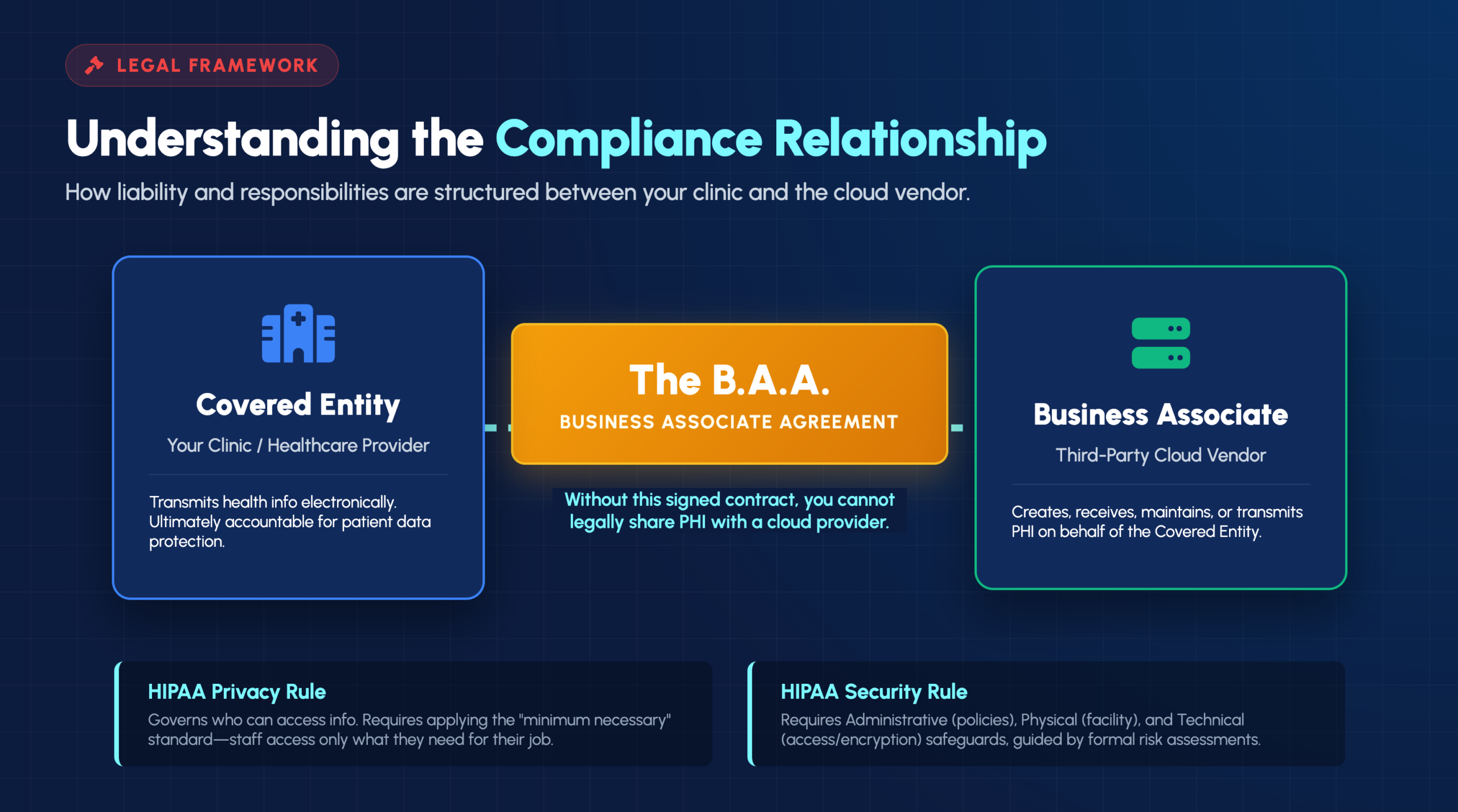
A Business Associate Agreement is a legally required contract between your clinic and any vendor that handles PHI on your behalf. The BAA establishes what the vendor can and cannot do with patient data, outlines their security responsibilities, and defines liability if a breach occurs.
Without a signed BAA, your clinic cannot legally share PHI with a cloud provider—regardless of how secure their systems might be.
Understanding these two categories clarifies who bears responsibility for protecting patient data:
Your clinic is the covered entity. The moment a cloud provider stores or processes your patient data, they become your business associate.
The HIPAA Privacy Rule governs who can access patient information and under what circumstances. Even in cloud environments, clinics are expected to apply the “minimum necessary” standard, meaning staff access only the PHI required for their specific job functions.
The Security Rule requires three categories of safeguards: administrative (policies and procedures), physical (facility and device protections), and technical (access controls and encryption). A formal risk assessment helps identify vulnerabilities specific to your cloud setup and documents how you’re addressing them.
Both clinics and their cloud providers have notification responsibilities if PHI is compromised. The BAA typically outlines how quickly the cloud provider will alert you to incidents, but your clinic remains responsible for notifying affected patients and the Department of Health and Human Services.
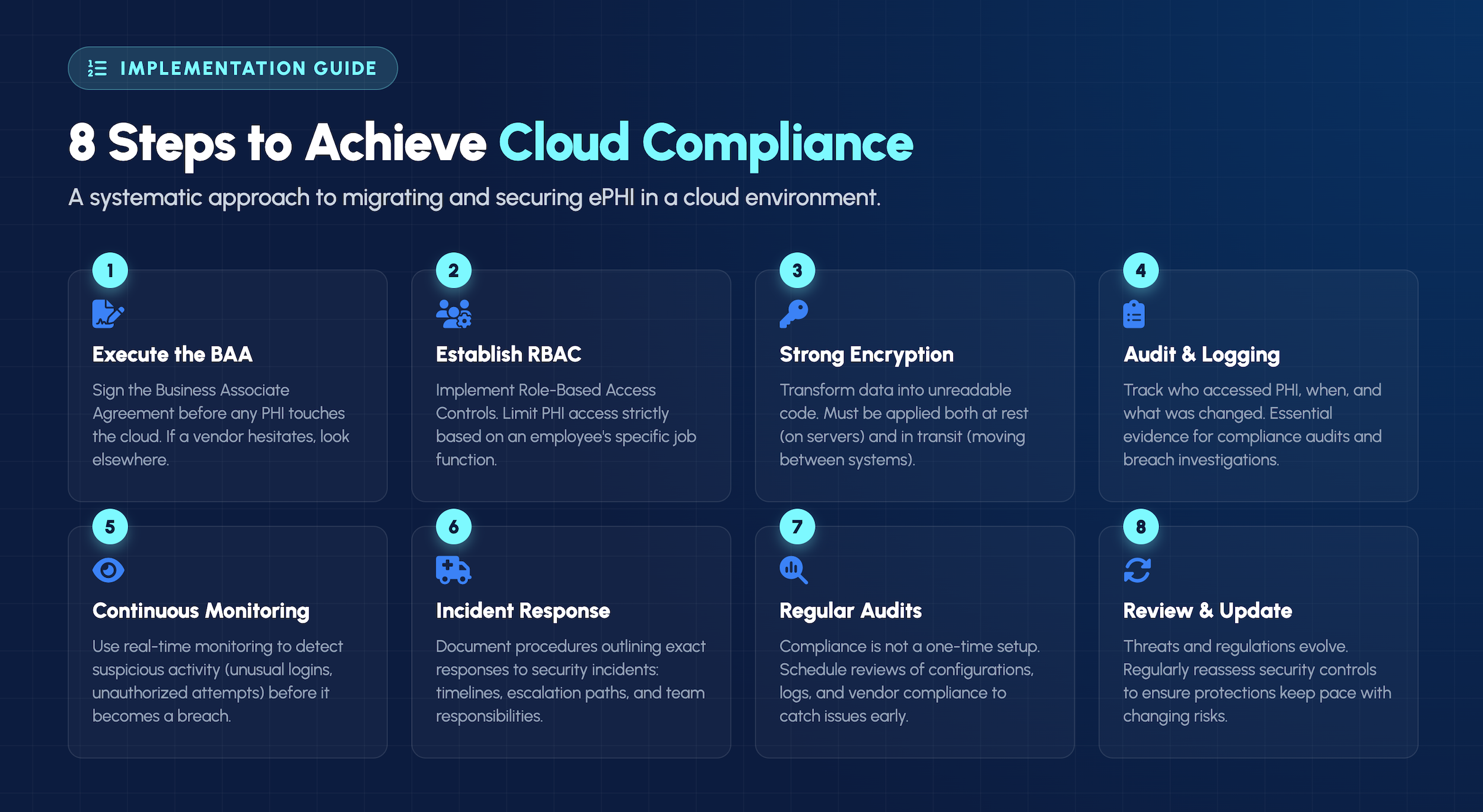
This step comes before any PHI touches the cloud. The BAA outlines your vendor’s responsibilities, establishes liability, and confirms they understand their obligations under HIPAA. If a vendor hesitates to sign a BAA, look elsewhere.
Not every staff member requires access to every patient record. Role-based access control (RBAC) limits PHI access based on job function—front desk staff might see scheduling information while clinical staff access medical histories.
Encryption transforms readable data into unreadable code that requires a decryption key to access. HIPAA-compliant cloud environments encrypt data both at rest (stored on servers) and in transit (moving between systems).
Comprehensive logs track who accessed PHI, when they accessed it, and what changes they made. These records prove invaluable during compliance audits and become essential evidence when investigating potential breaches.
Real-time monitoring detects suspicious activity—like unusual login patterns or unauthorized access attempts—before it escalates into a breach. This proactive approach goes beyond periodic security reviews.
Documented procedures outline exactly how your clinic will respond when a security incident occurs, including notification timelines, escalation paths, and specific responsibilities for each team member.
HIPAA compliance isn’t a one-time achievement. Scheduled reviews of cloud configurations, access logs, and vendor compliance help catch issues before they become violations.
Threats evolve, and so do compliance requirements. Regular reassessment of security controls ensures protections keep pace with changing risks and regulatory expectations.
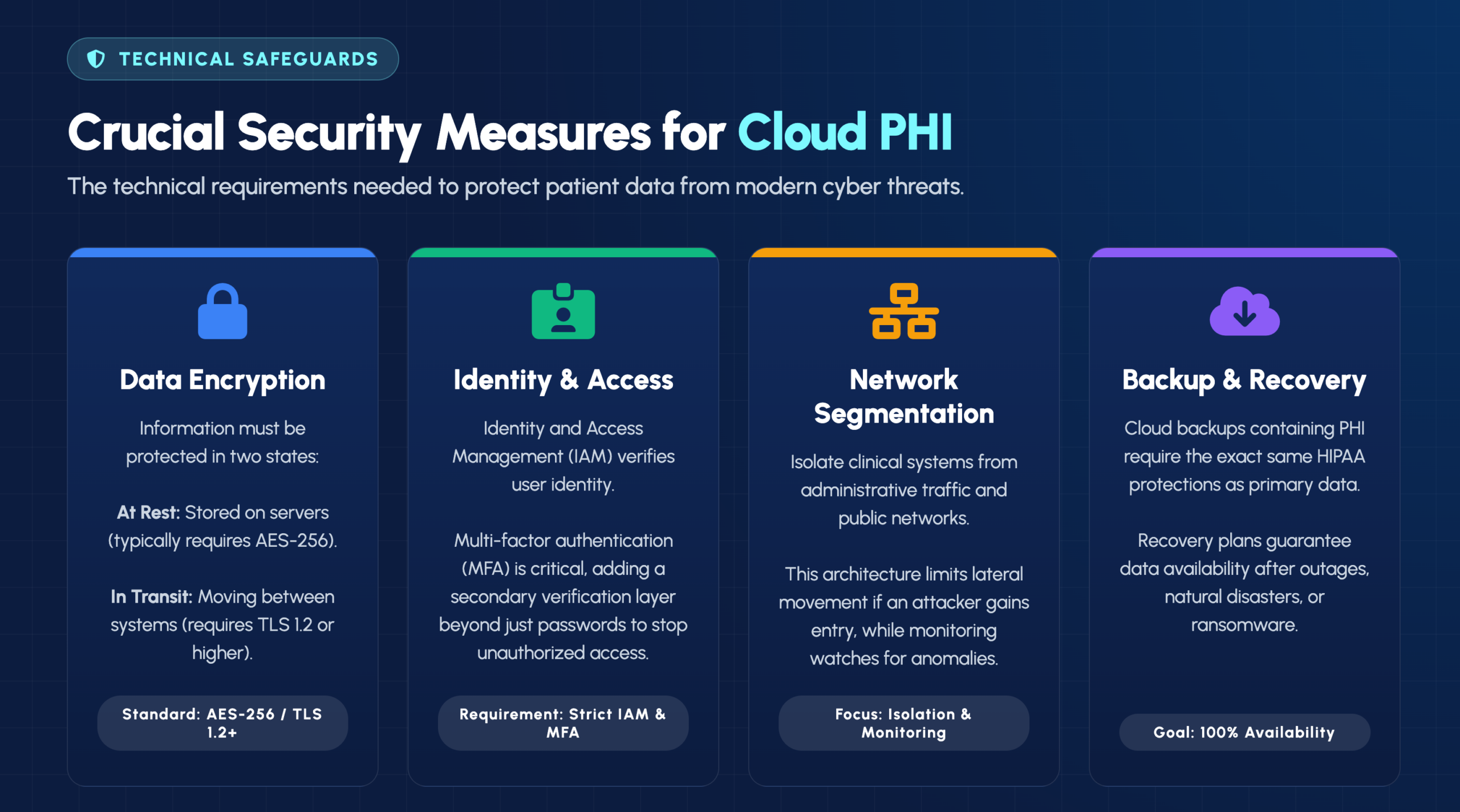
Data at rest refers to information stored on servers, while data in transit describes information moving between systems. Both states require encryption to meet HIPAA standards—typically AES-256 for storage and TLS 1.2 or higher for transmission.
Identity and Access Management (IAM) systems verify user identity and control what resources each user can access. Multi-factor authentication (MFA) adds an extra verification layer beyond passwords, significantly reducing the risk of unauthorized access.
Network segmentation isolates clinical systems from administrative traffic and public-facing networks. This architecture limits how far an attacker can move if they gain initial access, while continuous monitoring watches for anomalies that might indicate a breach in progress.
Cloud backups containing PHI require the same HIPAA protections as primary data. Recovery plans ensure patient information remains available after outages, ransomware attacks, or natural disasters.
HIPAA doesn’t exist in isolation. State privacy laws, payer requirements, and other regulations often overlap or add additional obligations. Keeping track of all applicable requirements challenges even well-resourced clinics.
Most clinic staff are healthcare professionals, not IT security or compliance specialists. The technical knowledge required to properly configure and maintain HIPAA-compliant cloud environments often exceeds what internal teams can provide.
Moving patient data to the cloud cannot interrupt clinical operations or compromise patient care. Successful migrations typically follow phased approaches with careful planning, testing, and fallback options.
HIPAA violations carry significant financial penalties that scale based on the level of negligence involved. Beyond fines, breaches damage patient trust and clinic reputation in ways that can take years to rebuild.
Before signing any agreement, consider asking:
A vendor’s reluctance to sign a BAA immediately disqualifies them from handling PHI. When reviewing BAA terms, pay close attention to how liability is allocated and what responsibilities each party holds during a breach.
Certifications like SOC 2, HITRUST, or ISO 27001 indicate that an independent third party has verified the vendor’s security controls. These certifications don’t guarantee HIPAA compliance, but they demonstrate a commitment to security best practices.
Knowing where your PHI is physically stored matters for both compliance and practical reasons. Some regulations require U.S.-based storage, and understanding data residency helps you assess jurisdictional risks.
HIPAA permits mobile access to patient data when appropriate security controls are in place. Staff working remotely or accessing records from mobile devices can maintain compliance through secure VPN connections, device encryption, and strong authentication.
However, accessing PHI from personal devices introduces additional risks. Clear policies defining acceptable use, required security configurations, and prohibited activities help protect patient data while supporting the flexibility modern healthcare demands.
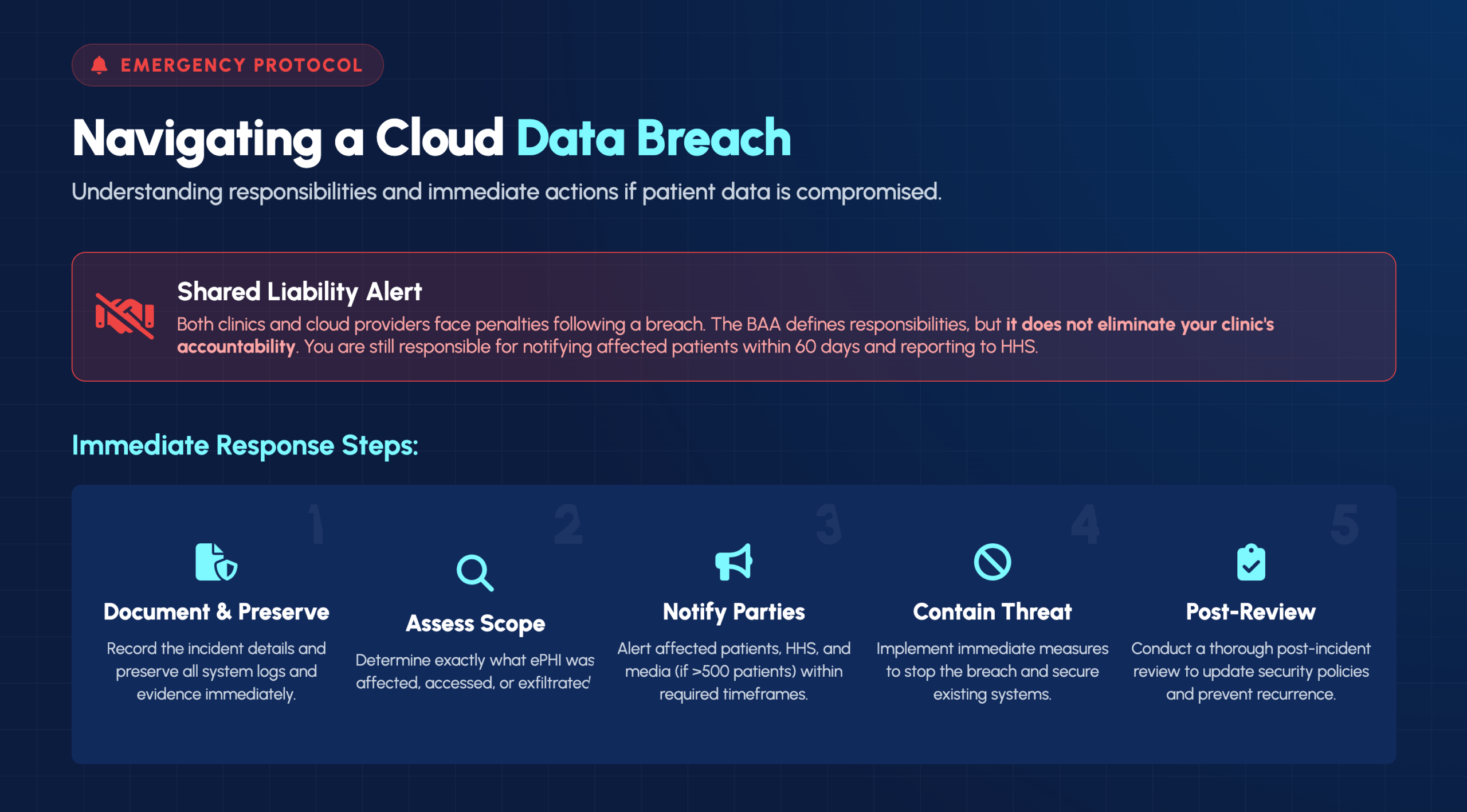
Cloud providers typically notify covered entities without unreasonable delay after discovering a breach. Your clinic then has obligations to notify affected patients within 60 days and report to HHS—the BAA doesn’t transfer these responsibilities to your vendor.
Both parties can face penalties following a breach. While the BAA defines specific responsibilities, it doesn’t eliminate your clinic’s accountability for protecting patient data. Regulators often investigate both the covered entity and business associate.
When a breach occurs, your response matters:
Moving patient data to the cloud involves technical complexity, regulatory requirements, and operational considerations that can overwhelm clinic staff already focused on patient care. IT GOAT’s U.S.-based team brings compliance expertise, proactive monitoring, and vendor coordination to simplify this transition.
Our approach removes the guesswork from HIPAA cloud compliance—from evaluating vendors and reviewing BAAs to configuring security controls and maintaining ongoing compliance.
Book a consultation to discuss your specific cloud migration and compliance questions.


