
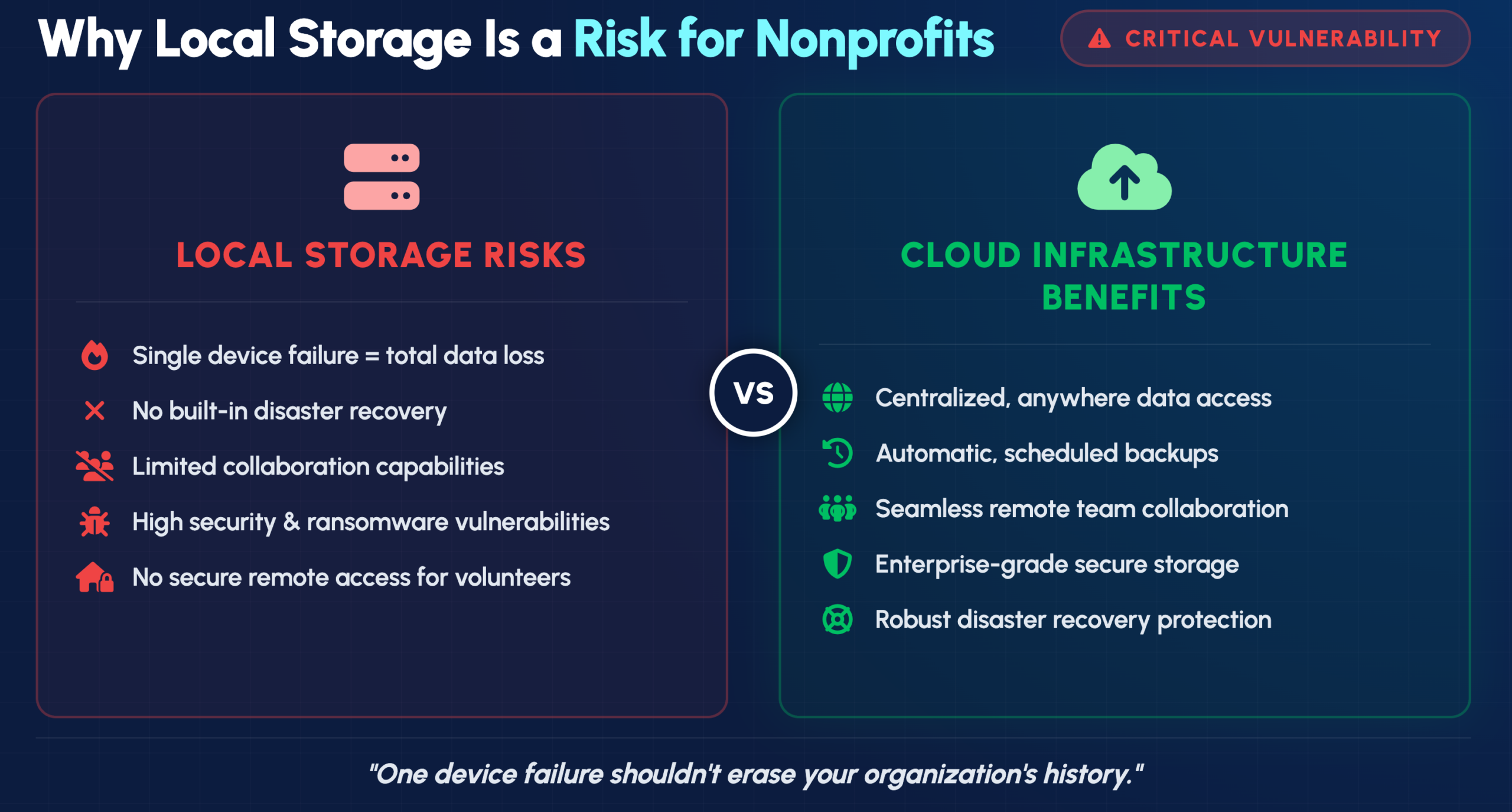
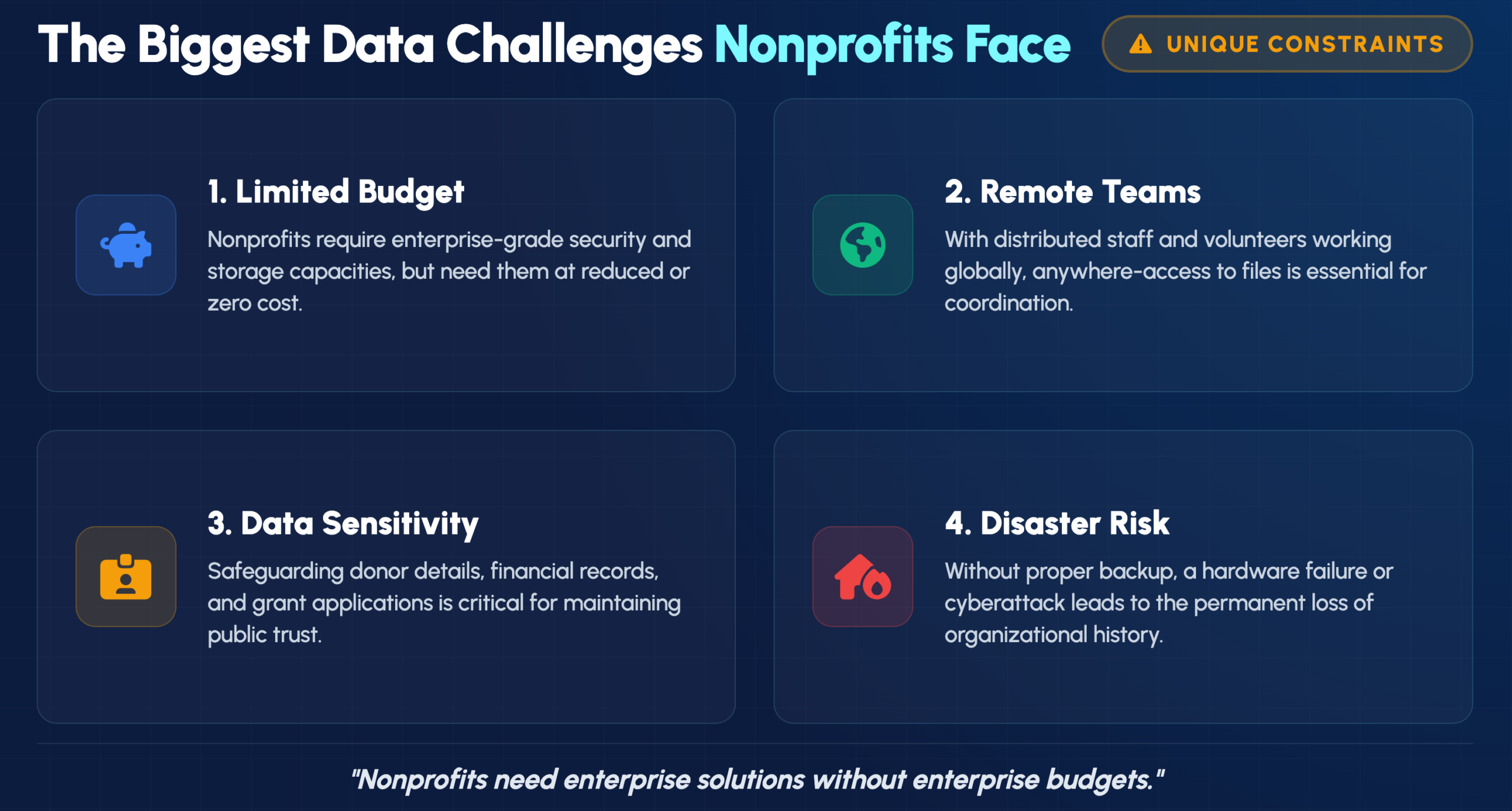
Nonprofit organizations handle sensitive donor information, grant applications, and years of operational records—often with limited IT budgets and no dedicated tech staff. A single hardware failure or ransomware attack can erase irreplaceable data that took years to build.
The right cloud storage solution protects your organization’s critical files while making collaboration easier for distributed teams and volunteers. This guide compares eight cloud storage and backup options designed for nonprofits, covering features, pricing, and how to choose the best fit for your organization.
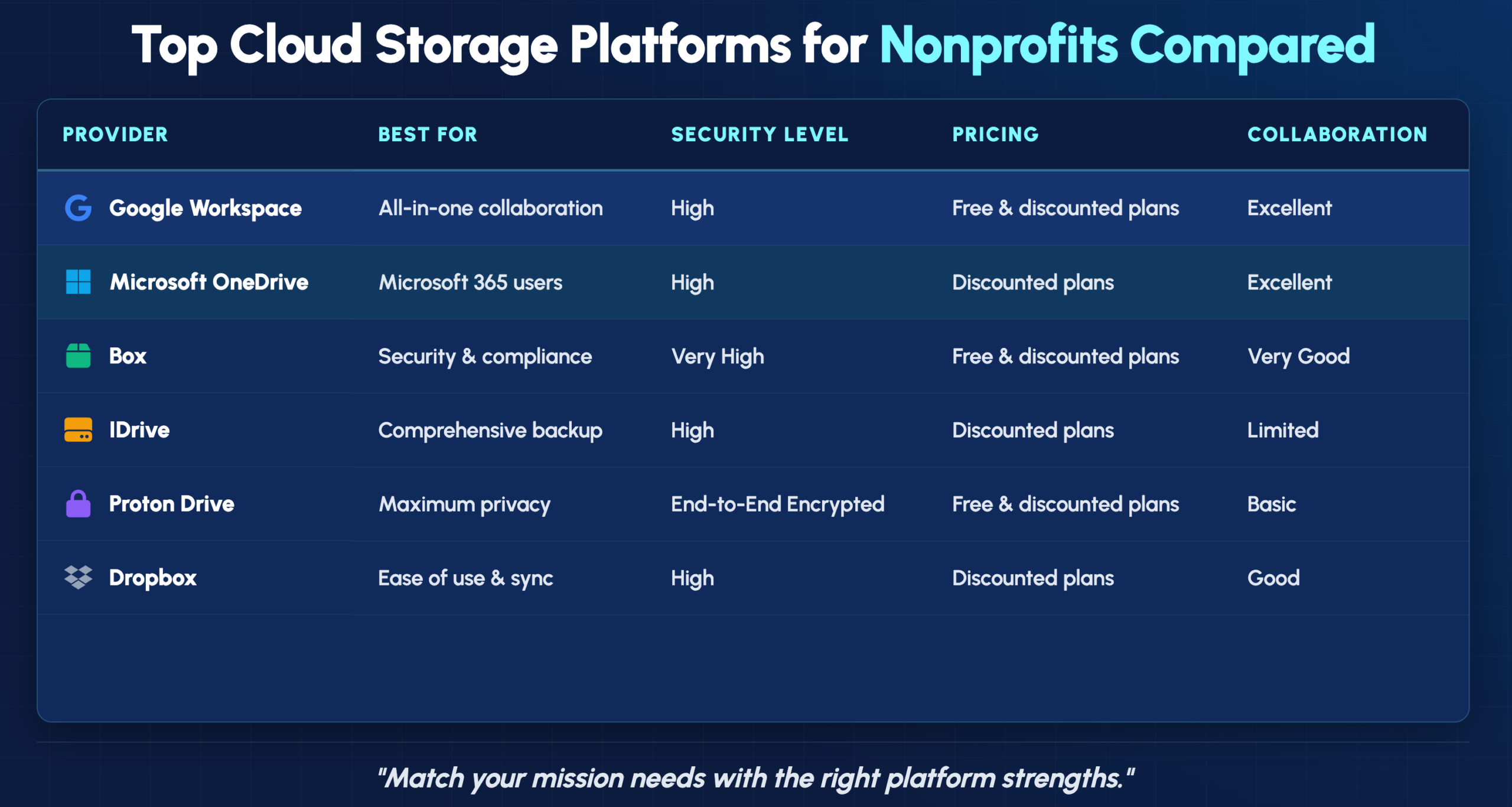
In 2026, the best cloud storage and backup solutions for nonprofits include Microsoft OneDrive for organizations using Microsoft 365, Google Drive for seamless collaboration, and Box for enterprise-grade security. For dedicated backup with ransomware protection and encryption, IDrive and Proton Drive offer affordable, scalable plans tailored to nonprofit budgets.
Nonprofits operate under constraints that most businesses don’t face. Tight budgets, volunteer-heavy teams, and the responsibility of protecting donor information create a unique set of pressures. Meanwhile, a single laptop failure or ransomware attack can wipe out years of grant applications, donor records, and program documentation.
Cloud storage—storing files on remote servers accessed through the internet rather than on local computers—addresses these challenges directly. Your team can access files from anywhere, collaborate in real time, and recover data if something goes wrong.
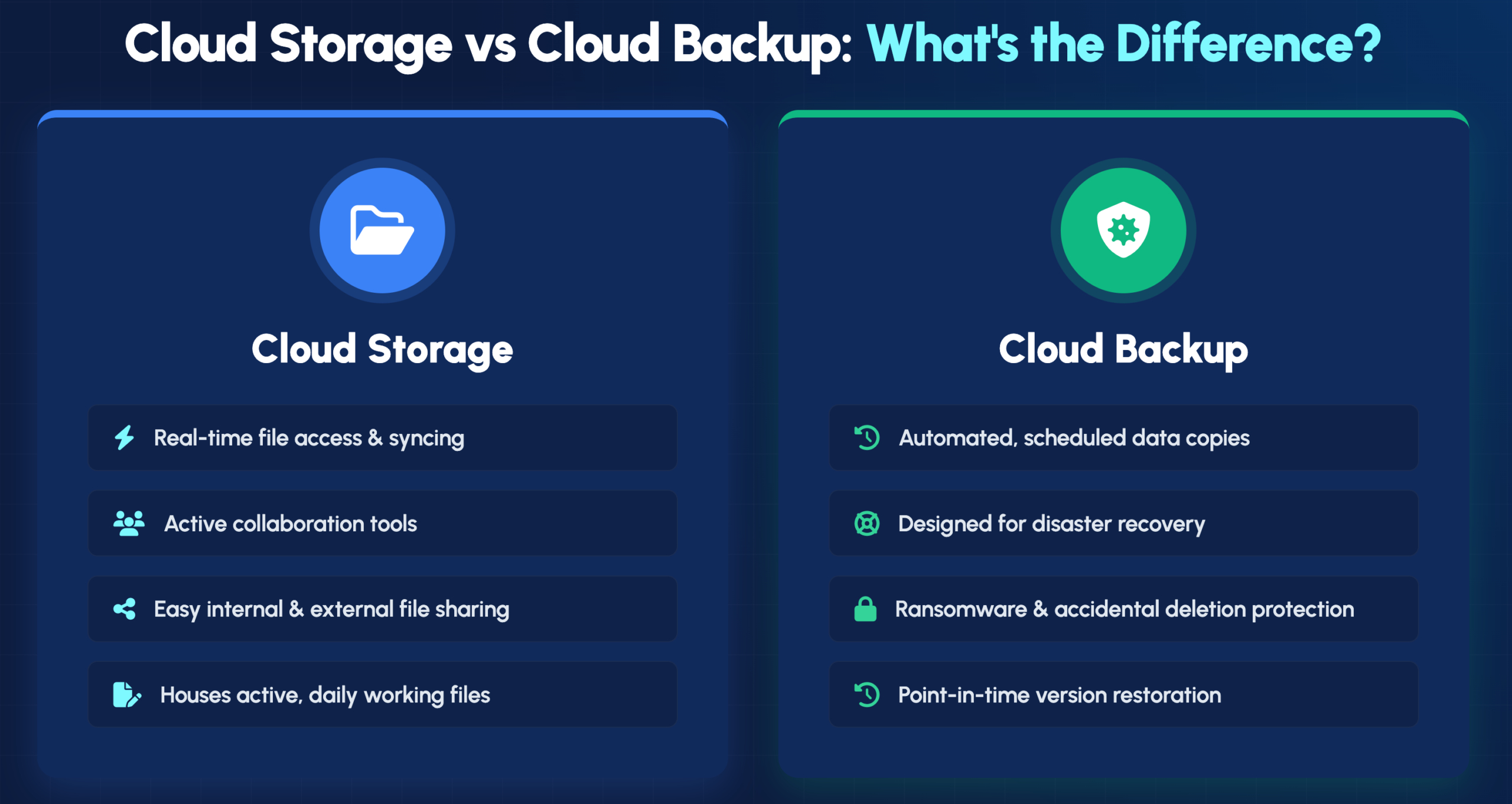
These two terms get used interchangeably, though they serve different purposes. Cloud storage focuses on active file access and collaboration—think Google Drive or Dropbox, where your team works on documents together. Cloud backup, on the other hand, creates .automated copies of your data for recovery after incidents like accidental deletion or ransomware attacks.
Many nonprofits benefit from using both. You might rely on Google Drive for daily collaboration while running IDrive in the background to create comprehensive backups of everything.
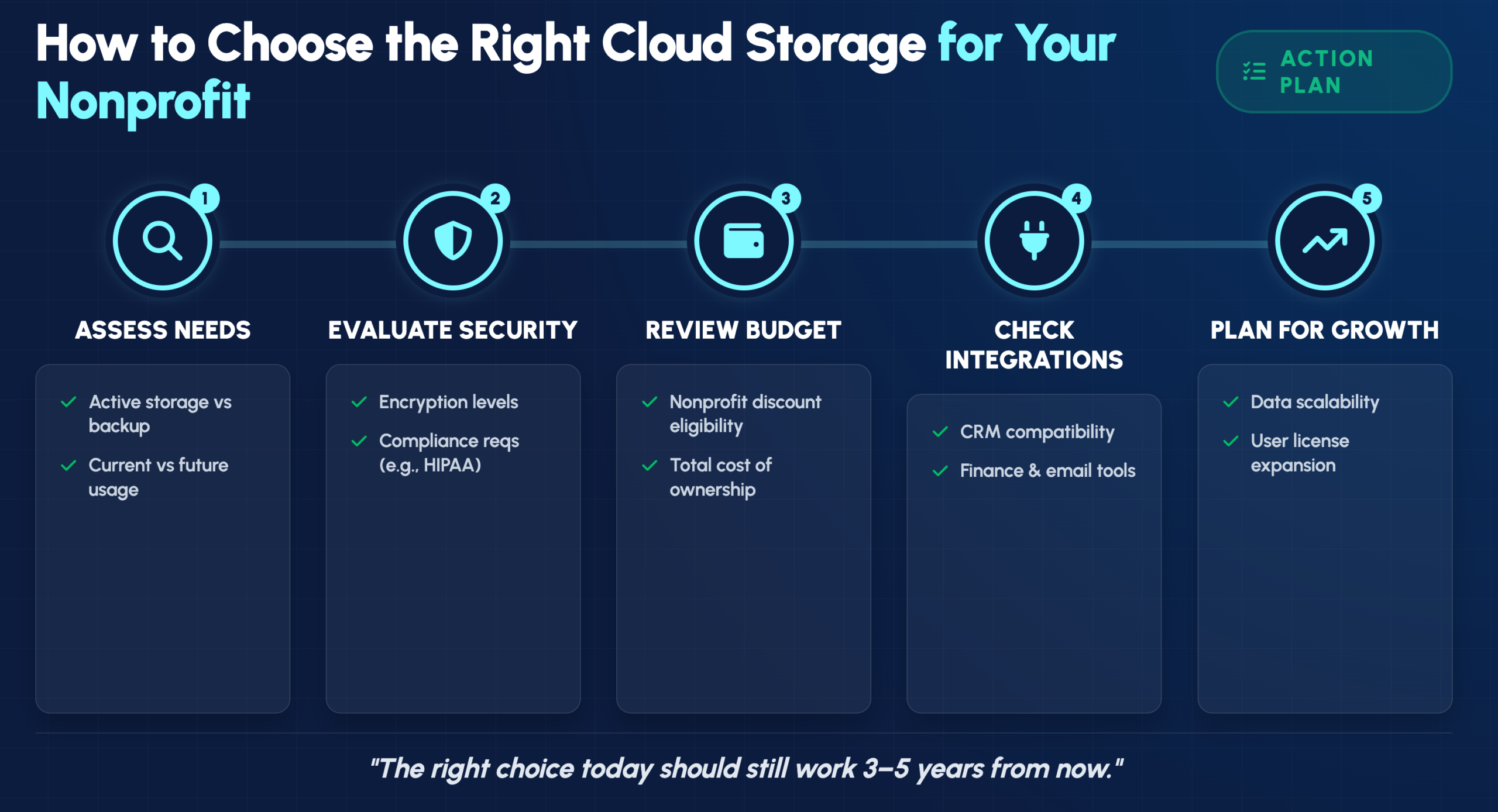
Choosing the right provider involves weighing several factors against your organization’s specific situation. Here’s what we considered when building this list.
We evaluated providers on encryption methods, access controls, and compliance certifications. Organizations handling sensitive donor or client data particularly benefit from providers meeting standards like SOC 2 or offering HIPAA-compatible configurations.
Many providers offer free or significantly discounted plans for registered nonprofits, often available through programs like TechSoup. We prioritized solutions with meaningful cost savings for eligible organizations.
Non-technical staff and volunteers typically make up a significant portion of nonprofit teams. User-friendliness and collaboration features like shared folders and real-time editing factored heavily into our assessment.
As organizations grow, so do their data requirements. We favored providers with flexible plans that scale easily over time without requiring disruptive migrations.
Compatibility with donor management systems, accounting software, and other productivity tools can dramatically improve workflow efficiency.
Google Workspace stands out as our top recommendation for nonprofits seeking powerful collaboration tools at minimal cost. The Google for Nonprofits program makes this accessible to eligible organizations.
Shared Drives provide centralized, team-owned folders that simplify file management across departments. Real-time document collaboration allows multiple team members to simultaneously edit Docs, Sheets, and Slides. The integration with Gmail and Google Meet creates a seamless ecosystem for communication and productivity, while generous storage pools accommodate growing organizational data.
Eligible organizations can access Google Workspace for Nonprofits at no cost. This free plan includes professional Gmail accounts, Google Drive, Docs, Meet, and other essential tools.
The familiar interface and strong real-time collaboration make onboarding easy. However, some organizations have privacy concerns about Google’s data practices, and advanced administrative features can take time to master.
OneDrive works exceptionally well for organizations already invested in the Microsoft 365 ecosystem. The deep integration with Office applications creates a cohesive experience for teams familiar with Word, Excel, and PowerPoint.
Seamless Office integration allows co-authoring and sharing directly within familiar applications. SharePoint connectivity enables advanced document management capabilities. Version history makes it easy to restore previous versions of files, and offline access lets you sync files to your desktop for use without an internet connection.
Microsoft offers significant discounts on Microsoft 365 licensing tiers for nonprofits, which include OneDrive storage. These grants and discounts are often available through partners like TechSoup.
Robust administrative controls and familiarity to most office users make this a strong choice. Smaller teams might find the complexity unnecessary, and you’ll get the most value by committing to the broader Microsoft ecosystem.
Dropbox has built its reputation on simplicity and reliable cross-platform file synchronization. For teams that value ease of use above all else, it remains a compelling option.
Easy file sharing through simple link-based permissions, Smart Sync to save hard drive space by keeping files in the cloud until needed, and broad third-party app integrations make Dropbox straightforward to adopt.
Through its Dropbox for Good program, eligible organizations can receive discounts on Dropbox Business plans.
The intuitive interface and excellent file sync make adoption straightforward. The free storage tier is limited, and you’ll find fewer built-in productivity tools compared to Google or Microsoft.
Box positions itself as an enterprise-grade solution with a strong focus on security and compliance. Larger nonprofits or those with strict data governance requirements often find it fits their situation well.
Advanced security controls include granular user permissions, watermarking, and access policies. Workflow automation through Box Relay handles repetitive, content-centric processes. Extensive integrations connect with over 1,500 applications, including Salesforce and Slack.
The Box.org program offers free or heavily discounted Box Business accounts to eligible nonprofit organizations.
The compliance capabilities and robust admin features serve document-heavy organizations well. The learning curve is steeper than simpler tools, and smaller nonprofits with basic requirements might find it excessive.
IDrive focuses primarily on backup rather than collaboration, making it ideal for nonprofits prioritizing disaster recovery and data protection over real-time document editing.
Continuous backup automatically protects data from multiple devices, including servers and mobile phones. Multiple device support allows backing up an unlimited number of devices into a single account. IDrive Express provides a physical shipping service for fast initial backups and large data restores.
IDrive offers discounts for nonprofit organizations on its business plans.
Comprehensive backup features and unlimited device support provide excellent protection. Real-time collaboration features are limited, and the interface feels less modern than some competitors.
Proton Drive takes a privacy-first approach with end-to-end encryption, appealing to organizations handling highly sensitive data where confidentiality is paramount.
Zero-knowledge encryption means not even Proton can access your files. Open-source transparency allows independent security verification. Swiss privacy protections benefit from Switzerland’s strong privacy laws, and secure file sharing uses encrypted, password-protected links.
The Proton for Nonprofits program provides free or discounted access to its suite of privacy-focused tools.
Maximum privacy protection and no data mining set Proton apart. The tradeoff involves fewer collaboration features and a smaller ecosystem compared to major providers.
pCloud distinguishes itself with lifetime purchase options that can significantly reduce long-term costs for budget-conscious organizations tired of recurring subscription fees.
Lifetime plan availability eliminates recurring subscription fees with a one-time payment. pCloud Crypto offers optional client-side, zero-knowledge encryption. File versioning provides access to previous versions of files for up to 30 days.
Nonprofits can inquire directly about available discounts to reduce the one-time cost further.
The one-time payment model simplifies long-term budgeting considerably. Brand recognition is smaller and third-party integrations are fewer than major providers offer.
Sync.com offers zero-knowledge encryption with straightforward pricing, providing a privacy-focused alternative without unnecessary complexity.
Zero-knowledge encryption ensures all files are encrypted client-side before upload. Compliance-ready features help meet data privacy standards. Secure file sharing includes password protection, download limits, and expiry dates.
Sync.com offers discounted pricing for nonprofit organizations on team plans.
The strong privacy focus and simple interface provide good value. Collaboration tools and integrations are more limited compared to larger platforms.
With eight solid options to consider, narrowing down the choice involves walking through a few key questions about your organization’s specific situation.
Start by estimating whether you primarily require document storage for collaboration or comprehensive backup for disaster recovery. Calculate current storage usage and project future growth based on your organization’s trajectory.
Consider the type of data you handle. Sensitive donor information or client health records require providers with robust security and relevant compliance certifications.
Before committing, explore programs like TechSoup, Google for Nonprofits, and Microsoft for Nonprofits. Always verify vendor-specific discount programs to secure the best possible pricing.
Check compatibility with the CRM, email marketing platform, and other software your nonprofit already relies on. Smooth integration prevents workflow disruptions and reduces the learning curve for your team.
Selecting and implementing the right cloud storage solution involves more than signing up for an account. Configuration, migration, security settings, and ongoing management all require attention—and most nonprofit teams don’t have dedicated IT staff to handle these details.
IT GOAT works with nonprofits to evaluate options, implement solutions properly, and provide ongoing support. Our team understands the unique constraints nonprofits face and can help you maximize the value of available discount programs.
Book a consultation to discuss your organization’s specific requirements.


