
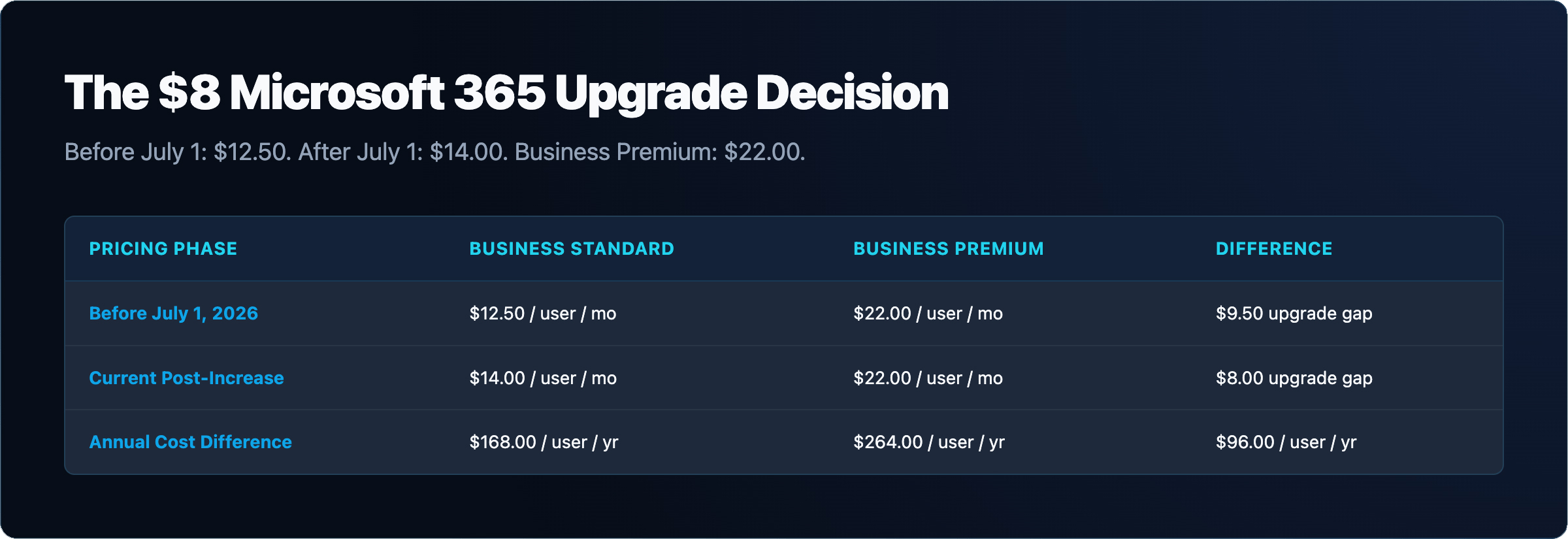
Microsoft raised Business Standard from $12.50 to $14.00 per user per month on July 1, 2026, while Business Premium held at $22.00. That puts the gap between the two plans at exactly $8.00 per user per month. This page breaks down what that $8.00 buys in security and compliance features, what it costs at different team sizes, and how to decide which plan fits your business.
Microsoft announced the pricing update on February 16, 2026. The changes took effect July 1, 2026, and apply to new subscriptions immediately. Existing customers move to the new prices at their next renewal. Business Basic increased from $6.00 to $7.00 per user per month. Business Standard increased from $12.50 to $14.00 per user per month. Business Premium remained at $22.00 per user per month. The full announcement is published at Microsoft’s licensing news page.
The Standard price increase of $1.50 per user per month is modest on its own, but it narrows the practical argument for staying on Standard when the jump to Premium is now only $8.00 more. For a 25-user team, that is $200 per month for a substantially different security posture. Whether that trade-off makes sense depends on what your business actually needs from those additional features.
All three Business plans remain capped at 300 users. Organizations above that threshold need Microsoft 365 Enterprise plans. Copilot is a separate add-on and is available on either Business Standard or Business Premium; it does not change the comparison between the two plans. For details on how Copilot billing works, see our overview of Microsoft 365 Copilot usage-based billing.
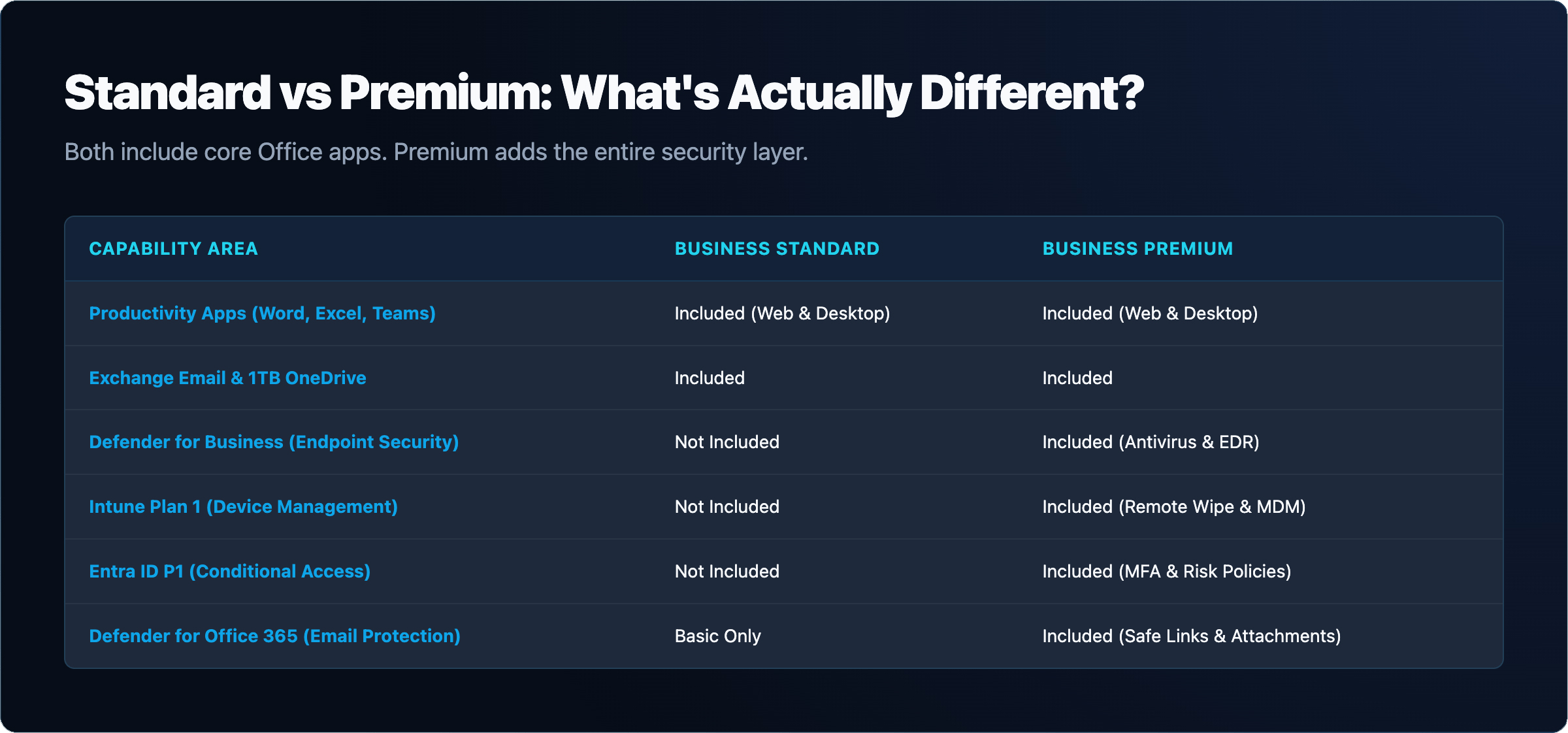
| Feature | Business Standard | Business Premium |
|---|---|---|
| Office apps (Word, Excel, PowerPoint, Outlook, etc.) | Included | Included |
| Exchange email and mailbox | Included | Included |
| OneDrive storage | Included | Included |
| Microsoft Teams | Included | Included |
| Endpoint protection (Defender for Business) | Not included | Included |
| Device management (Intune Plan 1) | Not included | Included |
| Conditional Access (Entra ID P1) | Not included | Included |
| Email threat protection (Defender for Office 365 Plan 1) | Not included | Included |
| Data protection (Purview sensitivity labels and DLP) | Not included | Included |
| Price per user per month (annual commitment) | $14.00 | $22.00 |
| Cost at 10 users per month | $140.00 | $220.00 |
| Cost at 25 users per month | $350.00 | $550.00 |
| Cost at 50 users per month | $700.00 | $1,100.00 |
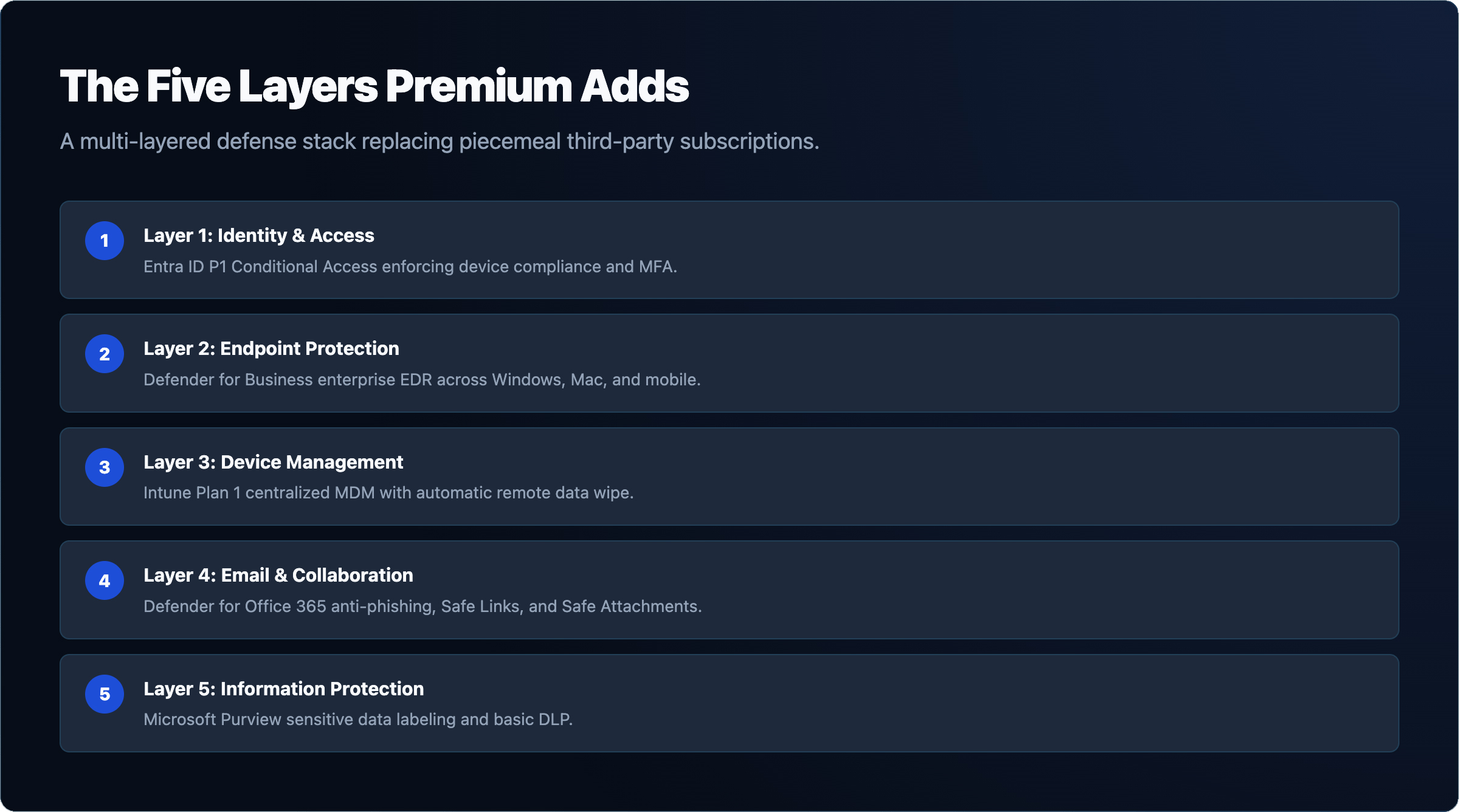
The five security and compliance components that Business Premium includes over Standard are distinct tools with specific functions. Understanding each one helps you evaluate whether the $8.00 gap is worth it for your environment.
Defender for Business provides endpoint detection and response for Windows, Mac, iOS, and Android devices. It covers threat detection, automated investigation, and remediation across managed endpoints. Businesses that need structured endpoint security and EDR capabilities will find this the most operationally significant addition in Premium.
Intune Plan 1 handles mobile device management and mobile application management. It lets you enforce device compliance policies, push configurations, and remotely wipe devices. Without Intune, you have no centralized way to enforce device standards across your workforce through Microsoft 365 alone.
Entra ID P1 enables Conditional Access policies. Conditional Access lets you require multi-factor authentication based on conditions such as user location, device compliance state, or application sensitivity. This is the control layer that most cyber insurance policies now expect organizations to have in place. If you are working through cyber insurance requirements, Conditional Access is frequently on the checklist.
Defender for Office 365 Plan 1 adds safe links, safe attachments, and anti-phishing policies on top of the baseline Exchange Online Protection that both plans include. It inspects email attachments in a sandbox before delivery and rewrites URLs to check them at click time.
Purview sensitivity labels and DLP let you classify documents and emails, apply persistent labels, and enforce data loss prevention policies that block or warn when sensitive content is shared outside the organization. This is the compliance layer that regulated industries and data-conscious businesses need.
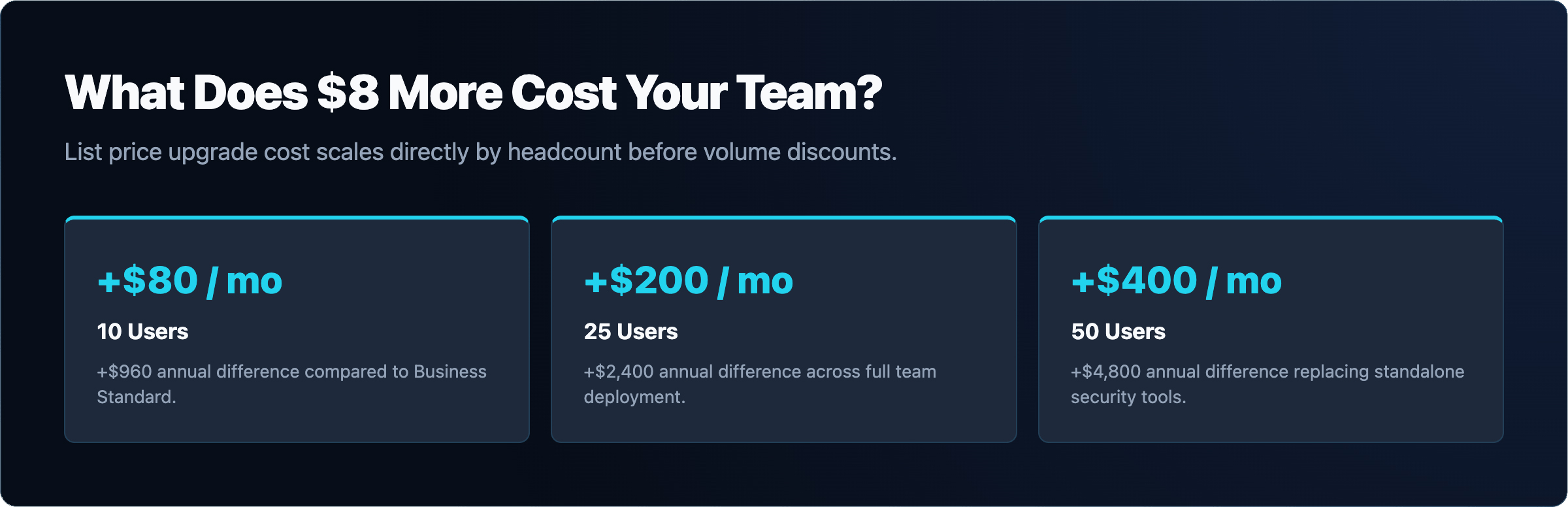
The $8.00 per user per month difference between Standard and Premium scales predictably. At 10 users, upgrading to Premium costs an additional $80 per month, or $960 per year. At 25 users, the additional cost is $200 per month, or $2,400 per year. At 50 users, it is $400 per month, or $4,800 per year. These are list prices at annual commitment. Volume agreements or partner pricing may differ.
The question is not whether $4,800 per year is a large number in isolation. The question is what you would spend to replicate those five security components through other means, and whether the integrated management experience has operational value for your team.
Some organizations consider staying on Business Standard and purchasing individual security tools to fill the gaps. The evidence provides standalone list prices for three of the five Premium components: Intune Plan 1 at $8.00 per user per month, Entra ID P1 at $7.00 per user per month, and Defender for Business at $3.00 per user per month. Verify current prices on Microsoft’s pricing pages before making purchasing decisions, as these figures should be confirmed at the time of purchase.
Adding just those three standalone licenses to Business Standard would cost $18.00 per user per month on top of the $14.00 Standard price, totaling $32.00 per user per month. Business Premium at $22.00 per user per month includes all five components, including Defender for Office 365 Plan 1 and Purview, which are not reflected in that standalone estimate. The math favors Premium if you need more than one or two of those components.
There is also an integration argument. The Premium components are designed to work together inside the Microsoft 365 admin center and Microsoft Defender portal. Managing separate vendor contracts, portals, and billing for equivalent tools adds administrative overhead. For businesses that rely on IT GOAT’s Microsoft integration services, the unified Premium stack simplifies ongoing management.
Upgrade to Business Premium when one or more of the following applies to your organization. You need to enforce device compliance before granting access to company data. You handle sensitive data subject to regulatory requirements, such as HIPAA, financial records, or legal documents. Your cyber insurance carrier requires Conditional Access or endpoint management controls. You want centralized endpoint protection without purchasing a separate EDR product. You need to prevent accidental or intentional data exfiltration through email or file sharing.
The $8.00 per user gap is also easier to justify when you consider that Business Premium replaces tools you might otherwise buy separately. If you are already paying for a third-party endpoint protection product, compare that cost against what Defender for Business provides before your next renewal.
Business Standard remains a reasonable choice for organizations that meet a specific profile. You have fewer than ten users with no remote or mobile workforce. All devices are company-owned, managed manually, and physically on-site. You have no regulatory compliance obligations around data classification or retention. You carry no cyber insurance policy that specifies security controls. You already have a separate, functioning endpoint protection solution that you are not ready to replace.
Standard gives you the full Office productivity suite, Exchange email, Teams, and OneDrive. For a small team with low risk exposure and no compliance requirements, that is a complete productivity platform. The security gap is real, but it is not automatically a problem for every business at every stage.
Microsoft allows you to assign different license types to different users within the same tenant. A 30-person company could assign Business Premium to 10 users who handle sensitive data or work remotely, and Business Standard to 20 users in lower-risk roles. Both groups share the same tenant, the same Teams environment, and the same SharePoint sites.
This approach lets you apply the cost of Premium where it is justified without upgrading the entire organization. It also lets you phase a migration to Premium over time, moving users as their roles or risk profiles change. Keep in mind that Intune and Conditional Access policies apply per user, so users on Standard will not be covered by those controls even if they share resources with Premium users.
Mixed licensing is a practical option for businesses that are evaluating a full upgrade but are not ready to commit. It is also useful when you have a clear distinction between roles that require security controls and roles that do not.
Switching from Business Standard to Business Premium at renewal does not require migrating data or reconfiguring email. The underlying Exchange mailbox, OneDrive files, and Teams data remain in place. What changes is the license assigned to each user, which unlocks the Premium features in the Microsoft 365 admin center.
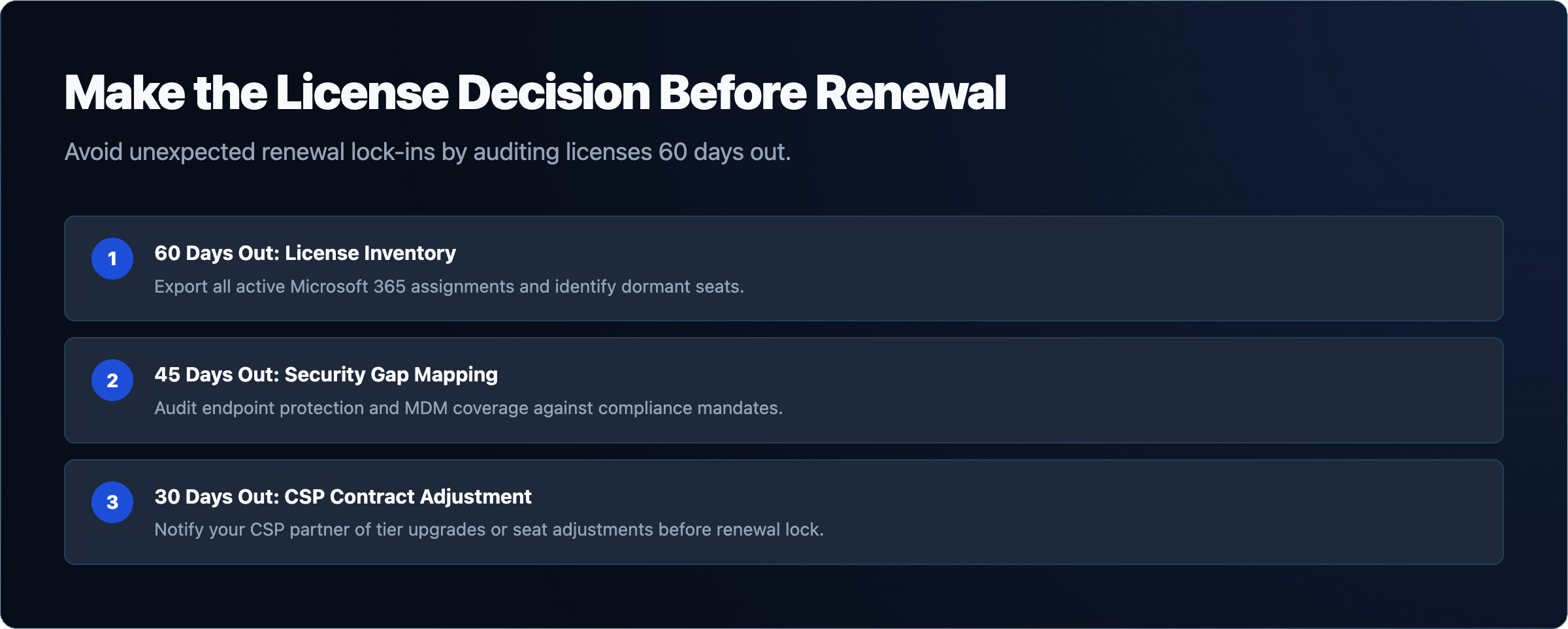
Plan the switch before your renewal date. Confirm the number of users who will move to Premium and whether you will keep any users on Standard. Work with your Microsoft partner or IT provider to update the subscription quantities before the renewal processes. After the new licenses are assigned, configure Intune enrollment, Conditional Access policies, and Defender for Business through their respective admin portals. These steps take time to plan and test, so starting the process at least 30 days before renewal is practical.
If you are moving from a different Microsoft 365 configuration or consolidating tenants as part of this change, review the common Office 365 migration challenges that arise during plan transitions to avoid disruption to mail flow or user access.
Existing Business Standard customers whose subscriptions renew after July 1, 2026 will automatically move to the $14.00 price. That renewal is a natural decision point: evaluate whether the additional $8.00 per user for Premium is the right investment before the next billing cycle locks in.


