
Most small nonprofits pay full price for software they could get donated or heavily discounted because no one on staff owns the applications list or tracks renewal deadlines. This page covers the major nonprofit technology programs, what each one actually provides, how to qualify, and how to structure a lean IT budget around donated and discounted licenses.
Nonprofit technology programs fall into two categories: donated licenses and advertising credits. Donated licenses replace software you would otherwise purchase outright. Advertising credits fund outreach without touching the program budget. Neither category covers hardware purchases in most cases, though TechSoup is an exception that includes discounted hardware alongside software.
The programs listed on this page are run by the vendors themselves or by designated verification partners. Each program sets its own eligibility criteria, and most require 501(c)(3) status in the United States. International equivalents vary by country. For a broader look at IT support for nonprofits, the parent page covers the full range of technology services relevant to the sector.
One practical note: these programs change. Microsoft adjusted its Business Premium grant structure in 2025. Google moved its nonprofit verification from TechSoup to Goodstack, formerly known as Percent. Verify every program at its source before applying or budgeting around it.
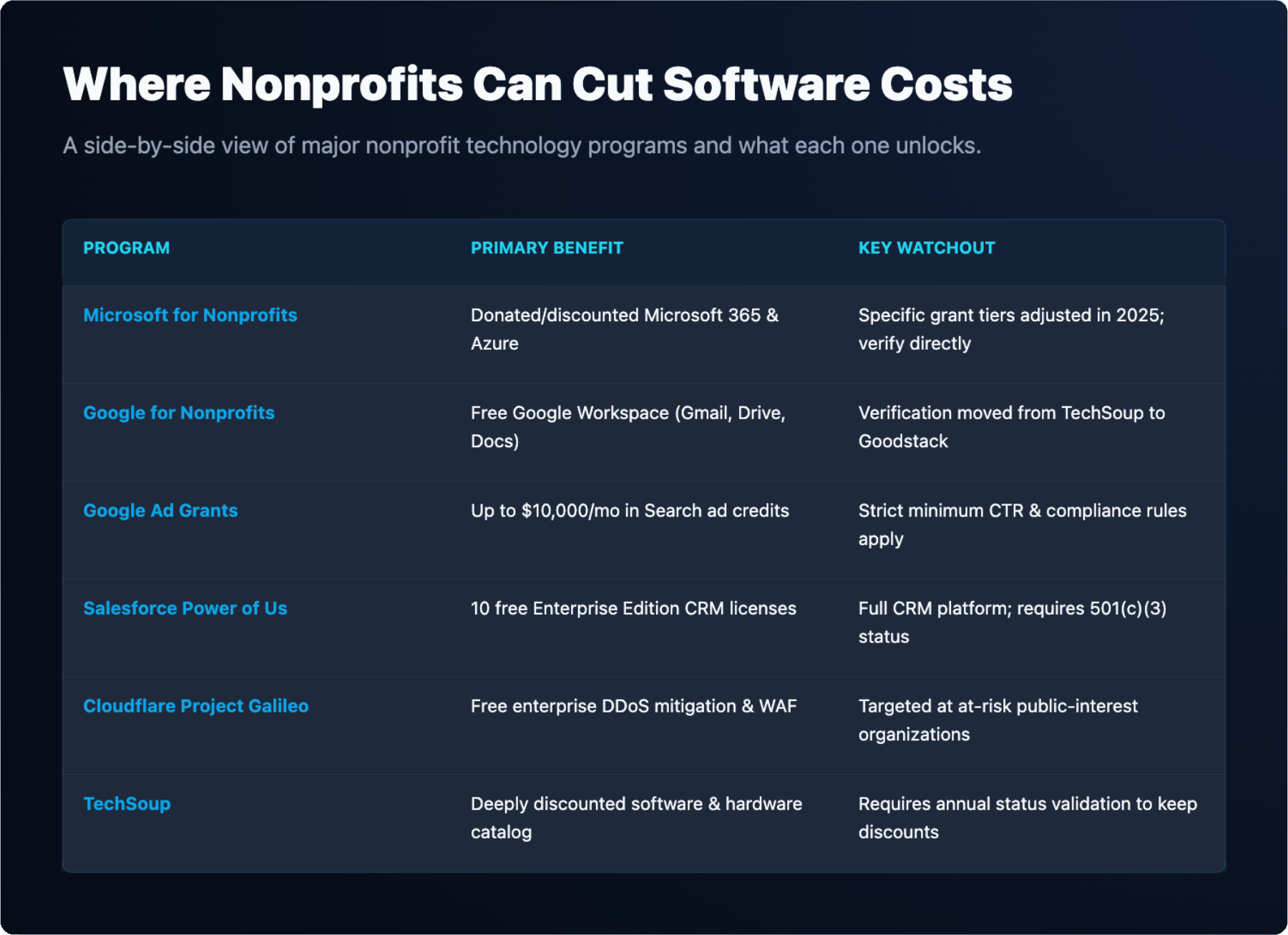
Microsoft for Nonprofits is managed directly at nonprofit.microsoft.com. Eligible organizations verify eligibility through Microsoft’s own portal rather than a third-party partner. Microsoft offers a combination of donated and discounted Microsoft 365 plans, Azure credits, and other products.
Microsoft changed its Business Premium grant in 2025. The specific seat counts and grant tiers available have shifted, so confirm the current offer directly with Microsoft before building a budget around a specific number of free seats. What has remained consistent is that nonprofits can access Microsoft 365 at significantly reduced cost compared to commercial pricing, and some plans include seats at no charge up to a defined limit.
For organizations already using Microsoft tools, proper configuration matters as much as the license itself. Poorly configured tenants leave security gaps even when the software is free. Microsoft integration services cover tenant setup, security baselines and ongoing management for organizations that need structured deployment rather than self-service configuration.
Google for Nonprofits is available at google.com/nonprofits. Verification previously ran through TechSoup but has moved to Goodstack, formerly Percent. Confirm the current verification partner at the Google for Nonprofits page before starting an application, as the process and required documentation depend on which partner is active.
Google Ad Grants is the most financially significant benefit in the Google for Nonprofits package. It provides up to $10,000 per month in Google Search advertising credit. The credit applies only to Search campaigns, not Display or YouTube. Campaigns must meet Google’s ongoing performance requirements, including minimum click-through rates, or the grant can be paused. Organizations that let their accounts go dormant or fall below performance thresholds lose access until they bring the account back into compliance.
The Google for Nonprofits package also includes Google Workspace for Nonprofits, which provides Gmail, Drive, Docs and related tools at no cost for eligible organizations. Storage limits and feature tiers differ from the commercial plans, so review the current terms before migrating existing data. For a comparison of storage options, the page on cloud storage for nonprofits covers the leading platforms and their nonprofit-relevant features.
Salesforce Power of Us, managed through salesforce.org, gives eligible nonprofits 10 free Enterprise Edition subscriptions. These are full Salesforce CRM licenses, not a stripped-down nonprofit tier. Organizations that need more than 10 seats can purchase additional licenses at a discounted rate. Eligibility requires 501(c)(3) status and verification through Salesforce.org’s application process.
TechSoup, at techsoup.org, operates differently from the vendor-run programs. It acts as a marketplace for donated and discounted software and hardware from multiple vendors. Organizations pay a small administrative fee rather than full retail price. TechSoup requires annual validation of nonprofit status, and access to discounts lapses if the organization does not complete the renewal cycle. Many vendors use TechSoup as their distribution channel, so a TechSoup account often unlocks discounts across several products at once.
Most U.S.-based nonprofit technology programs require 501(c)(3) status from the IRS. Government entities and religious organizations are sometimes excluded from specific programs even if they hold tax-exempt status. Read each program’s eligibility page carefully before investing time in an application.
Verification partners handle identity and eligibility checks on behalf of vendors. Google uses Goodstack. Microsoft verifies directly. Salesforce.org has its own application process. TechSoup validates annually. Each partner has its own documentation requirements, which typically include your IRS determination letter, organizational details and sometimes a description of your mission.
Renewals are where most organizations lose access. A verification that lapses mid-year can suspend licenses immediately, which disrupts operations and requires staff time to restore. Assign a specific person to own each program’s renewal date. Put renewal deadlines in a shared calendar with at least 60 days of lead time. Treat nonprofit program renewals the same way you treat domain and SSL certificate renewals: missing them has immediate operational consequences.
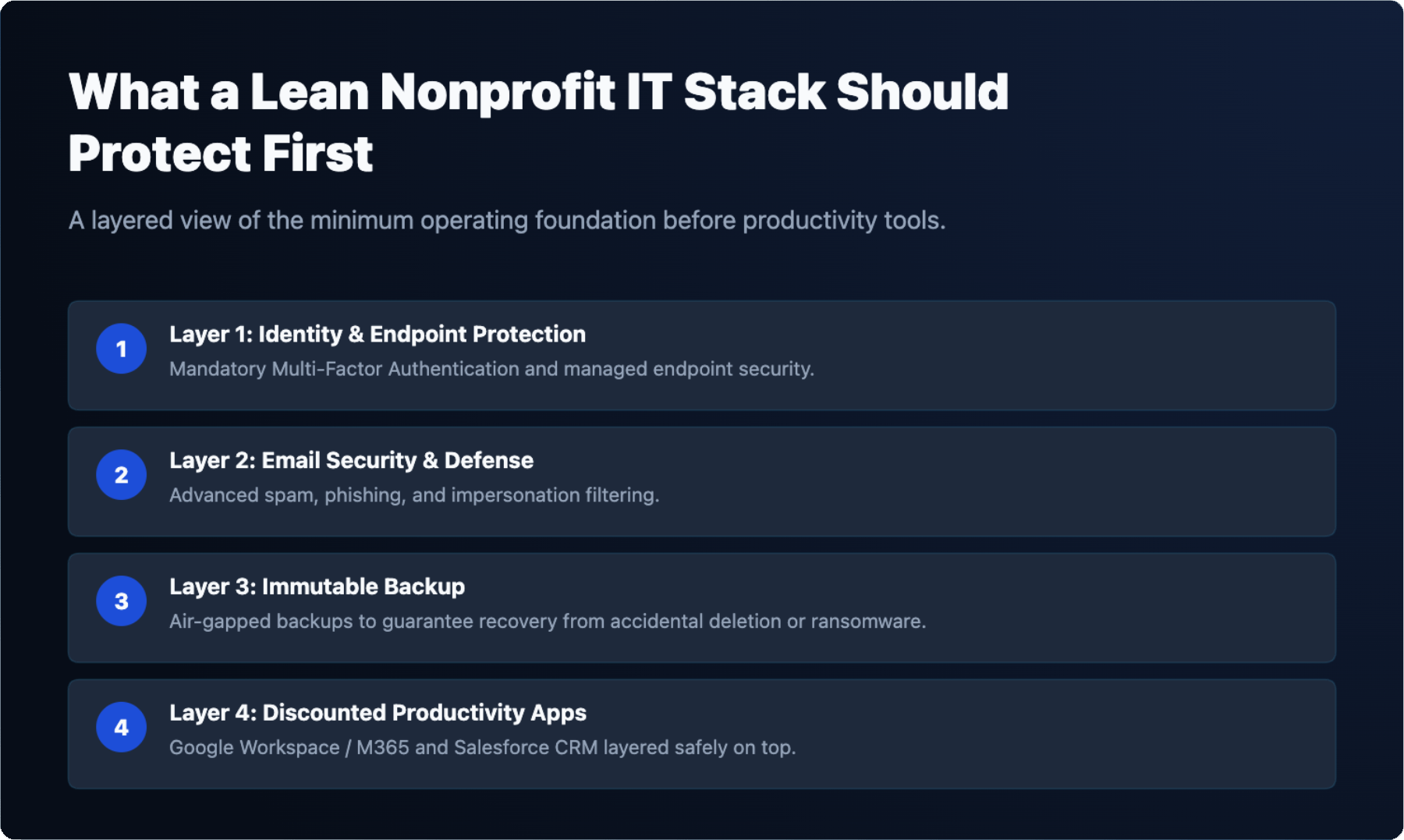
A lean nonprofit IT budget follows a specific priority order. Fund security basics, backup and support first. Then layer donated and discounted licenses on top to cover productivity software. Reversing that order leaves the organization dependent on programs that can change or lapse.
Security basics include endpoint protection, multi-factor authentication and email filtering. These are not optional even at minimal budgets. Backup and disaster recovery belongs in the same mandatory category. A ransomware event or accidental deletion without a tested backup is a mission-ending scenario for a small nonprofit.
Once those foundations are funded, apply for the programs in this page’s table. Use Google Workspace for Nonprofits or Microsoft 365 nonprofit plans to cover email and productivity. Use Salesforce Power of Us for donor management if your organization qualifies. Use TechSoup for any remaining software needs. Apply for Google Ad Grants if your organization has the capacity to manage Search campaigns to Google’s performance standards.
Budget for the administrative time required to maintain these programs. Applications, renewals and compliance monitoring are not zero-cost just because the software is free. Assign staff hours or include it in a managed services scope.
Start with an inventory. List every software tool the organization currently pays for, the annual cost, the renewal date and who owns the renewal. Then check each tool against the programs in the table below. Many organizations discover they are paying for products available at no cost through TechSoup or a vendor nonprofit program.
Apply for TechSoup validation first, since it unlocks discounts across multiple vendors with a single application. Then apply for Google for Nonprofits and Microsoft for Nonprofits in parallel. Both applications are straightforward if your 501(c)(3) documentation is current. Add Salesforce Power of Us if your organization uses or plans to use a CRM. Apply for Cloudflare Project Galileo if your website faces availability or security risks.
Once the applications are in motion, build the renewal calendar and assign ownership. The programs only deliver value if they stay active.
| Program | What It Covers | Eligibility | Verification Partner | Renewal Cycle | Source |
|---|---|---|---|---|---|
| Microsoft for Nonprofits | Donated and discounted Microsoft 365 plans, Azure credits and other Microsoft products; specific grant tiers changed in 2025, verify current offer | Eligible nonprofit organizations; verify requirements at source | Microsoft (direct verification) | Annual | nonprofit.microsoft.com |
| Google for Nonprofits | Google Workspace for Nonprofits (Gmail, Drive, Docs and related tools at no cost); access to Google Ad Grants and YouTube Nonprofit Program | 501(c)(3) organizations in the U.S.; government entities and some religious organizations excluded | Goodstack (formerly Percent); confirm current partner at source | Annual | google.com/nonprofits |
| Google Ad Grants | Up to $10,000 per month in Google Search advertising credit; Search campaigns only | Active Google for Nonprofits account; campaigns must meet ongoing performance requirements | Goodstack (via Google for Nonprofits enrollment) | Ongoing compliance; account reviewed continuously | google.com/nonprofits |
| Salesforce Power of Us | 10 free Enterprise Edition CRM subscriptions; additional seats available at discounted rates | 501(c)(3) organizations; eligibility verified through Salesforce.org application | Salesforce.org (direct) | Annual | salesforce.org |
| Cloudflare Project Galileo | Free DDoS mitigation, web application firewall and Cloudflare security services | At-risk public-interest organizations; not limited strictly to 501(c)(3); Cloudflare evaluates mission and threat profile | Cloudflare (direct application) | [ADD: confirm renewal cycle at cloudflare.com/galileo] | cloudflare.com/galileo |
| TechSoup | Donated and discounted software and hardware from multiple vendors; administrative fee applies | 501(c)(3) organizations and other eligible nonprofits; government and religious eligibility varies by product | TechSoup (direct validation) | Annual validation required | techsoup.org |
Small nonprofits typically run one of three IT models: a staff member who handles IT alongside other duties, a volunteer or board member with technical skills, or a managed IT provider. Each model has real tradeoffs.
Staff-handled IT works when the organization is very small and the technical demands are low. It breaks down when the staff member leaves, when a security incident requires specialized response, or when the organization grows and IT complexity increases faster than the staff member’s capacity.
Volunteer IT is common and often effective for basic setup tasks. It is unreliable for ongoing support, incident response and compliance requirements. Volunteers are not available on a defined schedule, and accountability is informal.
A managed provider gives the organization defined response times, documented processes and access to specialists across security, networking and cloud platforms. The cost is predictable and can be scoped to fit a nonprofit budget. The page on choosing a nonprofit IT provider walks through the criteria that matter most when evaluating managed service options for a nonprofit.
Send us your current software and support costs.
We will show which tools your organization could get donated or discounted and where the remaining budget should go first.
Several major vendors offer free or heavily discounted software to eligible nonprofits. Google for Nonprofits provides access to Google Workspace and up to $10,000 per month in Google Search ad credit through Google Ad Grants. Microsoft for Nonprofits offers grants and discounts on Microsoft 365 products; confirm current grant terms at nonprofit.microsoft.com before applying. Salesforce provides 10 free Enterprise Edition subscriptions through its Power of Us program. TechSoup offers additional donated and discounted software and hardware.
Most programs require 501(c)(3) status or an equivalent recognized nonprofit designation. Each vendor uses its own verification process: Google for Nonprofits currently verifies through Goodstack (formerly Percent), Microsoft verifies eligibility directly at nonprofit.microsoft.com, and Salesforce eligibility is handled through salesforce.org. After verification, you apply separately with each vendor. Requirements vary by program, so review each vendor’s current eligibility terms before submitting an application.
Yes, most nonprofit technology programs require periodic re-verification to confirm continued eligibility. TechSoup, for example, requires annual validation. Other vendors set their own renewal schedules. Setting internal calendar reminders ahead of each program’s renewal deadline helps avoid lapses in access. Losing verification status can interrupt access to discounted or donated software until eligibility is re-confirmed with the relevant vendor or verification partner.
Many nonprofit technology programs do accept churches and religious organizations, but not all. Some vendors exclude religious entities from specific grants or discount tiers. Eligibility rules vary by program and can change over time, so each organization should review the current terms directly with each vendor before applying. Checking program-specific eligibility pages at google.com/nonprofits, nonprofit.microsoft.com, and salesforce.org is the most reliable approach.
A practical approach is to prioritize spending by category rather than a fixed total. Fund security and data backup first, since those protect the organization’s operations and donor data. Allocate next for ongoing technical support, then for a hardware replacement reserve to avoid emergency purchases. Software costs come after that, reduced where possible through grants and discounts. Actual amounts depend on staff size, systems in use, and funder requirements.
Outsourcing IT support is worth considering when an organization has no dedicated internal IT staff, or when funders or regulators require documented security controls that the organization cannot maintain on its own. A managed service arrangement can provide consistent support, documented processes, and defined response times. Organizations should evaluate what internal capacity exists and what compliance or security documentation their funders or grant agreements specifically require before deciding.
We use cookies to enhance site performance and user experience. Your data stays private — we don’t sell your information or share it with unrelated third parties. To find out more about the cookies we use, view our Privacy Policy.