
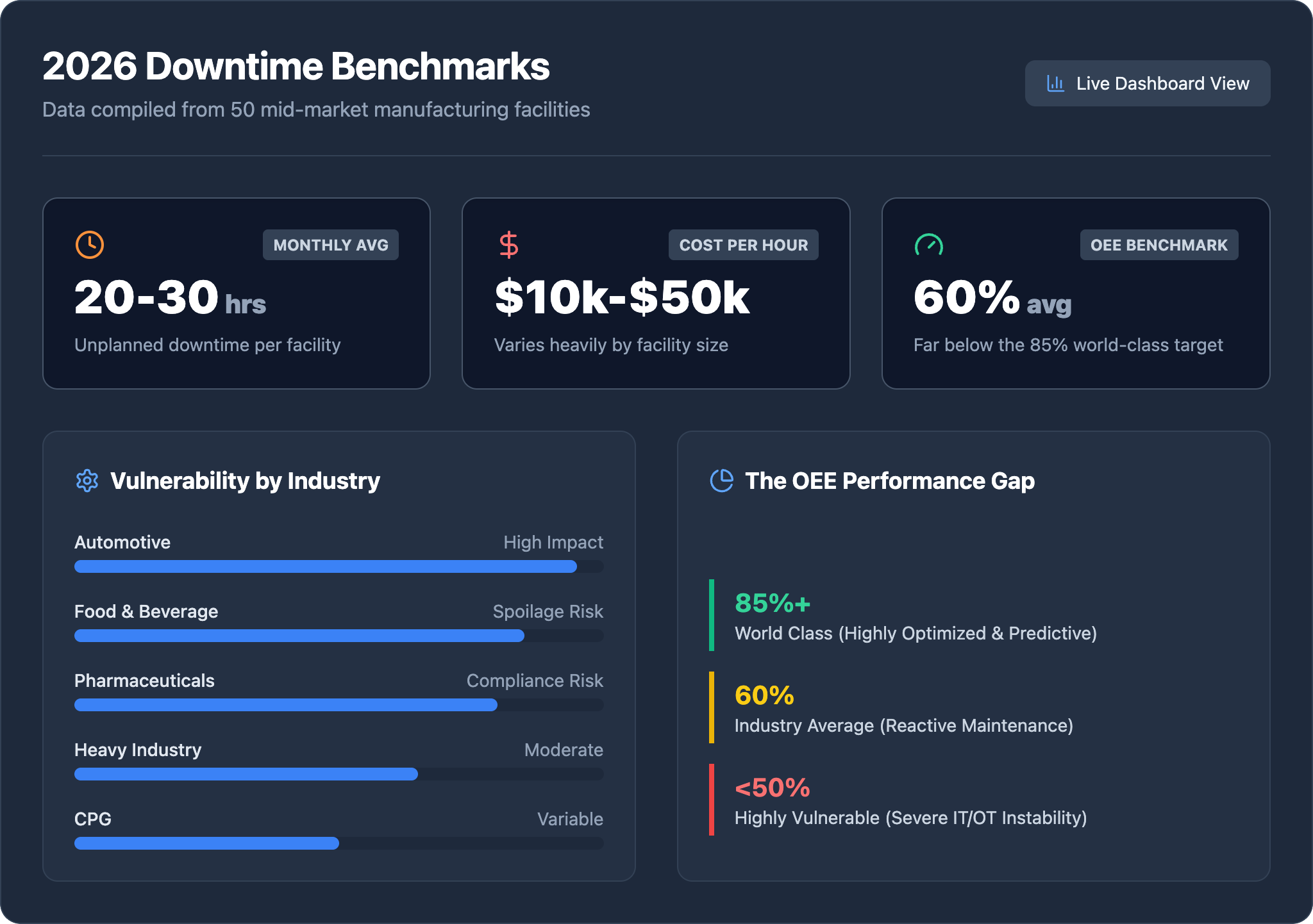
Generic MSP agreements define “critical” as an email server outage. On the plant floor, critical means a SCADA failure mid-shift, an ERP system offline during a production run, or ransomware working through your OT network while your line keeps moving. The cost of those events compounds by the minute — and the speed of your IT response determines how much of that cost you absorb.
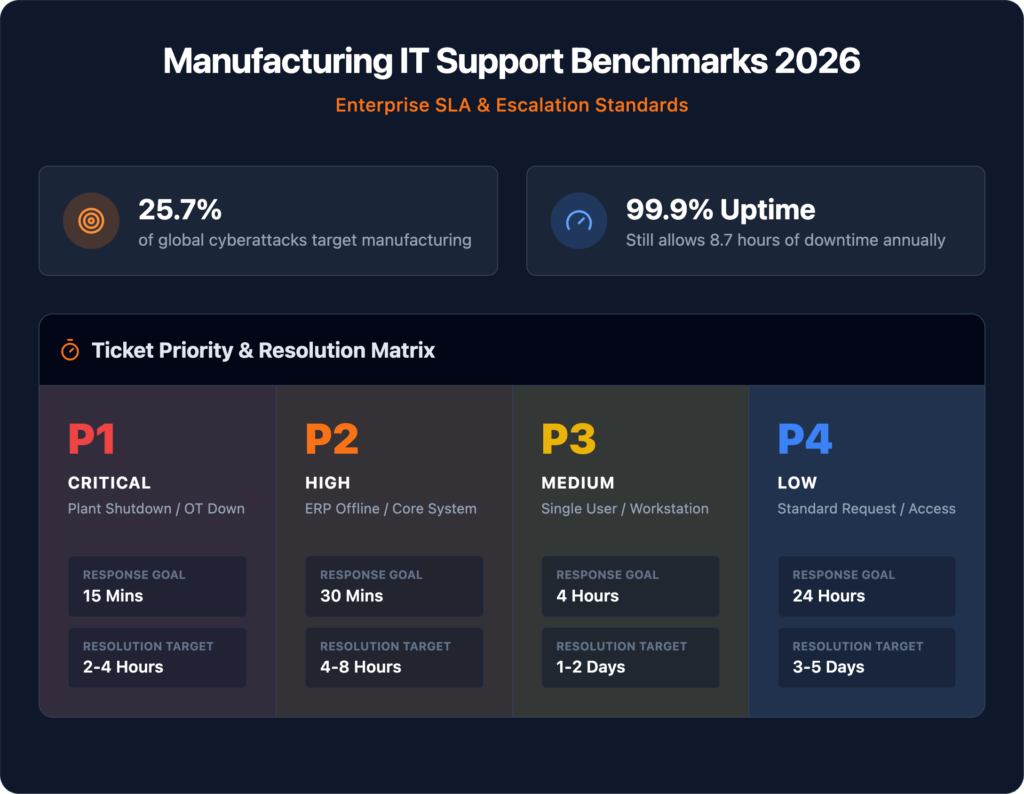
Manufacturing was the most targeted industry for cyberattacks globally for the third consecutive year in 2024, accounting for 25.7% of all incidents IBM X-Force responded to. Your SLA needs to be built for that reality, not borrowed from a professional services template.
Most IT support benchmarks were built for offices. An office tolerates a four-hour resolution window on a critical ticket. A production environment running three shifts does not.
The convergence of OT and IT systems has fundamentally changed what “support delay” means in manufacturing. IIoT sensors, cloud-connected MES platforms, and integrated ERP systems have eliminated the buffer that once separated the server room from the shop floor. A support ticket that would have been a minor inconvenience five years ago can now halt an entire production cell within minutes.
The operational reality is straightforward:
Without documented, manufacturing-specific benchmarks in your contract, there is no basis for holding any provider accountable when production goes down at 2 a.m. on a Sunday.
| Priority | Classification | Plant Floor Example |
|---|---|---|
| P1 — Critical | Production stopped | ERP system down, assembly line halted, SCADA network failure |
| P2 — High | Major degradation | Backup system failure, security breach, degraded network performance |
| P3 — Standard | Limited impact | Single workstation failure, software access issue, password reset |
| P4 — Low | Scheduled work | Software updates, routine maintenance, hardware refresh |
When a line management system, ERP, or SCADA interface goes offline, the losses don’t stay in the IT budget. They cascade:
Lost throughput — every minute offline is output you cannot recover with overtime alone.
Idle labor — operators, technicians, and line supervisors remain on the clock regardless of whether the line is running. Downtime converts productive labor into a sunk cost.
Missed shipments — JIT customers do not wait, and contractual penalties for delayed delivery are enforced without exception.
Compliance exposure — manufacturing operations subject to quality standards and traceability requirements rely on continuous system availability to maintain audit trails. When systems go down, those records go dark. Gaps in documentation create liability that outlasts the outage itself by months.
What makes downtime particularly damaging is its compounding nature. A single unresolved IT failure doesn’t just cost the hours it takes to fix — it triggers a chain of operational, financial, and reputational consequences that extend well beyond the incident window.
Most SLA conversations get derailed by a single misconception: that fast acknowledgment equals fast recovery. These are two completely different metrics, and treating them as interchangeable creates blind spots that show up as extended downtime.
Response time measures how quickly a technician acknowledges a reported issue and begins active work. Resolution time measures how long it takes to fully restore normal operations.
A technician who picks up a ticket in five minutes but takes six hours to restore a critical ERP system has technically met a response SLA while failing your operation entirely. Both metrics belong in every IT support contract. Neither tells the full story without the other.
Organizations using defined response and resolution frameworks achieve up to 30% faster resolution times compared to those relying on informal support arrangements. In a manufacturing environment running multiple shifts, that compression in recovery time directly translates to fewer scrapped production hours and lower labor waste during downtime events.
| Priority Level | Expected Response Time | Expected Resolution Time |
|---|---|---|
| P1 — Critical | Within 15–30 minutes | 2–4 hours |
| P2 — High | Within 1 hour | Within hours (same shift) |
| P3 — Standard | Within 2–4 hours | Next business day |
| P4 — Low | Next business day | Scheduled window |
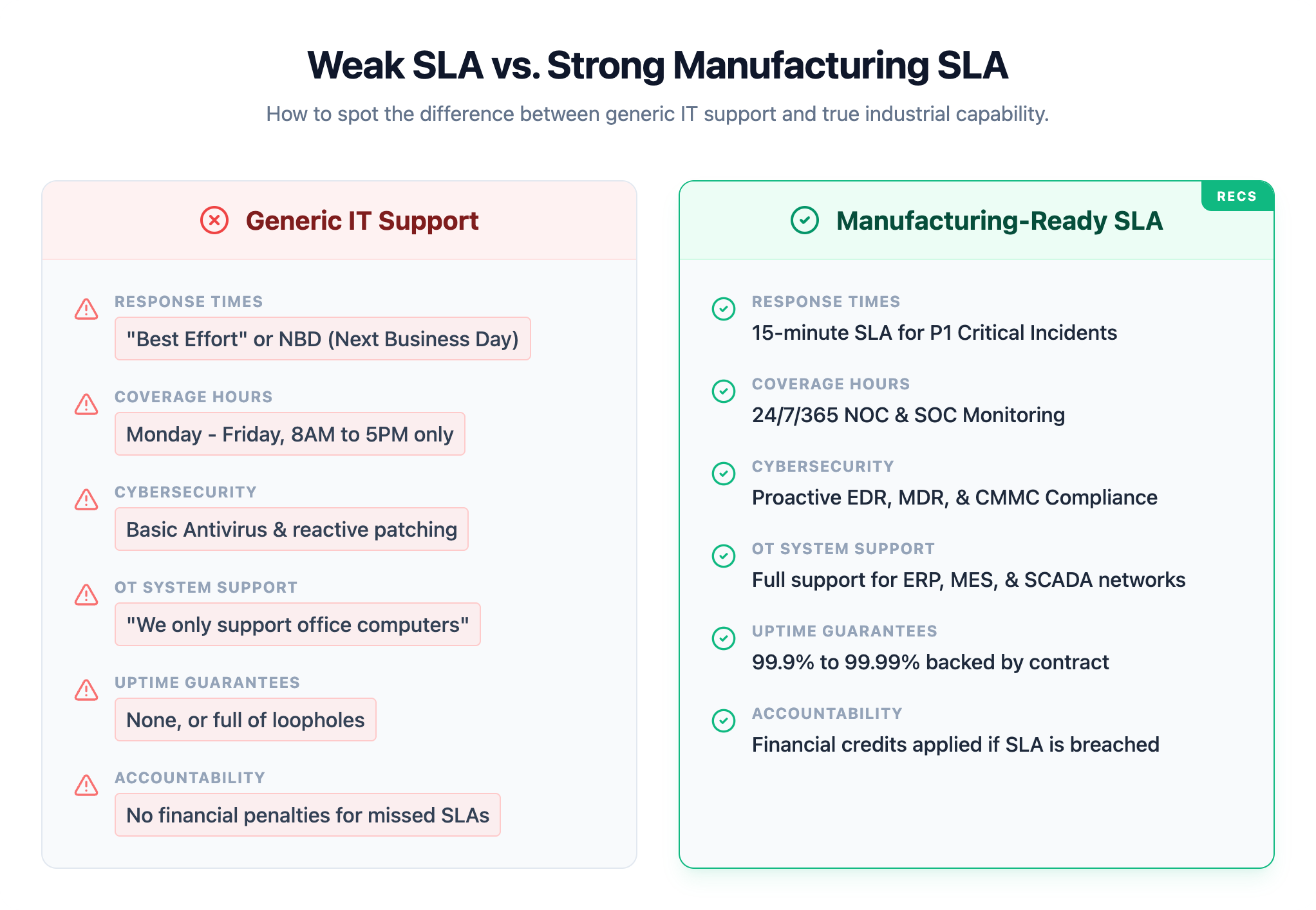
Beyond response times and uptime, a manufacturing-ready SLA requires five additional metrics to be contractually specified:
First Contact Resolution (FCR) The percentage of support issues resolved during the initial interaction without escalation or callbacks. Top-tier providers maintain FCR rates of 70% or higher. In a manufacturing environment, every unresolved first contact means a technician or line supervisor waiting on a callback while equipment sits idle.
Mean Time to Resolution (MTTR) The average duration from ticket creation to confirmed fix. MTTR gives operations teams a reliable basis for assessing how long a support incident will affect throughput. Manufacturing environments should hold vendors to a 2-to-4-hour resolution window for production-impacting issues.
Escalation Procedures A tiered escalation path defines exactly when an issue moves from frontline support to senior technicians and, if necessary, to management or specialized vendors. Critical issues should trigger automatic escalation within 15 to 30 minutes of acknowledgment if no resolution path is established. This clause is especially critical when an issue crosses from IT infrastructure into operational technology.
Proactive Monitoring Commitments Reactive support alone does not protect production uptime. A strong SLA specifies 24/7 infrastructure monitoring, automated alerting thresholds, and scheduled patching windows coordinated around production schedules. Proactive monitoring is what enables a 30-minute response window to actually mean 30 minutes — not 30 minutes after someone notices a problem.
Service Credits and Financial Penalties An SLA without enforcement mechanisms is a statement of intent. The contract must require regular performance reporting, quarterly business reviews with documented SLA attainment data, and concrete service credits or financial penalties when targets are missed. Without penalty language, the benchmarks carry no contractual weight.
Given that manufacturing accounts for 25.7% of all cyberattacks globally, the security provisions in your SLA are not secondary clauses. They are core operational protection.
Your IT support contract must specify:
Knowing what good looks like on paper is only useful if your evaluation process separates providers who perform from those who simply promise well.
Request historical SLA attainment data, not projections. Any credible MSP maintains records of actual response and resolution times measured against their stated commitments. If a provider hesitates to share that data, that hesitation is the answer.
Ask for manufacturing-specific references. A provider who excels at professional services firms has not proven anything relevant to a plant running three shifts. Ask specifically for contacts at facilities with similar shift structures and OT environments.
Test communication responsiveness during the sales process. How quickly a team responds when they are trying to win your business reflects their floor, not their ceiling.
Review contract exclusions carefully. Language around “business hours,” scheduled maintenance windows, and third-party system limitations can quietly carve out your most critical coverage gaps.
Verify U.S.-based support if response speed is a contractual requirement. Time zones and escalation handoffs directly affect whether a 30-minute acknowledgment window holds at 2 a.m. on a Saturday.
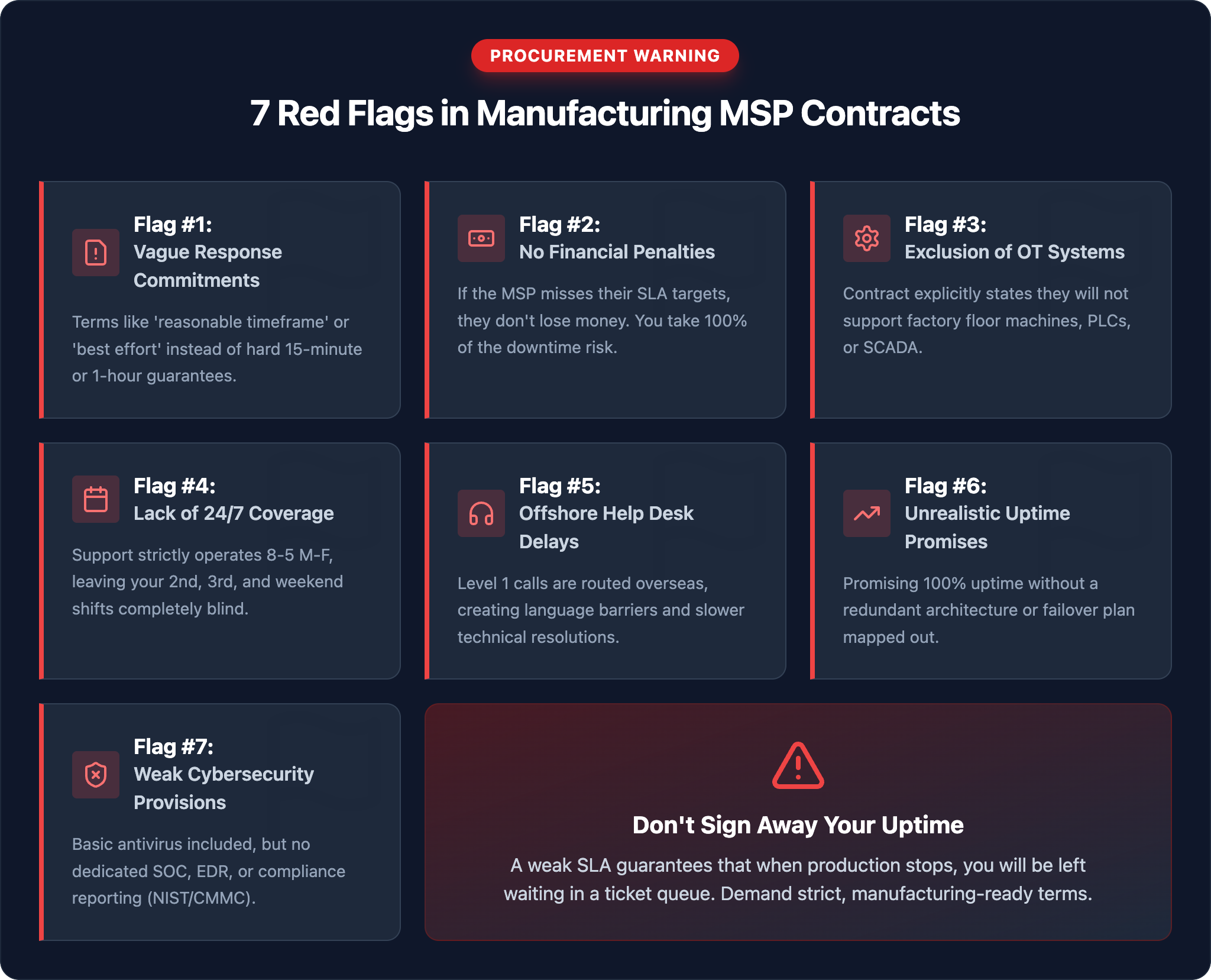
Most weak IT SLAs share the same warning signs. Review your current contract for these.
Knowing what strong SLA benchmarks look like is only half the equation. The other half is finding out whether your current agreement actually meets them and where the gaps are creating risk you haven’t priced in.
Book a Free SLA Review with IT GOAT →
IT GOAT works specifically with manufacturers who need IT support aligned to production realities. U.S.-based NOC, SOC, and help desk teams operating around the clock with SLAs written against your actual operating schedule, not a 9-to-5 assumption.
It depends on the priority tier. P1 production-down issues require acknowledgment within 15 to 30 minutes and resolution within 2 to 4 hours. P2 high-impact issues allow up to one hour for acknowledgment. P3 standard requests sit at 2 to 4 hours. Any MSP applying a flat response window across all issue types regardless of production impact is not structured for a manufacturing environment.
The minimum floor for most manufacturing operations is 99.9%, which permits roughly 8.7 hours of downtime annually. Facilities running continuous shifts, just-in-time production, or time-sensitive customer commitments should require 99.95% or higher. The right target is determined by the revenue and contractual consequences of each additional hour offline.
A response time guarantee is a single metric. An SLA is the full contractual framework governing uptime targets, resolution windows, escalation procedures, reporting obligations, and service credits when commitments are missed. Treating a response time promise as a substitute for a comprehensive SLA leaves significant operational and financial risk unaddressed.
CMMC doesn’t prescribe specific SLA language, but it does require documented security controls, incident response procedures, and audit-ready evidence of compliance. An MSP supporting a defense-supply-chain manufacturer should be able to demonstrate how their service delivery aligns with NIST 800-171 controls and provide documentation that supports your certification audit.
Your contract should specify service credits or financial penalties triggered automatically when targets are missed — not a good-faith discussion after the fact. The penalty structure is what converts a benchmark from a statement of intent into a binding obligation.
We use cookies to enhance site performance and user experience. Your data stays private — we don’t sell your information or share it with unrelated third parties. To find out more about the cookies we use, view our Privacy Policy.