
T support for a law firm covers more ground than general business IT. A provider must understand practice management platforms, document management systems, matter-level permissions, legal hold requirements, and the ethics rules that govern how client data is stored and transmitted. Standard managed IT services—helpdesk, monitoring, patching, backup—are the baseline. The legal layer sits on top of that baseline and cannot be treated as optional.
Firms that have worked with a provider experienced in legal IT spend less time explaining why a system matters and more time getting problems resolved. See how that plays out in practice in this law firm IT case study from IT GOAT.
Practice management software handles the operational side of running a firm: client intake, matter tracking, time entry, billing, and calendaring. The three platforms most commonly deployed in small and mid-size firms are Clio, MyCase, and PracticePanther. Each is cloud-based, which shifts some security responsibility to the vendor but does not eliminate the firm’s obligations under Rule 1.6(c).
IT support for these platforms includes configuring single sign-on and multi-factor authentication, managing user provisioning when attorneys join or leave, troubleshooting integration failures with accounting or e-signature tools, and ensuring that local devices connecting to these platforms meet the firm’s security baseline. When a billing system goes down the day before a deadline, the firm needs a provider who can diagnose whether the issue is local, network-level, or platform-side without delay.
Document management systems (DMS) are distinct from practice management platforms. A DMS stores, versions, and controls access to the actual documents in a matter. The leading platforms in the legal market are iManage, NetDocuments, and Worldox. Each enforces matter-level permissions, meaning that access to a document is tied to the matter it belongs to, not just to a user’s general role in the firm.
Proper DMS configuration requires setting up ethical walls between matters where conflicts exist, auditing access logs, and integrating the DMS with email so that messages are filed to the correct matter automatically. IT support also covers upgrades, local client installations, and the integration between the DMS and Microsoft 365 or Google Workspace. For guidance on moving documents securely between the firm and clients, the page on secure file sharing for law firms covers the leading tools and their trade-offs.
Email is the primary attack surface for law firms. Attorneys regularly communicate settlement figures, wire instructions, and confidential case details by email. Attackers know this. Business email compromise targeting wire transfers is a documented and recurring threat in the legal sector. A single redirected wire transfer can cause losses that dwarf the annual cost of IT services.
Effective email protection for a law firm includes advanced spam and phishing filtering, DMARC, DKIM, and SPF configuration, impersonation detection, and attorney-level security awareness training. IT GOAT’s managed email security service applies these controls as a managed layer, not a one-time configuration. ABA Formal Opinion 477R (2017) addresses the duty to use reasonable security measures when communicating client information electronically, and email is the primary channel that opinion addresses.
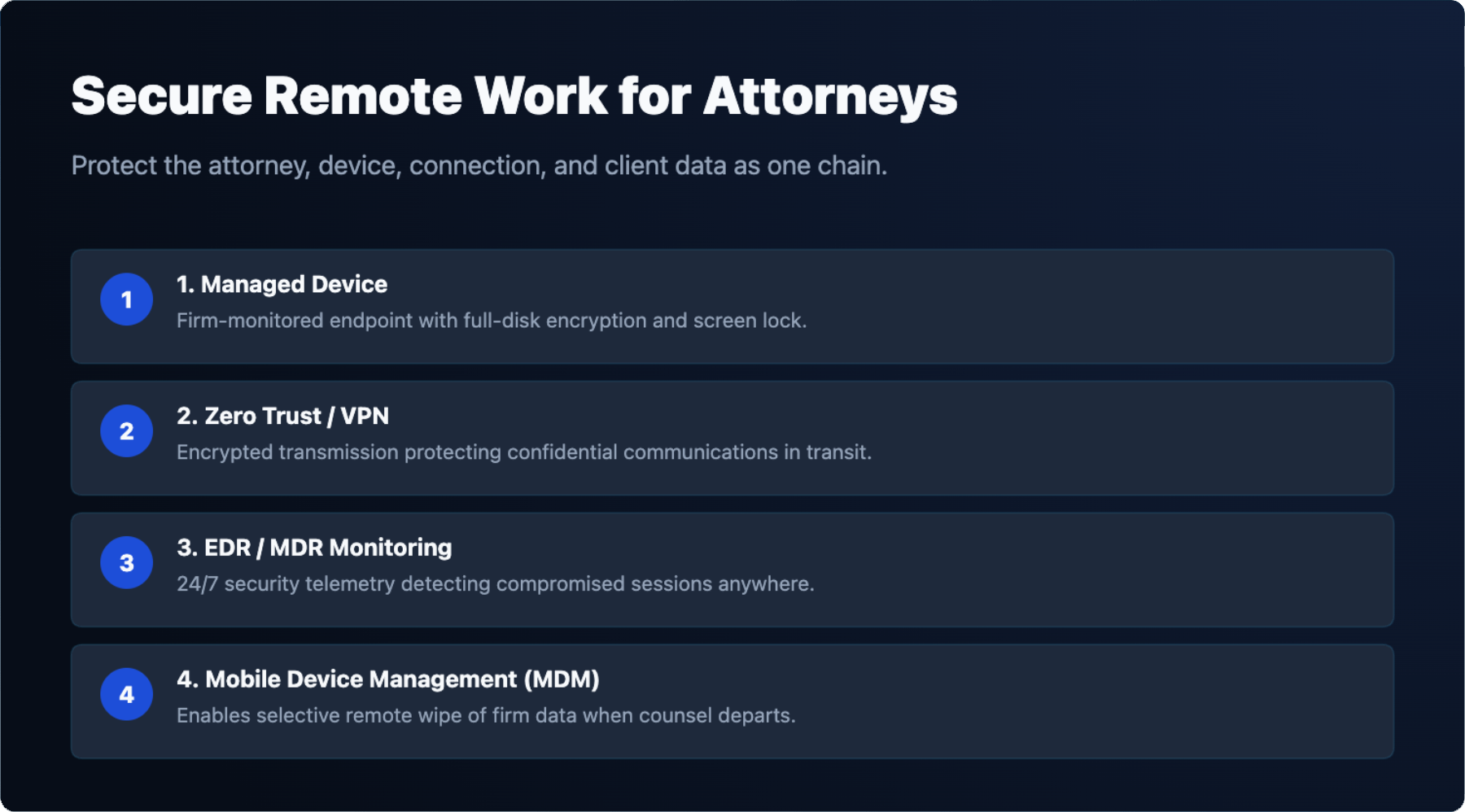
Attorneys work from courthouses, client offices, hotels, and home. Every device that connects to firm systems is a potential entry point. Remote access must be both functional and controlled. A VPN or zero-trust network access solution limits what a remote device can reach. Endpoint detection and response (EDR) software monitors devices for malicious activity regardless of where they connect from.
Mobile device management (MDM) enforces encryption, screen lock, and remote wipe on phones and tablets that hold client data. When an attorney leaves the firm, MDM allows the firm to remove firm data from a personal device without wiping the entire device. IT GOAT’s 24/7 threat detection and MDR service monitors endpoints continuously, so a compromised device is flagged whether the attorney is in the office or across the country.
Three Model Rules directly govern how attorneys must approach technology. ABA Model Rule 1.1, Comment 8 states that competence includes understanding the benefits and risks of relevant technology. This is not aspirational language—it is part of the competence standard. ABA Model Rule 1.6(c) requires that lawyers make reasonable efforts to prevent unauthorized disclosure of or unauthorized access to information relating to the representation of a client.
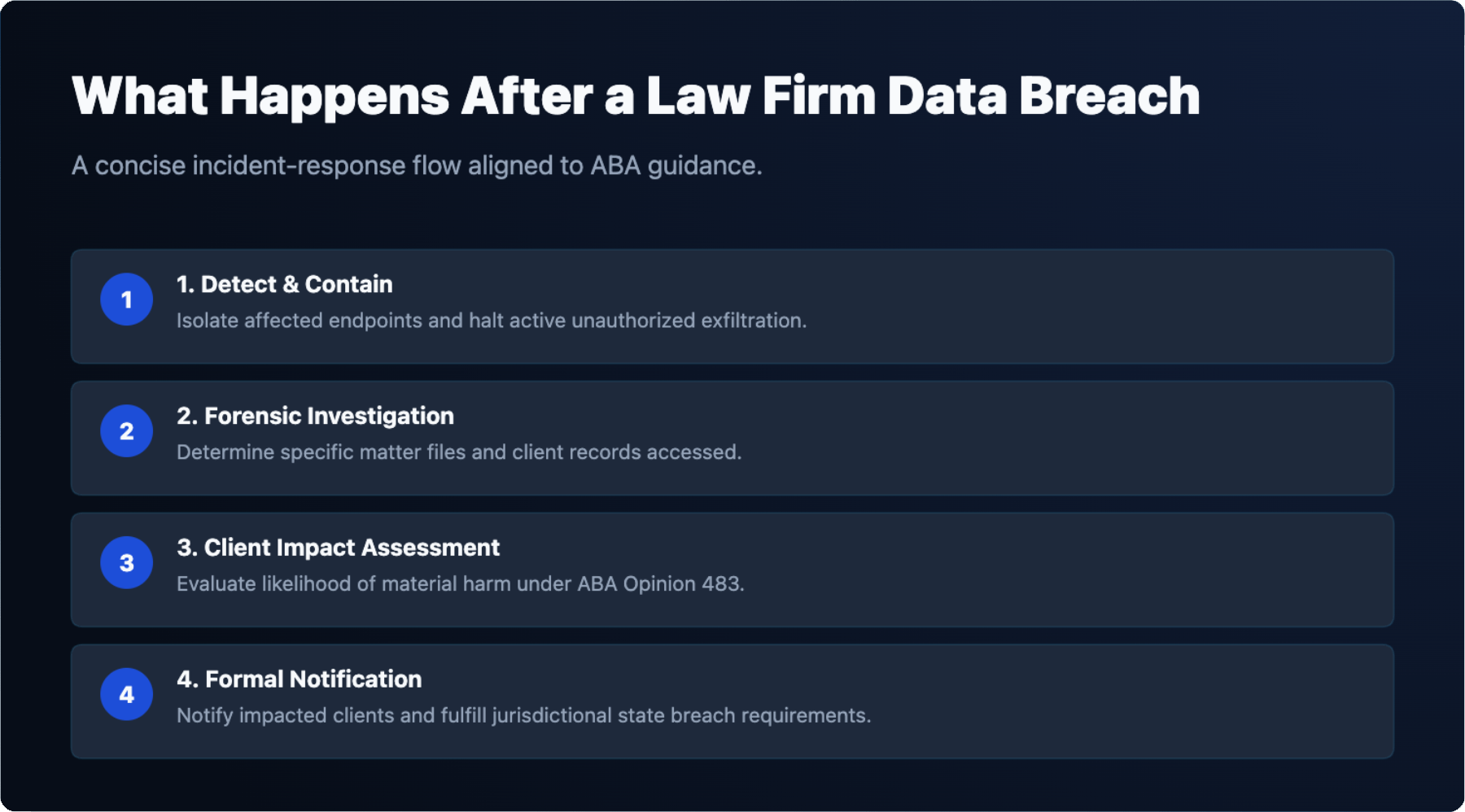
Beyond the Model Rules, three ABA Formal Opinions provide specific guidance. Formal Opinion 477R (2017) addresses securing client communications and requires lawyers to assess the sensitivity of information before choosing a transmission method. Formal Opinion 483 (2018) addresses a lawyer’s duties after a data breach, including the obligation to notify affected clients when a breach is likely to cause material harm. Formal Opinion 512 (July 2024) addresses the use of generative AI tools and the duties of competence and confidentiality that apply when attorneys use those tools.
These opinions are not IT documents, but they define what “reasonable” means in a legal context. An IT provider working with law firms must understand these standards well enough to help the firm meet them, not just sell services that sound security-focused.
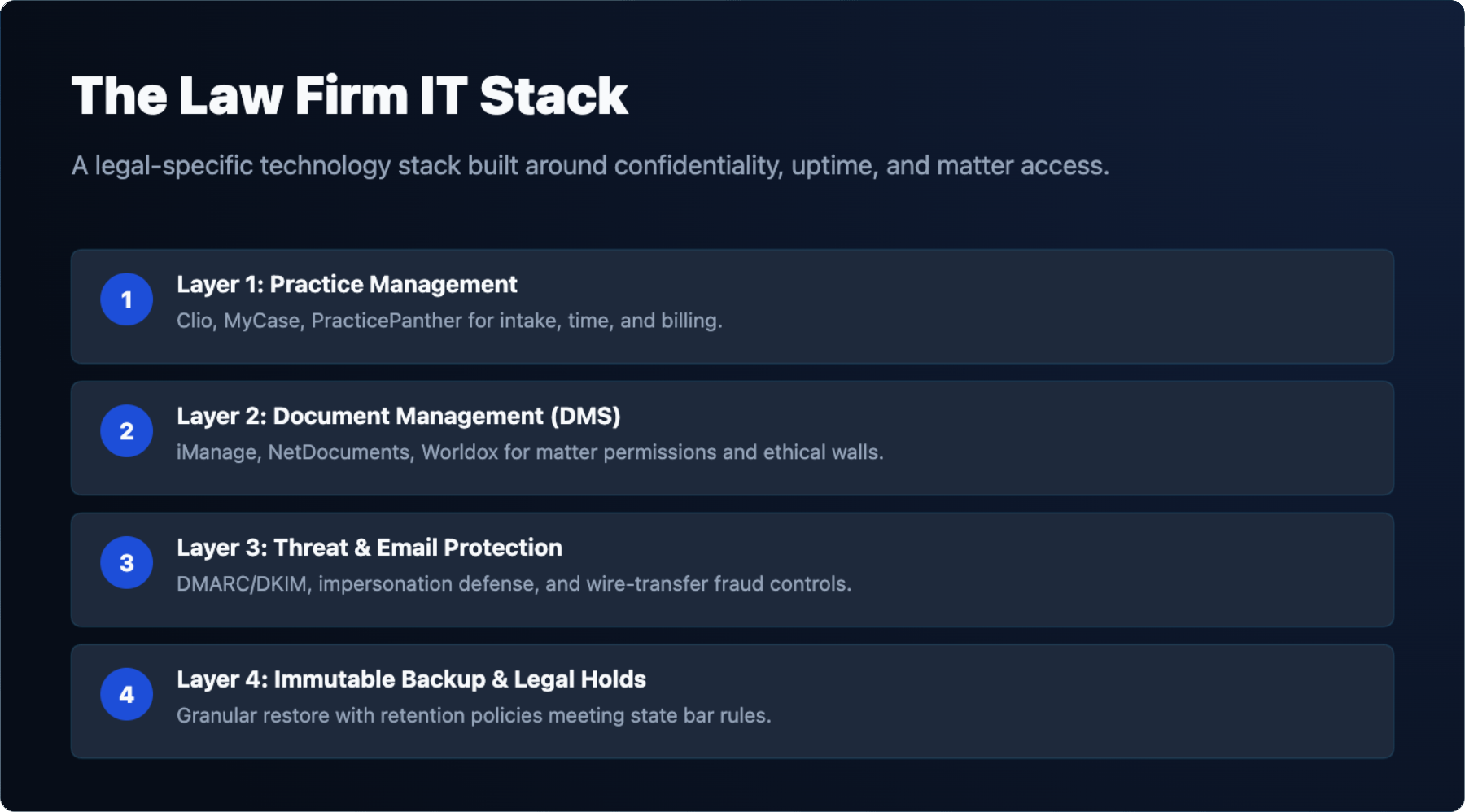
Law firms have retention obligations that go beyond general business records. Client files must be retained for periods defined by state bar rules, which vary by jurisdiction. When litigation is anticipated or active, a legal hold requires that relevant data be preserved and not overwritten by routine backup rotation or deletion policies.
A backup solution for a law firm must support granular recovery—restoring a single document or email thread, not just an entire server. It must also support immutable storage so that backup data cannot be altered or deleted, which is relevant both for legal holds and for ransomware defense. IT GOAT’s backup and disaster recovery service is built around tested, documented recovery procedures, not just scheduled backup jobs. Backup that has never been tested is not a recovery plan.
Selecting an IT provider is a vendor due diligence decision. The firm is entrusting a third party with access to systems that hold privileged client communications. That access must be governed by a written confidentiality agreement, and the provider’s security controls must be documented and verifiable, not described verbally during a sales call.
Providers that serve law firms should be able to demonstrate experience with the specific platforms the firm uses, articulate how they handle a breach event, and explain their monitoring and response capabilities in concrete terms. A provider that offers vCIO services can also help the firm plan technology investments aligned with growth, compliance requirements, and budget cycles—rather than reacting to failures after they occur.
Most managed IT providers serving law firms price on a per-user, per-month basis. The range varies based on the services included, the size of the firm, and whether security services such as MDR, email security, and backup are bundled or priced separately. [ADD: IT GOAT’s per-user monthly price range for law firm managed IT] Firms should be cautious of pricing that excludes security services as add-ons, because the resulting base price understates the actual cost of a compliant environment.
Project work—migrations, new office setups, DMS implementations—is typically scoped and priced separately from the monthly managed services agreement. [ADD: IT GOAT’s typical project rate or range] Understanding what is and is not included in the monthly fee before signing prevents disputes when the firm needs work that falls outside the standard scope.
Use the checklist below when evaluating any IT provider for your law firm. The right column identifies what should be documented in writing before the engagement begins.
| Evaluation criterion | What to ask | What to get in writing |
|---|---|---|
| Legal software experience | Which practice management and DMS platforms have you supported, and for how long? | Named platforms and reference clients in the legal sector |
| 24/7 monitoring | Who monitors systems after hours, and what triggers an alert? | Monitoring scope, alert thresholds, and after-hours staffing model |
| Written response times | What are your guaranteed response and resolution times by severity level? | SLA with defined response windows for critical, high, and standard issues |
| Confidentiality agreement | Will you sign a confidentiality agreement covering client data your staff may access? | Executed NDA or confidentiality clause in the services agreement |
| Breach response plan | What is your process if a breach is detected on our systems, and how do you notify us? | Written incident response procedure with notification timelines |
| Backup testing | How often do you test restores, and how do you document the results? | Backup testing schedule and documented restore test results |
| vCIO planning | Do you provide strategic technology planning, and how often do we meet to review it? | vCIO meeting cadence and deliverables included in the agreement |
| Pricing model | What is included in the monthly fee, and what triggers additional charges? | Itemized service scope with explicit exclusions and overage terms |
| Security certifications or audits | Have you completed any third-party security assessments, and can we see the results? | SOC 2 report, penetration test summary, or equivalent audit documentation |
| Subcontractor disclosure | Do any subcontractors have access to client systems or data? | List of subcontractors and confirmation that confidentiality obligations flow down |
Tell us which practice management and document systems your firm runs.
We will review how client files are protected, where the gaps are against ABA guidance, and what it would take to close them.
A law firm typically needs help desk support, security monitoring, backup and disaster recovery, and technical support for practice management and document management platforms. Common practice management systems include Clio, MyCase, and PracticePanther, while document management systems include iManage, NetDocuments, and Worldox. Each of these platforms has specific configuration and integration requirements that general IT support may not cover.
ABA Model Rule 1.1, Comment 8 requires lawyers to maintain competence with the benefits and risks of relevant technology. This obligation applies to the supervising attorney even when technical work is delegated to staff or an outside provider. Delegating IT functions does not transfer the attorney’s professional responsibility to understand how client data is being handled and protected.
Most state bar ethics opinions permit cloud storage of client files, provided the firm conducts reasonable due diligence on the vendor before use. This typically includes reviewing the vendor’s security practices, data handling policies, and contractual commitments. ABA Formal Opinion 477R (2017) addresses securing client communications and supports the use of cloud services when appropriate safeguards are in place.
Under ABA Formal Opinion 483 (2018), a firm’s duties after a data breach include investigating the incident, taking steps to stop the breach, and notifying affected clients. Firms must also comply with applicable state breach notification laws, which vary by jurisdiction and may impose specific timelines and disclosure requirements independent of the ABA’s guidance.
Managed IT pricing for law firms typically follows a per-user or per-device monthly model, with cost driven by firm size, the number of locations, security requirements, and the software platforms supported. Pricing is scoped to each firm’s environment, so the most accurate way to understand cost is to request a direct assessment from your provider. Additional factors include whether the engagement covers after-hours support, compliance monitoring, or specialized legal application support.
Yes. ABA Model Rule 1.6(c) requires lawyers to make reasonable efforts to prevent unauthorized disclosure of client information, which extends to third-party vendors with access to that information. A confidentiality or data protection agreement with your IT provider is one documented step toward meeting that obligation and should define how client data is accessed, handled, and protected.
We use cookies to enhance site performance and user experience. Your data stays private — we don’t sell your information or share it with unrelated third parties. To find out more about the cookies we use, view our Privacy Policy.