
Running IT across five locations with five different configurations isn’t a growth strategy. It’s a liability with an address at every site you operate.
The average data breach now costs $4.88 million — and the organizations absorbing the highest costs share a common profile: fragmented controls, inconsistent configurations, and limited visibility across distributed environments. For a business operating across offices, warehouses, and jobsites, a single unpatched endpoint or misconfigured firewall at a remote location carries the same financial exposure as one at headquarters.
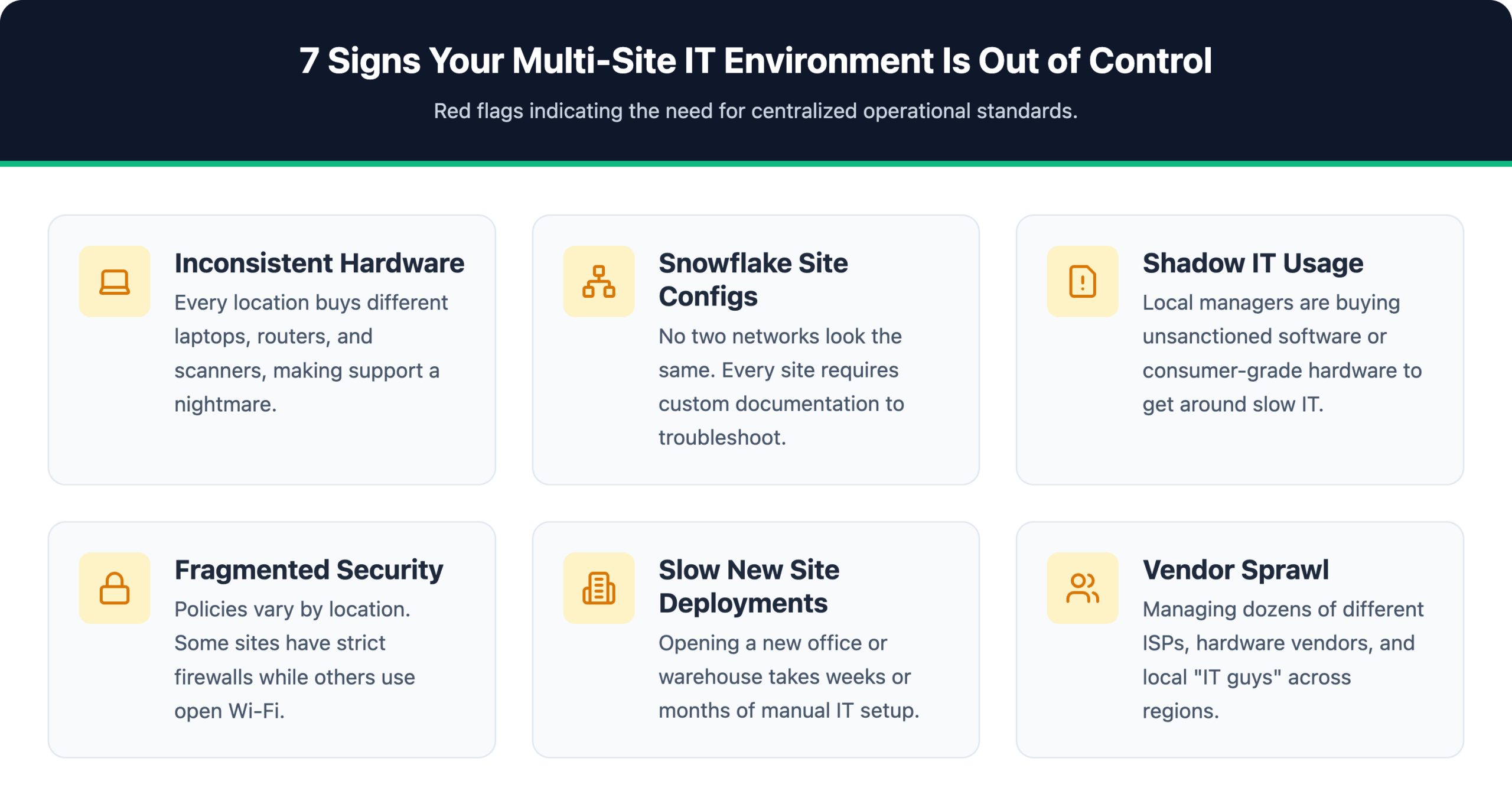
Most multi-site IT problems don’t start with bad decisions. They start with no decisions. Over time, your IT environment stops looking like a system and starts looking like a collection of individual problems waiting for the worst possible moment to surface.
The businesses that scale without chaos aren’t necessarily bigger or better funded. They have a repeatable playbook that travels with them to every location they open. This guide is that playbook.
IT standardization means defining a consistent set of systems, configurations, policies, and hardware profiles that apply across every office, warehouse, and jobsite — regardless of size or geography. Without that consistency, every new location introduces new variables, and those variables compound into support overhead, security exposure, and budget unpredictability.
The operational case: When every site runs the same firewall templates, endpoint configurations, and identity controls, the team deploying site eight works from the same runbook as site one. Troubleshooting is faster because the environment is known. Onboarding is faster because there’s nothing new to learn. Procurement is faster because the hardware list is already approved.
The security case: Only 54% of organizations report full visibility into all connected devices on their network — a gap that widens sharply when warehouses, field offices, and jobsites run inconsistent configurations. Unpatched systems and non-standard setups aren’t edge cases. They’re the attack surface.
Organizations that standardize see measurable improvements across four operational metrics.
| Metric | Impact of Standardization |
|---|---|
| Site deployment time | Faster — repeatable process replaces custom project |
| Support resolution time | Shorter — known environment, known fix |
| Security incident rate | Lower — uniform controls close configuration gaps |
| IT budget predictability | Higher — approved hardware and vendor lists eliminate one-off costs |
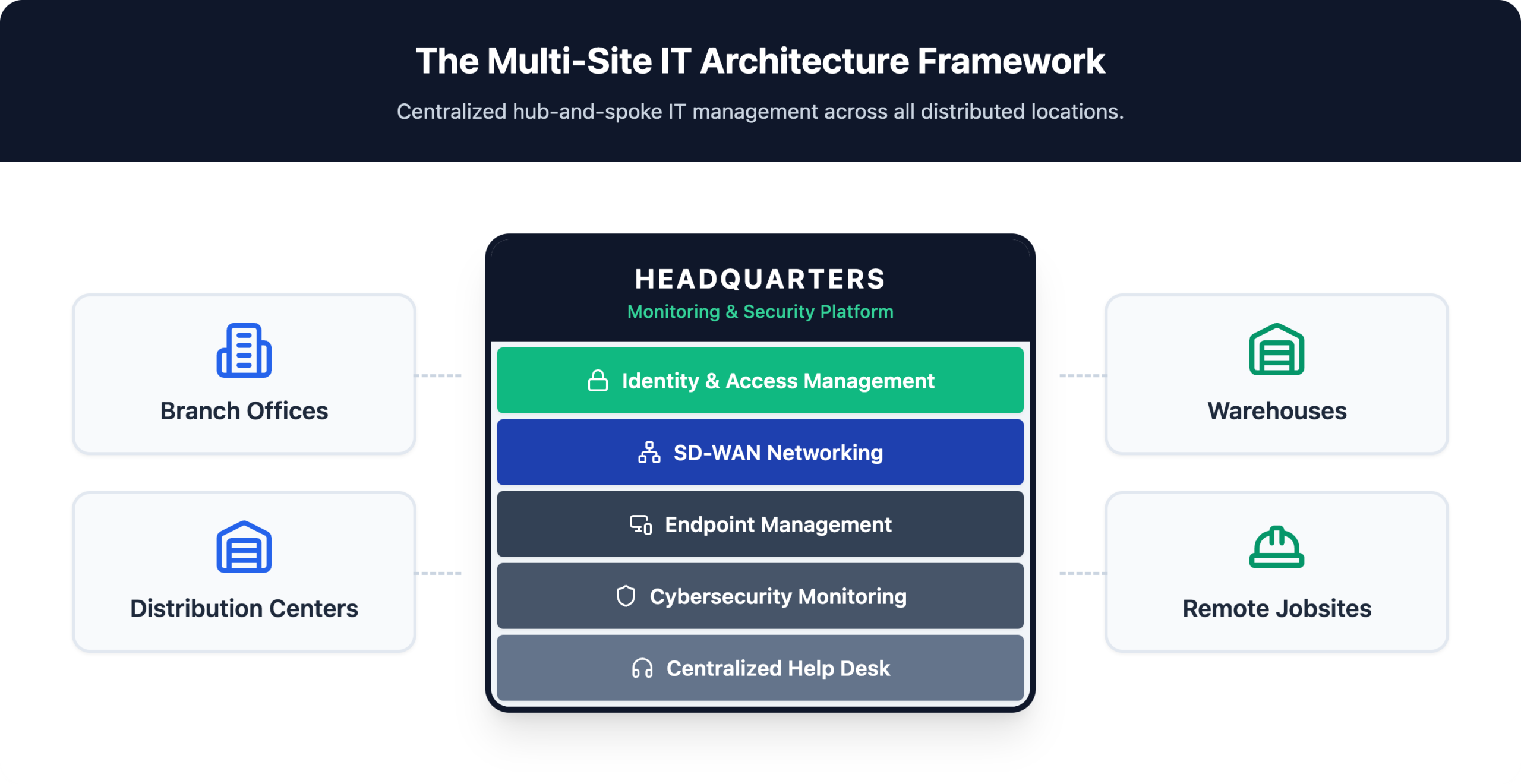
Fixing multi-site IT chaos requires a structured framework, not patching individual problems as they surface.
IAM controls who gets access to which systems, under what conditions, and with what permissions. In a multi-site environment, this means single sign-on so employees authenticate once across all connected applications, role-based access controls so a warehouse worker never touches financial systems, and centralized provisioning so onboarding and offboarding happen at the organizational level — not site by site. IAM is the control plane that makes every other pillar enforceable.
Standardized networking starts with consistent policy, not just consistent hardware. SD-WAN replaces manually configured branch connections with centrally managed, policy-driven routing that prioritizes critical traffic and enforces security rules across all locations simultaneously. Gartner projects that 70% of enterprises will favor SD-WAN and SASE for branch networking, up from less than 25% in 2021 — a shift driven by how rapidly distributed environments are outgrowing legacy approaches.
Endpoint sprawl is both an operational and security problem. Warehouses run rugged handhelds, shared tablets, and barcode scanners alongside standard laptops. Without a mobile device management (MDM) platform and standardized hardware profiles, each device is a liability. Automated provisioning and pre-approved hardware lists eliminate the inconsistency that creates both support overhead and security gaps.
A security baseline defines the minimum controls every site must maintain without exception: endpoint protection, a defined patching cadence, centralized logging, and continuous monitoring. Baseline enforcement isn’t optional — it’s the difference between a manageable security posture and one where a single incident at a remote warehouse becomes a network-wide event.
A single help desk, unified ticketing system, and remote monitoring platform give IT teams real-time visibility across every location rather than reactive awareness after something breaks. Centralized support reduces mean time to resolution, lowers per-site support costs, and ensures that no location operates as a blind spot.
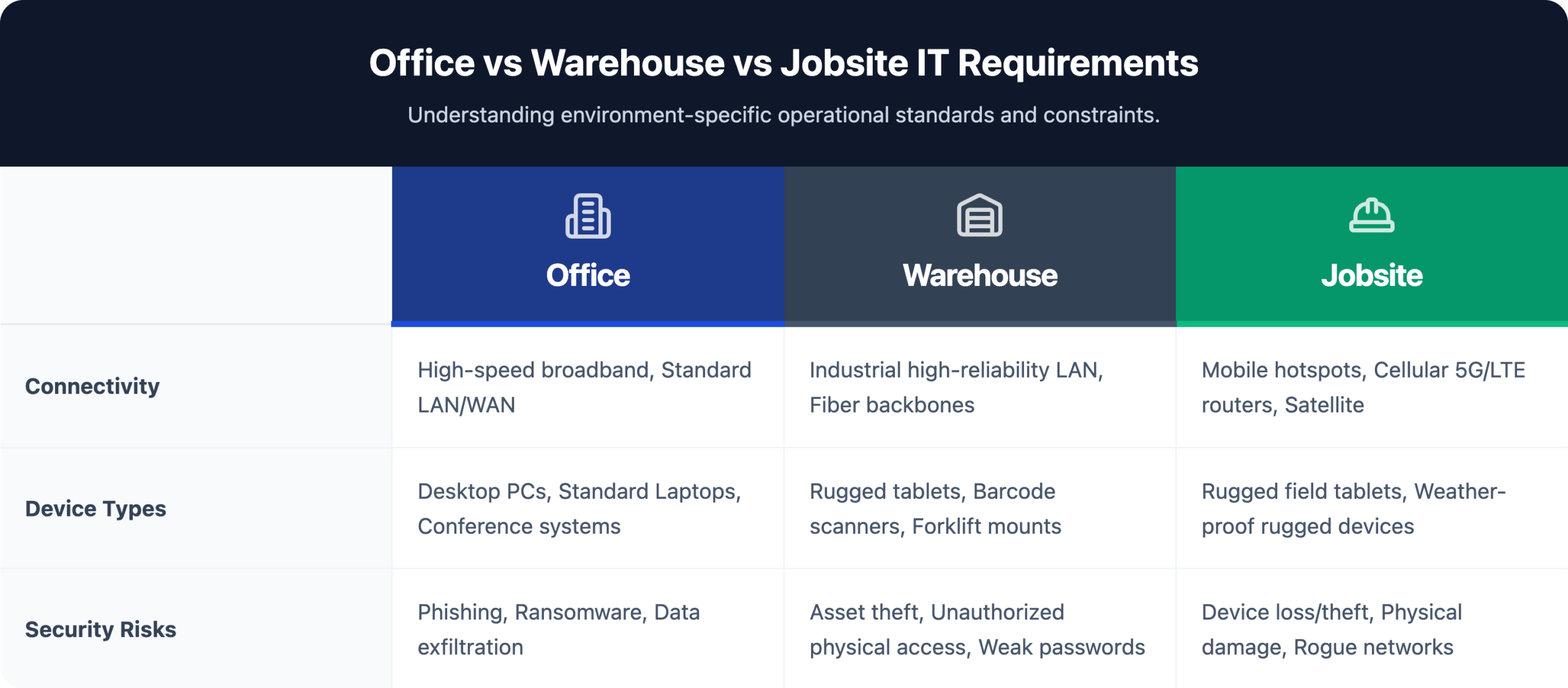
A single IT framework doesn’t mean a single IT configuration. The value of standardization comes from defining clear rules for each environment type — then applying those rules consistently across every site in that category.
| Environment | Key IT Systems | Unique Challenges |
|---|---|---|
| Office | Collaboration tools, VoIP, conference room tech, segmented Wi-Fi | Shadow IT accumulation, aging endpoints |
| Warehouse | WMS integration, rugged MDM devices, RFID/barcode infrastructure, industrial Wi-Fi | Device sprawl, harsh RF environment, 24/7 operations |
| Jobsite | Cellular connectivity, portable equipment, cloud-first tools, temporary access | No fixed infrastructure, contractor access, rapid setup needs |
Standardization only holds when the underlying technology enforces it. Four platform categories form the operational backbone of any well-run multi-site environment.
Remote Monitoring and Management (RMM) RMM platforms give IT teams centralized visibility into every endpoint, server, and network device across all sites. They automate patch deployment, flag configuration drift, and allow technicians to troubleshoot and remediate issues without dispatching someone on-site. For organizations managing warehouses, branch offices, and jobsites simultaneously, RMM eliminates the blind spots that make distributed environments expensive and difficult to secure.
Mobile Device Management (MDM) MDM centralizes control over smartphones, tablets, rugged handhelds, barcode scanners, and shared workstations regardless of where those devices operate. It enforces security policies, manages app deployment, and enables remote wipe if a device is lost or compromised. In operational environments with high device turnover and shared equipment, MDM is the difference between a controlled asset inventory and an untracked exposure.
SD-WAN and Secure Networking SD-WAN replaces site-by-site network configuration with centrally managed connectivity policies applied consistently across every location. It improves performance, reduces dependence on expensive MPLS circuits, and enforces security policies at the network edge without requiring on-site expertise at each location.
Identity and Zero Trust Platforms Zero trust operates on one principle: no user or device is trusted by default, regardless of location. Identity platforms enforce this through single sign-on, multi-factor authentication, conditional access policies, and role-based provisioning. Consistent identity controls across every site close the gaps that attackers exploit when access policies vary by location.
Running multi-site IT without a measurement framework is managing by instinct. These five metrics give operations leaders an objective basis for evaluating performance across every location:
Mean time to resolution — Average hours from ticket open to confirmed close, measured per site. Variance between locations reveals where configuration differences are creating support complexity.
Site deployment time — Days from commitment to a new location to full network and security operational status. A repeatable deployment process should compress this number with each successive site.
Endpoint compliance rate — Percentage of devices meeting patch and configuration standards across all locations. Only 54% of organizations have full device visibility — your compliance rate is only meaningful if the denominator includes every device.
Multi-site IT complexity compounds fast. Each unmanaged site adds exposure, support burden, and operational drag that slows the broader business.
Book a Multi-Site IT Consultation with IT GOAT →
IT GOAT works with growing multi-location businesses that need consistent infrastructure, centralized visibility, and reliable support across every site type.
Timeline depends on current infrastructure state and site count. Organizations that follow a phased approach — documenting a standard, piloting at one or two locations, then scaling — typically see meaningful progress within a few months. Attempting to standardize everything simultaneously across all sites at once is the most common reason these projects stall.
Start with a full IT audit of inherited systems before making any migration decisions. Map every device, platform, and access credential across the acquired environment, then migrate users and workloads to your standard platforms in sequenced order. Retire legacy tools on a defined schedule rather than running parallel systems indefinitely — which compounds both security exposure and support costs.
For most growing businesses, building an internal IT team capable of supporting multiple site types simultaneously is neither practical nor cost-effective. An MSP with genuine multi-site experience gives operations leaders the expertise, tooling, and scalability required without the overhead of hiring specialists for every discipline. The right partner operates as an extension of the internal team, not a replacement for operational accountability.
Traditional site-to-site VPNs require manual configuration at each location and provide no intelligent traffic prioritization. SD-WAN centralizes network policy management, automatically routes traffic across multiple connections based on application priority, and enforces security rules consistently across every site — without requiring on-site networking expertise at each location.
Device sprawl is the primary risk — warehouses have the highest concentration of shared, unmanaged, or inconsistently configured endpoints of any site type. Industrial Wi-Fi degradation is the second: metal racking, concrete floors, and high-bay ceilings require purpose-built access points that standard office-grade hardware can’t reliably replace. WMS integration failures round out the top three — when warehouse management systems lose connectivity to back-end ERP, the operational impact is immediate and measurable.
We use cookies to enhance site performance and user experience. Your data stays private — we don’t sell your information or share it with unrelated third parties. To find out more about the cookies we use, view our Privacy Policy.