
When a construction firm loses a six-figure wire transfer to a compromised vendor email, the conversation stops being about IT and starts being about survival.
The FBI tracked $2.9 billion in exposed losses from Business Email Compromise in 2023 alone — and construction sits squarely in the crosshairs. Large subcontractor payments, last-minute change orders, and wire transfers processed under deadline pressure create exactly the conditions attackers exploit. A stolen password is all it takes to redirect a payment, lock down your Procore environment, or expose confidential bid data to a competitor.
Multi-factor authentication is the most direct technical control available to interrupt that attack chain. But MFA isn’t a single switch you flip company-wide and forget.
Here’s what your firm needs to lock down, and where most construction companies leave the door open without realizing it.
Construction carries a structural disadvantage most industries don’t. Project managers, estimators, and back-office staff work from fixed offices. Field supervisors, subcontractors, and crew leads operate across dozens of jobsites simultaneously — logging into shared devices, personal phones, and temporary networks.
That fragmentation creates identity verification gaps a single password policy cannot close. And passwords alone are not a viable control. Microsoft tracks more than 600 million identity attacks per day globally — nearly all of them password spray or brute-force attempts that systematically test common credentials until one opens.
The financial exposure is direct:
More than 99.9% of compromised accounts did not have MFA enabled. That’s not a configuration mystery — it’s a missing control.
Not every system carries equal risk. Sequence MFA deployment by attack surface and financial consequence — starting with the platforms that give attackers the most direct path to money, data, or project operations.
| Platform | Why It’s High Priority |
|---|---|
| Microsoft 365 / Google Workspace | Primary entry point for phishing and account compromise — highest priority for every firm |
| Procore, Autodesk, Bluebeam | Hold subcontractor agreements, bid documents, and proprietary drawings |
| Sage, Viewpoint, ERP platforms | Direct access to cash flow, vendor relationships, and payment schedules |
| VPN and remote desktop | Hand attackers a direct connection into your internal network |
| Banking and accounts payable portals | Wire fraud prevention depends entirely on MFA here — non-negotiable |
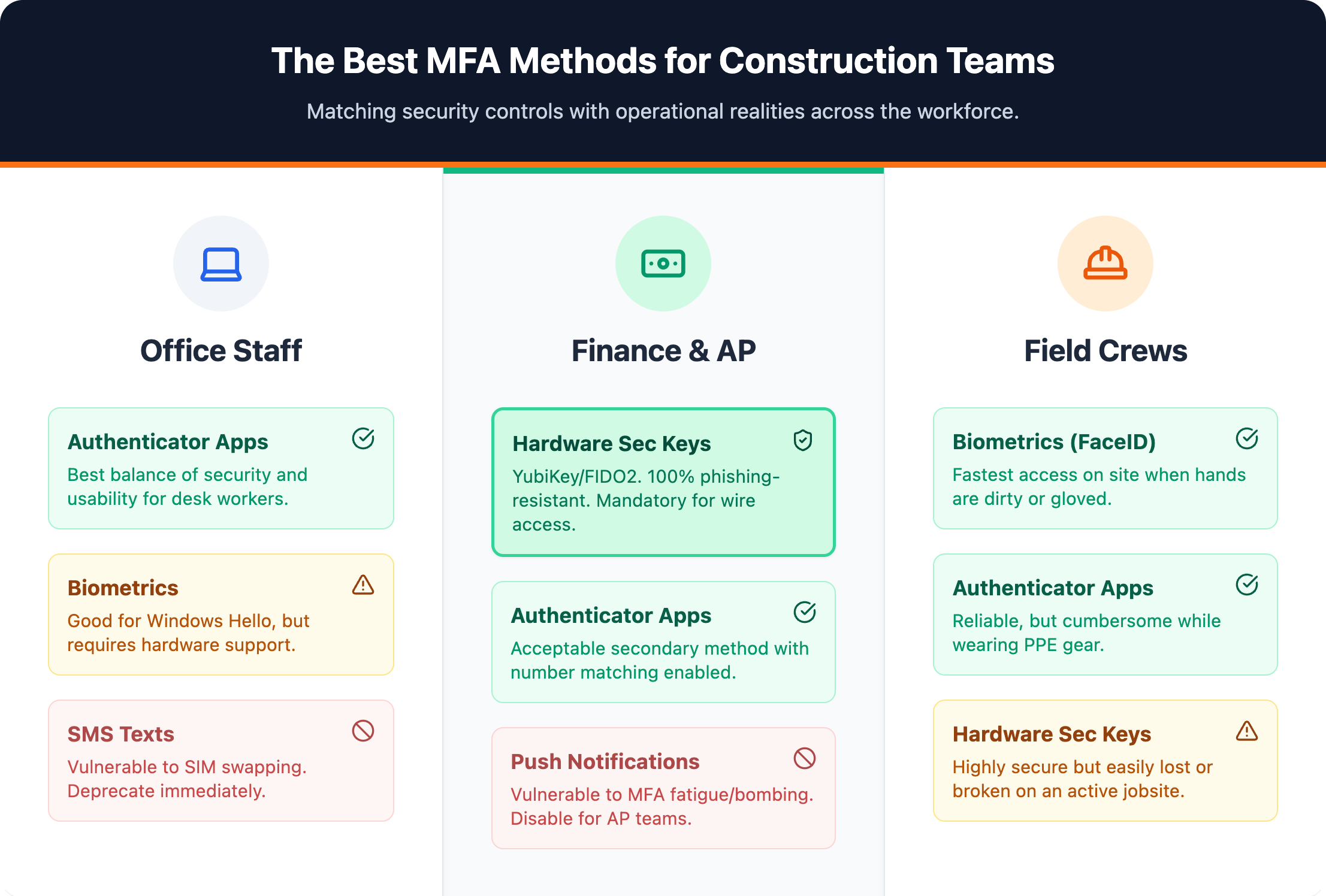
One-size enforcement fails in construction. A policy built for office workers generates resistance and workarounds in the field — which defeats the protection entirely. Map authentication methods to the actual risk profile and device environment of each user group.
Hardware security keys Anyone with wire transfer authority or the ability to modify vendor banking details needs a FIDO2 security key (such as YubiKey). These are phishing-resistant by design: authentication is cryptographically bound to the legitimate domain, meaning a credential-harvesting site cannot intercept or replay it. SMS codes do not protect against Business Email Compromise — hardware keys do.
Authenticator app with number matching Project managers access financial data regularly but aren’t initiating wire transfers. Microsoft Authenticator with number matching requires users to confirm a displayed code rather than simply approve a push notification — closing the door on MFA fatigue attacks where attackers spam approval requests until a user accepts.
Push notifications or biometrics Field crews operate under conditions that make complex authentication impractical. Push notifications with number matching and biometric authentication (fingerprint or face unlock) deliver strong security without requiring hardware distribution across jobsites. Both are natively supported on modern iOS and Android devices.
Same enforcement as internal staff Subcontractor accounts are frequent targets precisely because firms apply looser controls to external users. Any account that touches project data, financial systems, or document repositories carries the same risk profile as an internal account. No exceptions.
Procore administrators control MFA at the company level through Company Admin → Company Settings → Security tab. Enable two-factor authentication and set it to required, not optional. Once enforced, all users — including subcontractors with project access — must complete MFA enrollment before logging in. Optional MFA is functionally no MFA at all.
Without SSO, enable MFA through Autodesk Account security settings at the account level. With SSO connected to Microsoft Entra ID or Okta, MFA enforcement passes through that provider — the preferred configuration. Centralizing enforcement through a single identity provider closes gaps faster and reduces administrative overhead across every connected platform.
Bluebeam Studio doesn’t have a native MFA enforcement console. Security runs through your identity provider. If the firm uses Microsoft Entra ID or another SSO provider, MFA applies at login before a user accesses Studio sessions or shared document sets. The same logic applies to any document collaboration tool in your stack — centralize identity management and MFA coverage extends automatically.
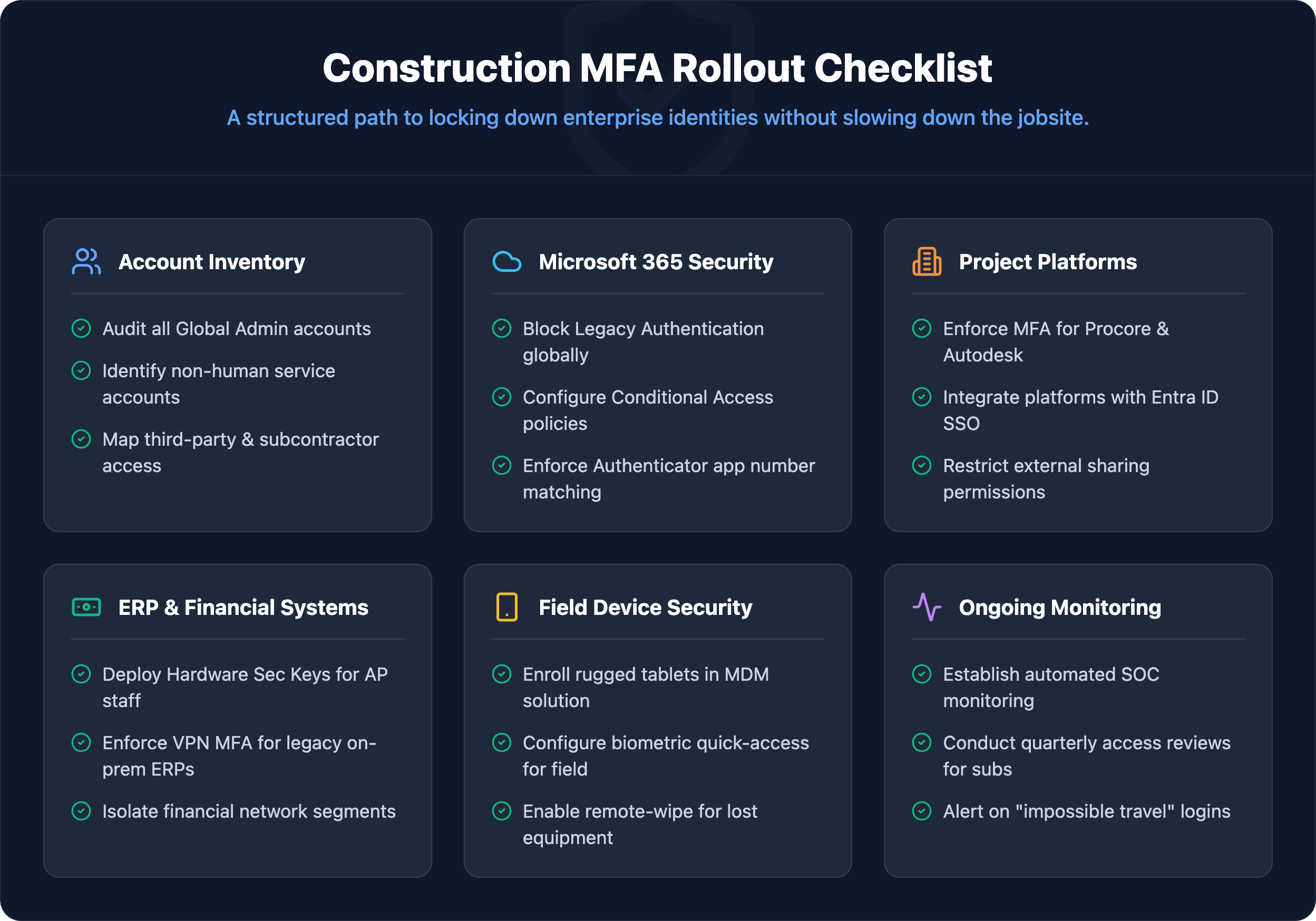
For most construction firms, Microsoft 365 is the operational backbone — email, project files, financial approvals, and subcontractor communication all run through it. Microsoft Entra ID is the right place to enforce MFA at scale.
Starting point — Security Defaults Firms without an existing identity policy can enable Security Defaults inside Entra ID, which enforces MFA for all users at no additional cost beyond a standard Microsoft 365 license.
Scaled control — Entra ID P1 ($6/user/month) Unlocks Conditional Access policies, event logging, and advanced reporting — the right tier for firms that need role-based enforcement.
Advanced control — Entra ID P2 ($9/user/month) Adds risk-based Conditional Access and privileged identity management for firms with complex access requirements or federal contract obligations.
Conditional Access removes the friction that frustrates field crews. Define named locations — a permanent jobsite IP range or regional office network — and require MFA only when a login originates outside those trusted boundaries. A superintendent signing in from the site trailer skips the prompt. The same account accessed from an unrecognized device triggers verification. Security holds without slowing down workers already managing tight schedules.
Older email protocols (SMTP, IMAP, POP3) do not support modern authentication challenges — they bypass MFA entirely. Confirm these protocols are blocked within your tenant configuration. Any active legacy authentication connection is an open path that MFA policy cannot close.
Construction creates identity security problems standard enterprise MFA guidance doesn’t account for. Rotating crews, shared equipment, and subcontractors cycling in and out mean the assumption of one device per user breaks down completely on most jobsites.
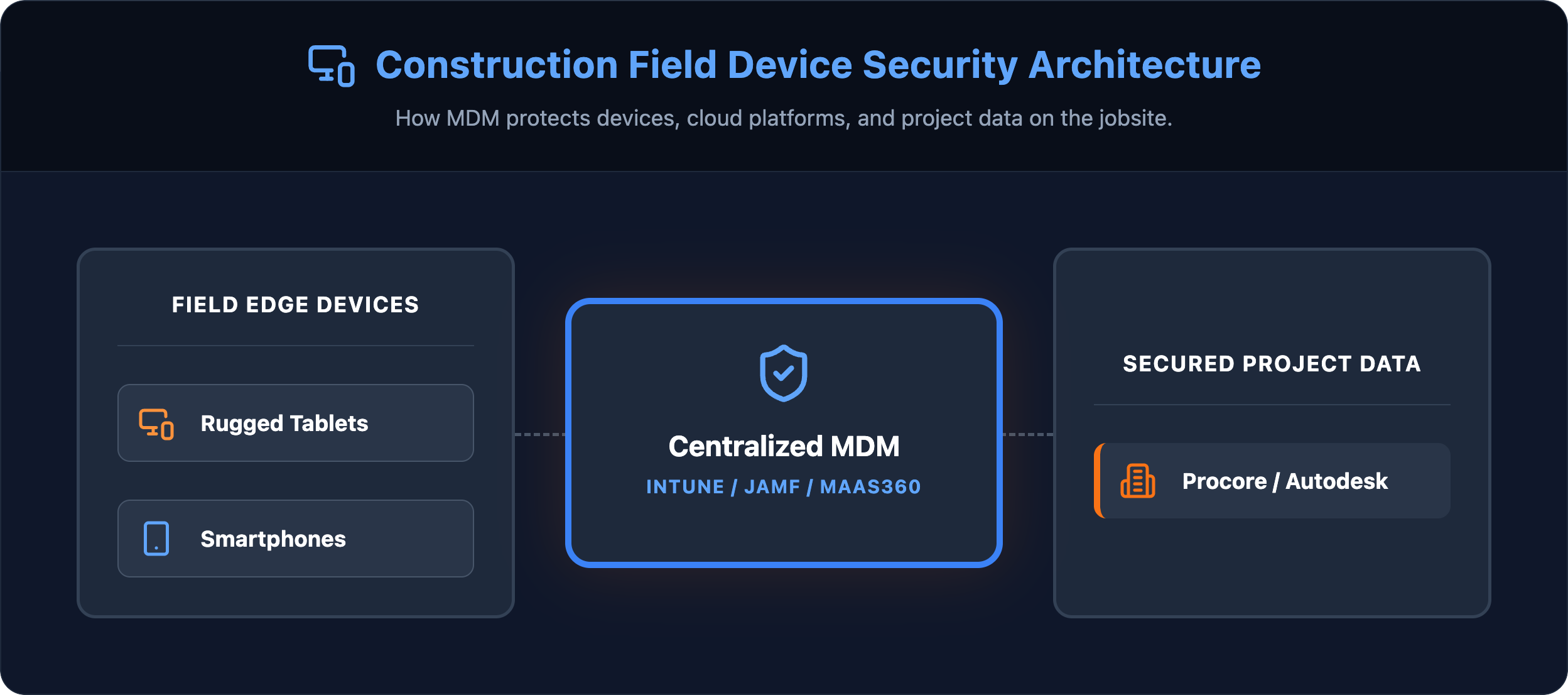
Shared trailer tablets and kiosks Configure these endpoints with device-based authentication tied to the machine itself, enforce automatic session timeouts after 5–10 minutes of inactivity, and restrict access scope to project management tools, daily logs, and safety documentation only. A shared trailer tablet has no business reaching payroll systems or financial approval workflows.
Subcontractor and vendor access Guest accounts provisioned through Microsoft Entra ID should carry the same MFA requirements as internal staff, with time-limited permissions that expire automatically at project close or contract end. Never grant a subcontractor standing access to internal systems on an open-ended basis.
Lost or replaced devices Device loss on a jobsite is not an edge case. When a superintendent loses a phone, the IT helpdesk needs a documented re-enrollment process ready to execute within hours. Pre-register backup authentication methods for every field user — a secondary phone number or backup codes stored securely in their profile. Establish these procedures before the first device goes missing, not after.
A poorly timed rollout that locks field crews out of project management platforms mid-pour or during a critical submittal deadline creates operational damage that sets the entire security initiative back. A phased approach eliminates that risk.
Step 1 — Inventory accounts and flag high-risk users Audit every cloud account: Microsoft 365, Procore, Sage, DocuSign, banking portals. Flag accounts with admin privileges, payment authorization access, or the ability to modify vendor banking details. These are the accounts attackers target first.
Step 2 — Pilot with office and IT staff Run the first enforcement wave through office staff. This group is more likely to troubleshoot enrollment issues independently — problems surface before they affect field operations. Document every friction point and adjust before the broader rollout.
Step 3 — Train field crews with hands-on support Field workers need in-person enrollment sessions, not email instructions. Short walkthroughs at the jobsite combined with a one-page quick-reference guide covering the authenticator app process reduce support calls and resistance. Assign a point of contact at each site for the first two weeks of enforcement.
Step 4 — Enforce across all platforms with a firm date Set an enforcement date for each platform tier, communicate it clearly, and block access for non-compliant accounts once the grace period closes. Conditional Access policies allow enforcement to be scoped by role and risk level — granular control without a blanket lockout.
Getting MFA configured correctly across a mixed environment of field devices, office workstations, and third-party platforms is where most construction firms stall. The technical requirements are straightforward. The execution across dispersed teams is not.
Book a Construction IT Assessment with IT GOAT →
IT GOAT works directly with construction firms to implement MFA across both field and office environments — accounting for shared jobsite devices, subcontractor access, and the construction platforms your teams depend on daily.
Authenticator apps generate time-based codes locally on the device without requiring a cellular connection. Hardware security keys work entirely offline. Neither method depends on signal strength, making both viable for remote sites.
SSO reduces friction by consolidating logins, but creates a single point of failure if credentials are compromised. MFA must run alongside SSO, not instead of it. Removing MFA from any authentication layer introduces unnecessary exposure regardless of SSO configuration.
IT resets MFA enrollment and the worker uses pre-issued backup codes or a registered secondary method to regain access. A documented recovery process prevents a lost device from becoming a prolonged operational disruption.
Yes, without exception. Any account that touches project data, financial systems, or document repositories carries the same risk profile as an internal account — regardless of whether it belongs to an employee or an external partner.
Most firms complete a phased rollout within a few weeks. Office staff go first since their environment is more controlled, followed by field teams once device configurations and recovery procedures are confirmed.
We use cookies to enhance site performance and user experience. Your data stays private — we don’t sell your information or share it with unrelated third parties. To find out more about the cookies we use, view our Privacy Policy.