
Construction firms aren’t being targeted by accident. They’re being targeted because distributed jobsites, rotating subcontractor credentials, and deadline pressure make them easier to compromise — and harder to walk away from when the ransom demand arrives.
Ransomware attacks against construction and engineering firms grew 41% in one year. By September 2025, construction had become the single most targeted industry sector globally for ransomware, accounting for more than 11% of all victims. When a firm loses access to its project files, accounting system, and email on a Wednesday morning, the clock starts ticking in hours — and every hour carries a real dollar cost in idle crews, missed submittals, and delayed draws.
Cyber insurers now scrutinize exactly this distinction when binding coverage or reviewing claims. Federal contracting rules are pushing the same requirements into bid eligibility for defense-adjacent work. This checklist covers the four areas where construction firms most commonly carry unrecognized risk — and what closing each gap actually requires.
General IT frameworks are built for office environments with fixed infrastructure, centralized staff, and predictable access patterns. Construction operations look nothing like that.
The risk profile is structural, not incidental:
Distributed operations — Multiple active jobsites run with inconsistent connectivity, forcing field teams toward workarounds that bypass security controls and leave data exposed or unsynced.
High-value data targets — Bid packages, subcontractor contracts, project financials, and BIM files carry significant competitive and financial value. Ransomware groups targeting construction specifically cite payroll data, tax documents, contracts, and financial records as primary targets.
Workforce turnover — Crews and subcontractors rotate across project phases. Without disciplined offboarding, former workers retain active credentials long after their last day on site.
Project deadline pressure — An IT outage during a concrete pour, a steel delivery window, or a pre-inspection phase doesn’t just create inconvenience. It triggers liquidated damages clauses, delays downstream trades, and creates a powerful incentive to pay rather than recover — which is exactly what attackers are counting on.
A checklist built specifically for construction accounts for these variables rather than working around them.
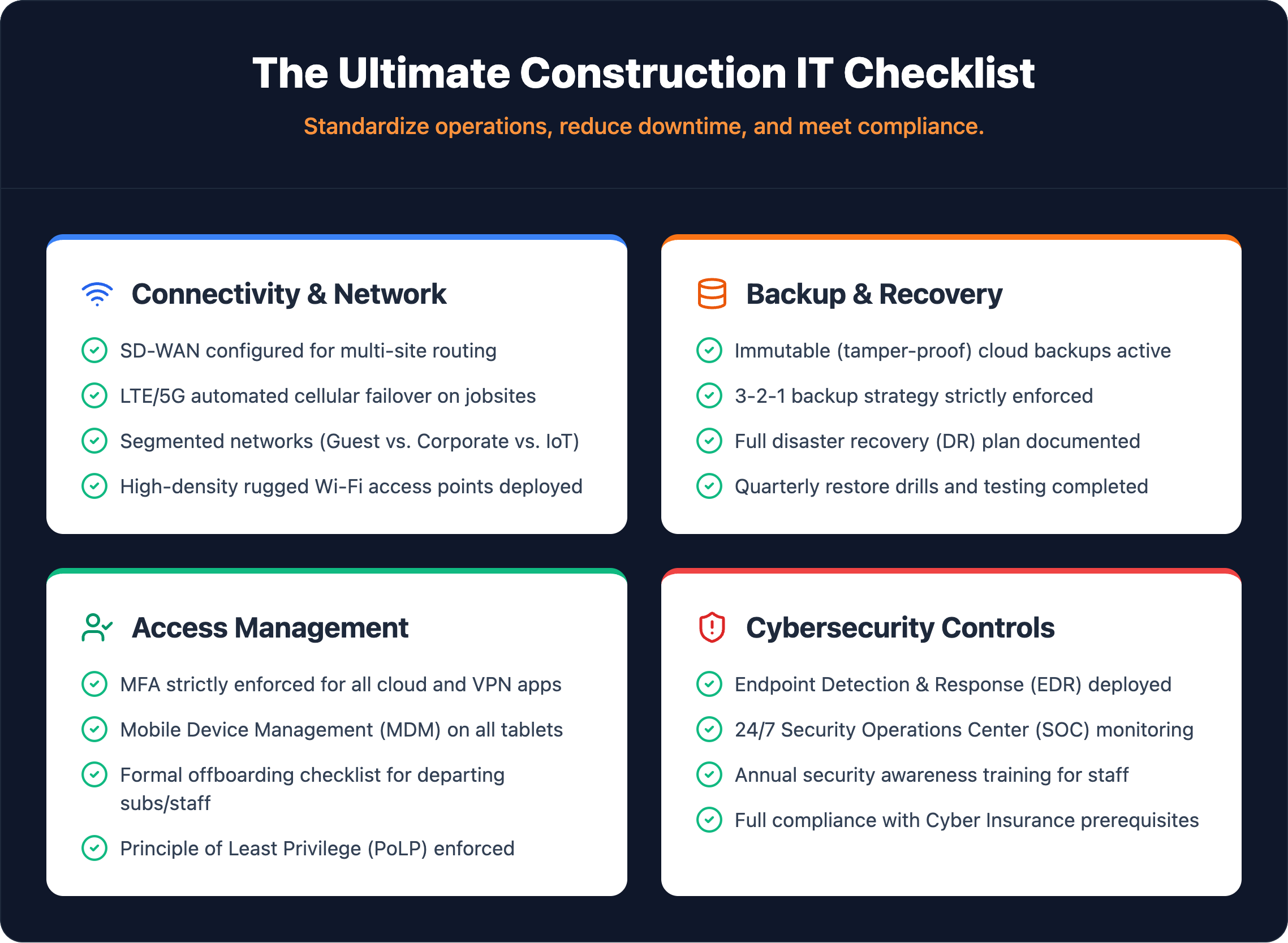
Document every workstation, laptop, tablet, printer, and network device across all offices — serial numbers, assigned users, physical locations. Track every software license and flag unauthorized installs. Enroll every jobsite mobile device and hotspot in MDM. An undocumented device is an unprotected device.
Audit bandwidth against actual demand. Deploy LTE failover on jobsites — a single connectivity failure reverts crews to manual processes. Segment networks with VLANs so subcontractor and guest traffic can’t reach core infrastructure. Enforce VPN for all remote access to project files and ERP — no open RDP connections.
Apply the 3-2-1 rule: three copies, two media types, one offsite with immutable retention enabled. In 2024, 94% of ransomware attacks targeted backup systems — immutability is non-negotiable. Set RPO and RTO targets based on your actual project schedules and contract penalty clauses. Test restores quarterly with documented pass/fail results. An untested backup is an assumption, not a safeguard.
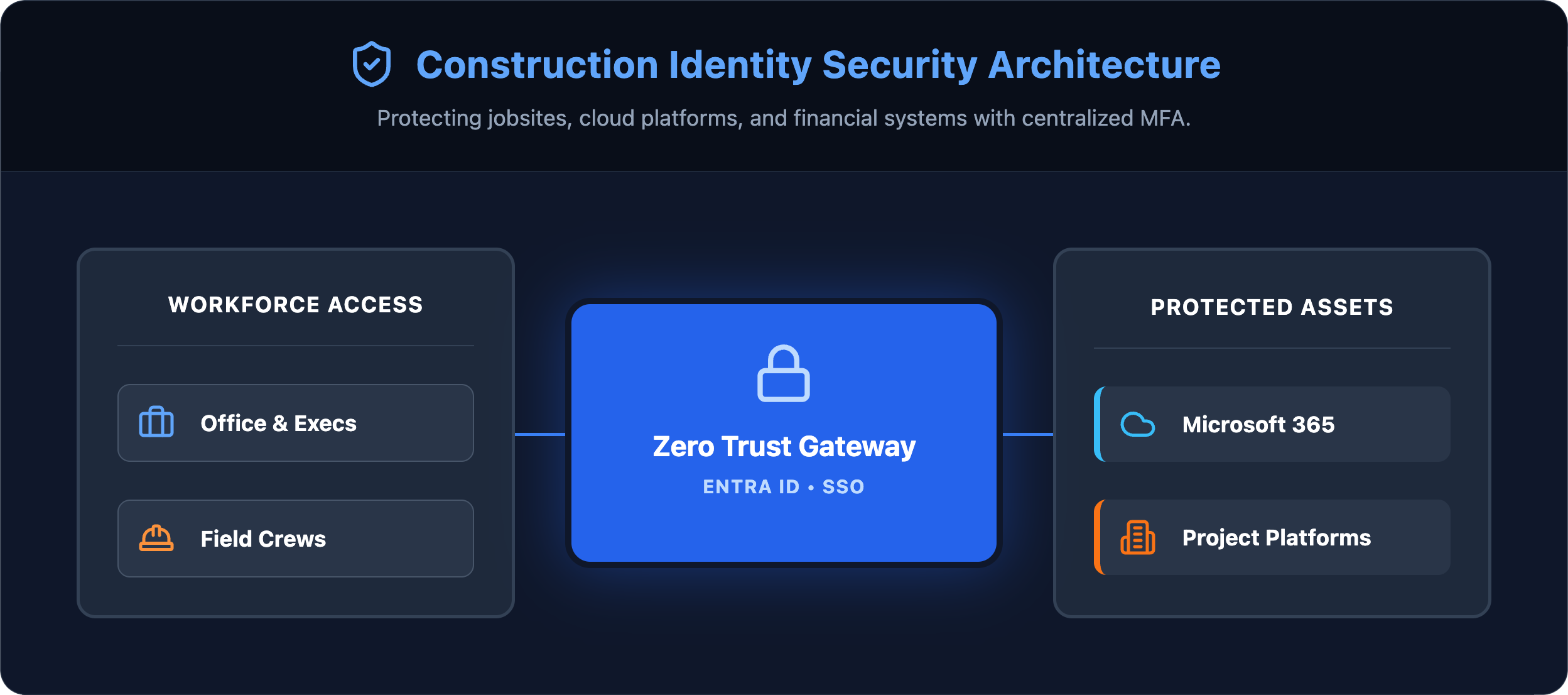
68% of breaches trace back to the human element. Enforce MFA on email, Procore, Autodesk, and VPN — no role exemptions. Apply role-based access by project and trade. Tie every subcontractor account to a hard offboarding trigger at project completion, with credential revocation confirmed within 24 hours. Enroll all devices in MDM as a condition of project access, not an optional step.
Write scenarios specific to construction: ransomware during a closeout, a jobsite server failure mid-pour, an office outage freezing payroll. Assign a named decision-maker and technical lead with after-hours contact numbers — committee decisions during an active incident cost hours. Pre-configure cloud failover for estimating, PM, and ERP before an incident. Run quarterly live drills. Plans never tested under realistic conditions will fail when the pressure is real.
Backup integrity and access controls form the foundation. These active security controls stop attackers before they reach your data.
Traditional antivirus compares files against known threats. EDR monitors behavior in real time, flagging anomalous activity on workstations and servers even when no signature match exists. Without EDR, an intrusion spreads silently until a ransom demand appears on screen.
Phishing remains the primary entry point for attacks against construction firms — 93% of attacks in 2024 started via a phishing campaign. Email filtering, link scanning, and attachment sandboxing block the majority of malicious messages before they reach an inbox. User awareness training closes the gap that technology alone can’t cover.
Unpatched systems give attackers a documented roadmap. Operating systems, third-party applications, and firmware all require scheduled patching with documented verification. Manual patching cycles routinely miss systems — automated patch testing and deployment is the only way to close that window reliably.
Business-hours-only coverage leaves a 16-hour window each weekday and full weekend exposure where intrusions go undetected. A Security Operations Center with continuous monitoring enables rapid containment rather than morning-after discovery.
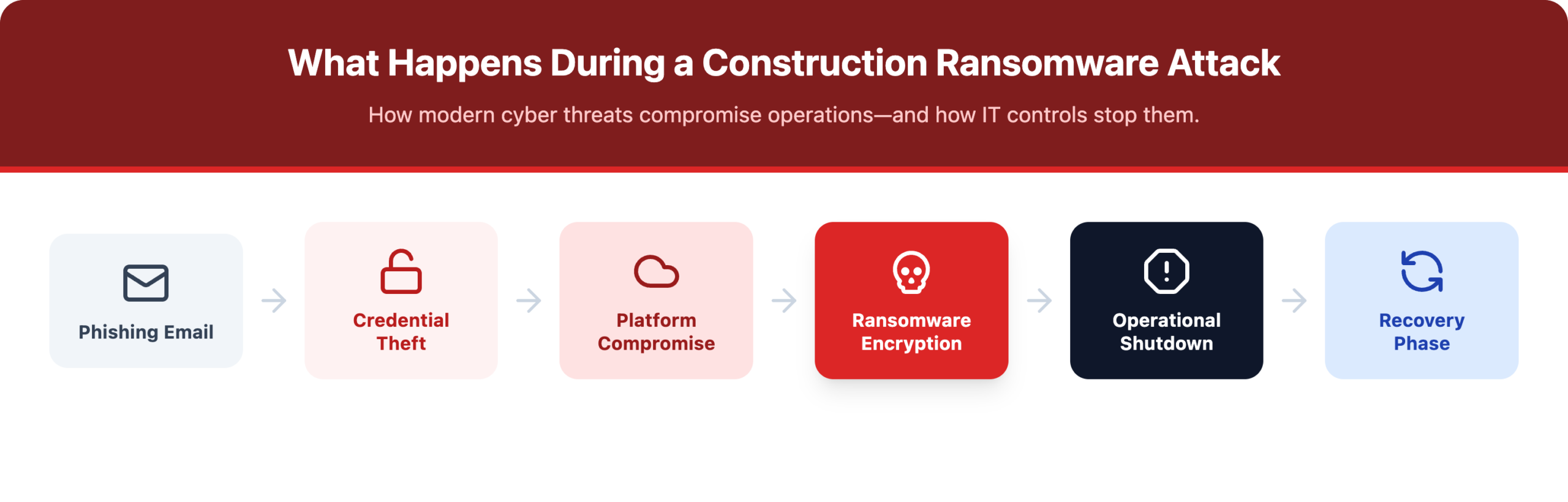
Most breaches in construction firms now enter through application-layer credentials and misconfigured cloud platforms — not firewall gaps.
| Platform Category | Common Tools | Key Security Actions |
|---|---|---|
| Project Management | Procore, PlanGrid, Buildertrend | SSO enforcement, role-based access, quarterly access reviews |
| Design / BIM | Autodesk, Revit, Bluebeam | File encryption, export controls, access reviews |
| Accounting / ERP | Sage, Viewpoint, QuickBooks | MFA, segregation of duties, audit logging |
| Productivity | Microsoft 365, Google Workspace | Conditional access, DLP policies, guest access governance |
Microsoft 365 deserves specific attention — it’s the most targeted productivity environment in construction because it controls email, file storage, and internal communication simultaneously. Conditional access policies restrict login attempts from unmanaged devices. Data loss prevention rules block sensitive documents from being forwarded externally. SharePoint permissions require the same access review discipline applied to project platforms.
Sage, Viewpoint, and ERP systems carry the highest consequence for unauthorized access. Segregation of duties prevents a single user from both approving and processing transactions. Audit logging must be active on all financial modules and reviewed on a defined schedule.
| Cadence | What to Review |
|---|---|
| Monthly | Backup success rate verification and restore testing (target: 99%+ success rate) |
| Quarterly | User access reviews, privileged account audits, full disaster recovery simulations |
| Annually | Full infrastructure audit — network architecture, software licensing, endpoint posture, compliance alignment |
Beyond the scheduled cadence, certain business events require an immediate unscheduled review: winning a new federal contract, completing an acquisition, onboarding a major subcontractor with system access, or experiencing any security incident. CMMC 2.0 enforcement means firms pursuing government work face compliance consequences if controls aren’t current at the moment of bid submission — not just at audit time.
The controls in this checklist are not theoretical safeguards. They are the same requirements cyber insurers are building into policies, the same controls CMMC 2.0 is making mandatory for federal contractors, and the same gap between a four-hour recovery and a four-day shutdown.
Book a Construction IT Assessment with IT GOAT →
IT GOAT works specifically with construction and project-based businesses across the United States. We’ll walk through your current infrastructure against every item on this checklist — and identify which gaps carry the highest operational and financial risk before an incident forces the conversation.
A 10-to-50-person operation running a single site should expect to spend $2,500 to $7,500 on an initial IT infrastructure assessment alone, before factoring in managed services contracts, software licensing, and hardware refresh cycles. Mid-sized firms with multiple jobsites will spend significantly more. The critical mindset shift: treat IT as a recurring operational expense, not a one-time capital investment. Firms that defer managed services to cut costs typically absorb those savings as emergency recovery costs after an incident.
Project management platforms, estimating software, and accounting systems represent the highest-value targets. These systems hold bid data, subcontractor pricing, client contracts, and financial records. Losing access to any of them during an active project phase creates immediate revenue exposure and potential contract liability.
For most small to mid-sized construction firms, a managed service provider delivers broader expertise and more consistent coverage than a single in-house hire. One internal IT generalist cannot realistically cover network security, cloud infrastructure, endpoint management, and compliance simultaneously. MSP partnerships give firms access to specialized skill sets without the cost of building a full internal team.
Ransomware and business email compromise (BEC) cause the most financial damage consistently. Ransomware attacks against construction grew 41% in the past year, and attackers frequently time campaigns around high-stakes project phases when wire transfer requests and bid submissions are routine. A fraudulent payment instruction buried in an email thread is far harder to catch when project teams are moving fast across multiple sites.
The claim can be denied regardless of policy language. Insurers are now requesting logs, backup test records, and configuration documentation at the time of a claim. Firms that had the right controls in place but failed to document them face the same outcome as firms that never implemented them. Documentation is as important as the controls themselves.
We use cookies to enhance site performance and user experience. Your data stays private — we don’t sell your information or share it with unrelated third parties. To find out more about the cookies we use, view our Privacy Policy.