
School districts became the most ransomware-targeted industry on the planet in 2024, accounting for 18% of all publicly posted ransomware victims across every sector globally. That is not a technology statistic. That is a budget crisis, a reputational emergency, and a legal liability waiting to land on your district’s doorstep.
The PowerSchool breach that unfolded in late 2024 and early 2025 made this concrete. Attackers gained access to student information systems holding enrollment records, grades, health data, and staff credentials across thousands of districts.
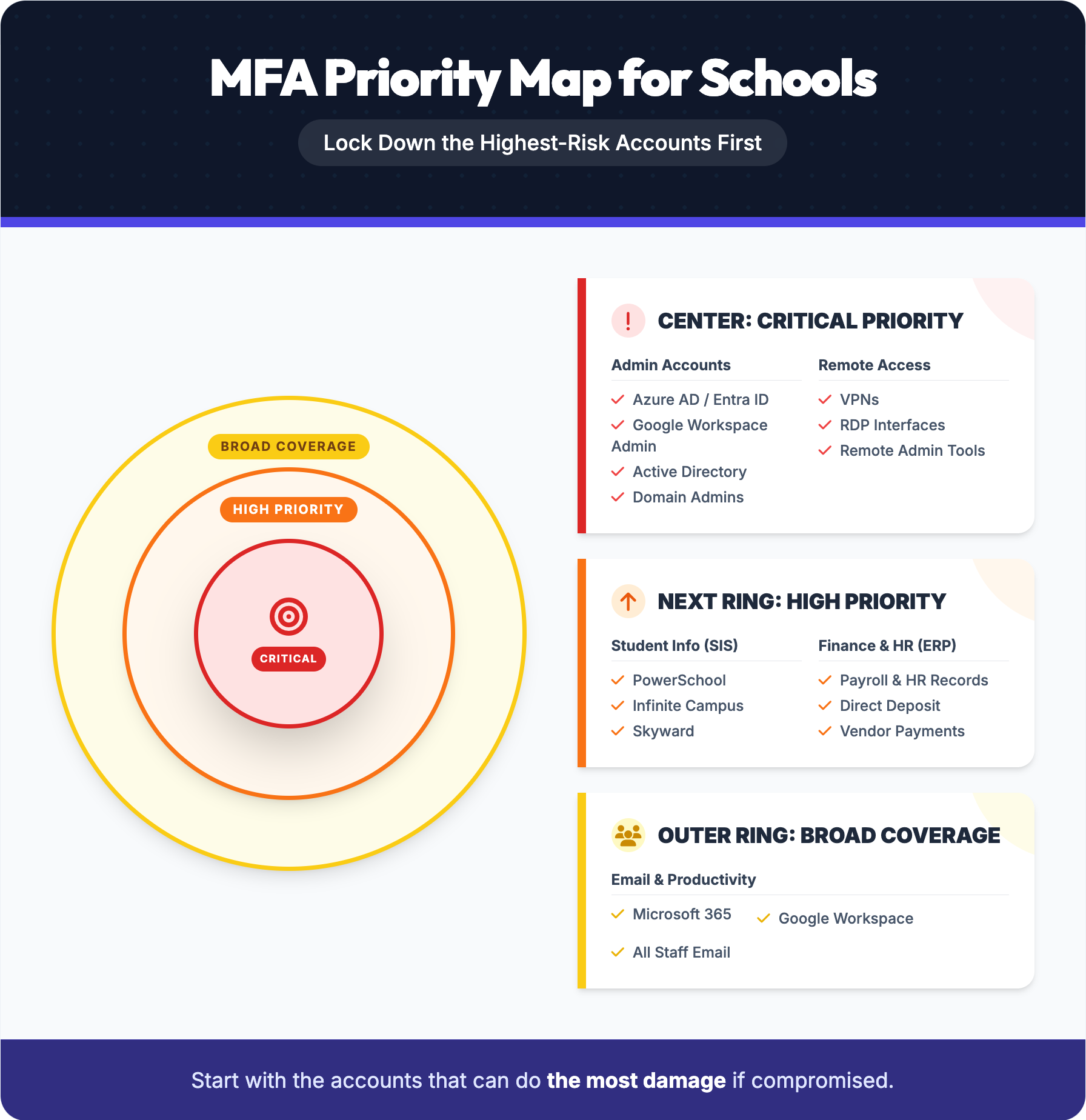
Cyber insurers have already drawn their line, requiring MFA on email, remote access, and privileged accounts as a baseline condition for coverage. What remains is the harder question every district leader now faces: how do you actually deploy MFA across a workforce that includes substitute teachers, shared workstations, and staff resistant to any change in their daily login routine.
Multi-factor authentication requires users to verify their identity through two or more independent credentials before gaining access to a system, application, or network resource. For school districts, this means a compromised password alone is no longer sufficient for an attacker to access student records, payroll systems, or administrative platforms. Microsoft’s identity telemetry found that 99.2% of compromised accounts did not have MFA enabled, which tells you exactly where most breaches begin and where the most straightforward fix exists.
The three authentication factors that form the foundation of any MFA deployment are:
Effective MFA combines at least two of these factors from different categories. Using a password alongside a one-time code from an authenticator app satisfies that requirement. Using a password alongside a security question does not, because both factors fall into the same category.
For district IT and operations leaders, the practical implication is that MFA is not a single product or switch to flip. It is a layered control that must be matched to the access environment, whether that means Windows logins, remote desktop connections, VPN access, cloud applications, or student information systems. The right factor combination depends on who is authenticating, from where, and what they are accessing. Understanding that distinction is what separates a deployment that reduces real risk from one that creates friction without meaningfully improving security posture, which is why the implementation approach matters as much as the decision to deploy.
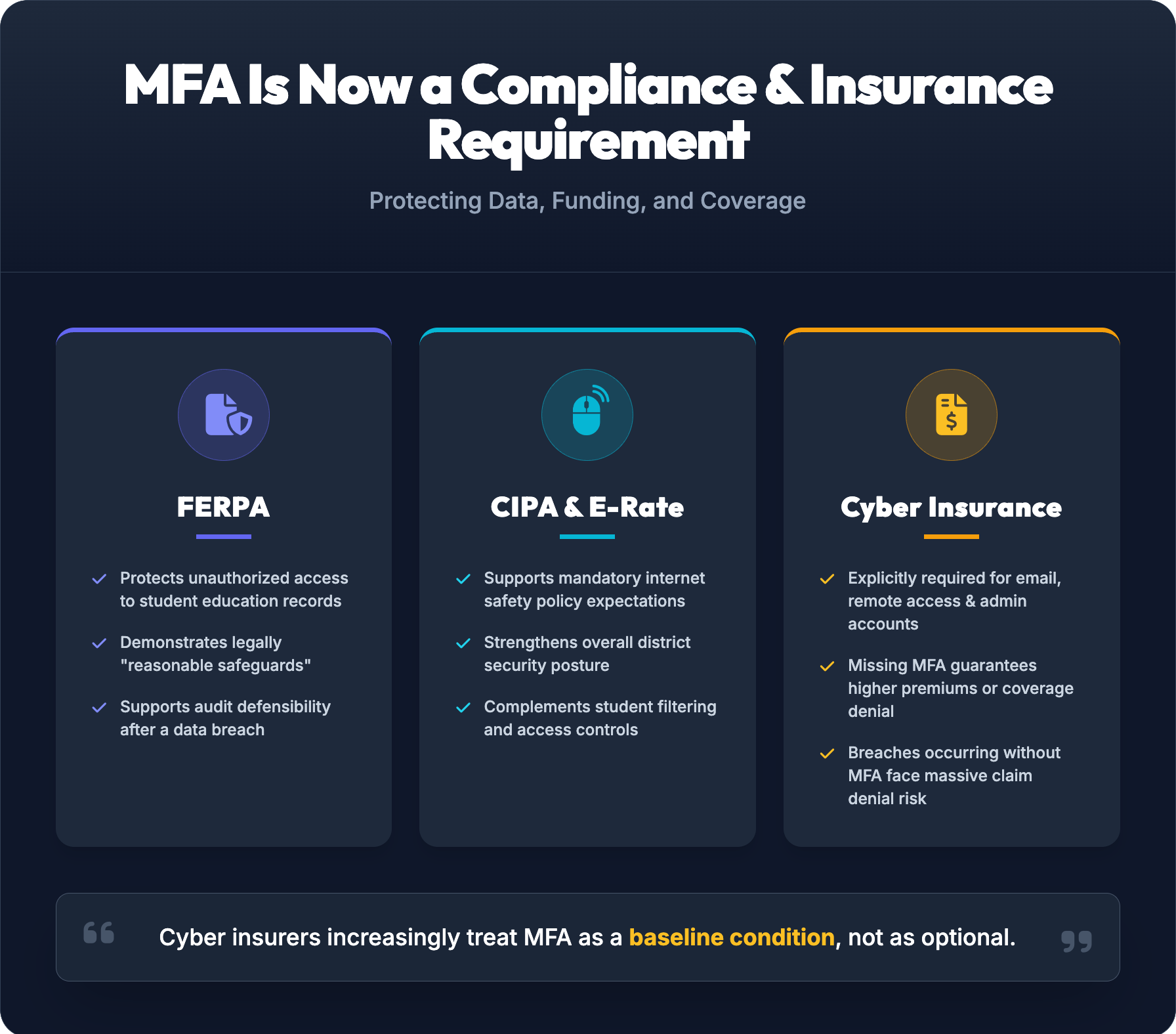
Beyond the operational case for MFA, school districts face a set of compliance and insurance obligations that make deployment a practical necessity rather than a best practice recommendation.
FERPA requires districts to maintain reasonable safeguards over student education records. While the regulation does not prescribe specific technical controls, access control is central to any defensible compliance posture.
MFA directly demonstrates that only authorized personnel can reach systems containing protected student data, which matters when the Department of Education reviews a district’s security practices following a breach. Districts that cannot show documented access controls face significant exposure, both regulatory and reputational.
Understanding why MFA matters in a school district starts with understanding the specific attack patterns that target education environments every day.
Attackers routinely harvest staff credentials through convincing fake login pages that mirror district portals, Google Workspace, or Microsoft 365 sign-in screens. Once a password is stolen, it is immediately useful without MFA in place. With MFA enabled, a stolen password alone does not open the door. The attacker still needs the second factor, which they do not have. Microsoft’s identity telemetry confirms this: 99.2% of compromised accounts had no MFA enabled at the time of the breach.
Ransomware in education does not start with malware. It starts with a compromised admin account. Once an attacker controls a privileged account, they can push malicious software across the entire network, lock down servers, and demand payment before classes resume. MFA interrupts this chain at the credential stage, before the attacker ever reaches the systems they need to cause damage at scale.
Attackers who gain access to a superintendent’s or finance director’s inbox can redirect vendor payments, request fraudulent wire transfers, or impersonate leadership to manipulate staff. Inbox hijacking is the enabler for these scams. MFA blocks unauthorized access to email accounts, removing the attacker’s ability to operate from a trusted internal identity.
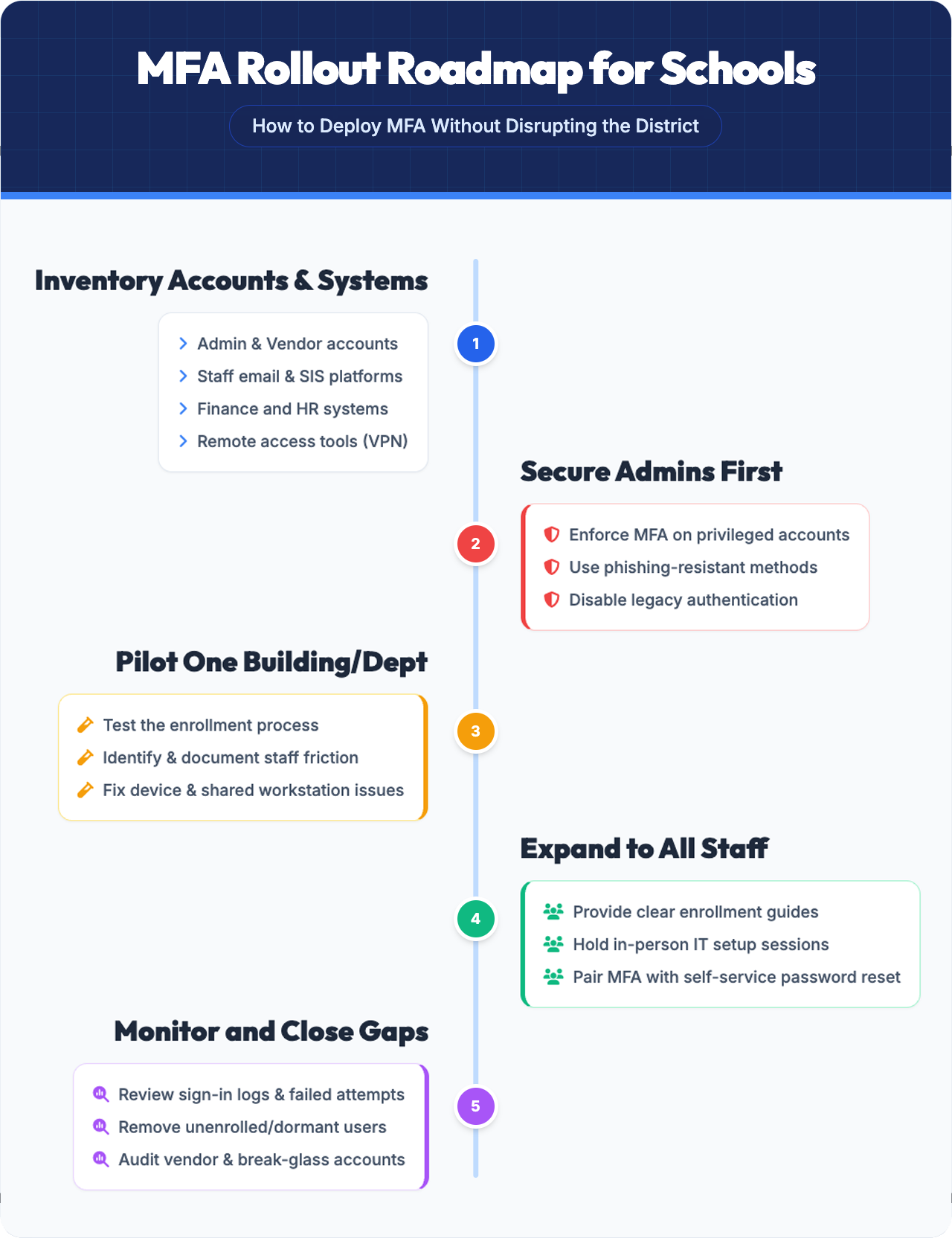
Deploying MFA across a school district is a sequenced operational program, not a single IT configuration change. Given that 99.2% of compromised accounts in Microsoft’s identity telemetry had no MFA enabled, the exposure from delayed or partial rollouts is not theoretical. The following steps reflect how districts with limited IT resources can build coverage systematically without disrupting daily operations.
Start by cataloging every account class: domain admins, global admins, staff accounts, contractor access, and vendor connections into platforms like your SIS, HR, and payroll systems. Flag legacy applications using older authentication protocols such as IMAP4, POP3, or SMTP, since these systems block modern MFA enforcement and require remediation before deployment can proceed.
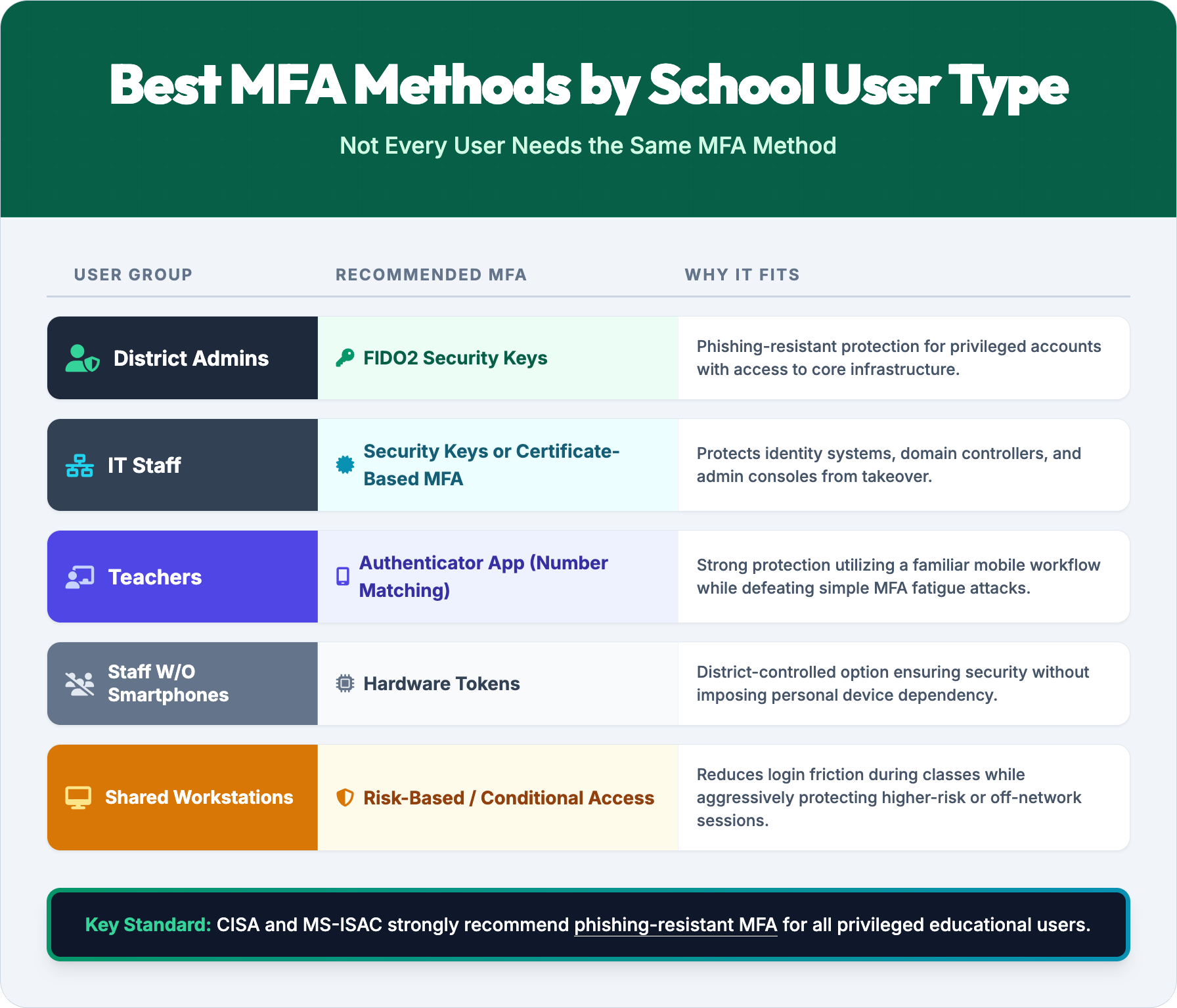
Privileged accounts carry the highest breach risk and should be locked down immediately. Domain admins, global admins, and any account with elevated system access need MFA enforced before the broader rollout begins. CISA and MS-ISAC guidance now specifically calls for phishing-resistant methods on these accounts, including FIDO2 security keys and certificate-based authentication.
Run the initial deployment in one school or department to stress-test workflows, surface enrollment friction, and refine communications before scaling. This stage also identifies shared device and BYOD constraints that require alternative authentication methods for staff without district-issued smartphones.
Provide written enrollment guides, schedule in-person registration sessions, and connect MFA adoption directly to protecting student records and district operations. Combining MFA enrollment with self-service password reset reduces support ticket volume and accelerates adoption.
Sign-in logs reveal accounts not yet enrolled, repeated failed MFA attempts, and anomalous access patterns that signal active credential attacks. Monitoring is not a post-deployment task; it is an ongoing control that keeps coverage complete as staff turnover and new systems are added.
Once the rollout framework is in place, the next decision is selecting which MFA methods are appropriate for different staff roles and system types across the district.
Getting MFA deployed is only half the work. Keeping it functional, adopted, and effective over time requires deliberate architectural decisions that most districts overlook in the initial rollout.
Pairing MFA with single sign-on is the most effective way to reduce authentication fatigue without weakening security. When staff authenticate once through a central identity provider, MFA prompts become less frequent and less disruptive, which drives higher adoption and fewer workarounds. Districts that skip SSO often find users sharing credentials or disabling security features to avoid repeated login friction across disconnected systems.
For privileged accounts, standard push notification MFA is not sufficient. CISA and MS-ISAC guidance now specifically requires phishing-resistant methods such as FIDO2 security keys or certificate-based authentication for administrators. Push-based approvals can be bypassed through prompt bombing attacks, where an attacker floods a user with requests until one is accidentally approved. Given that 99.2% of compromised accounts in Microsoft’s identity telemetry had no MFA at all, districts that do enable MFA for admins need to ensure those factors are genuinely attack-resistant.
IT GOAT works directly with school districts to assess MFA readiness, design a deployment approach that fits the district’s existing infrastructure, and manage the rollout without pulling internal staff away from daily operations.
That includes evaluating which systems require phishing-resistant methods for privileged accounts, identifying legacy authentication protocols that block MFA enforcement, and building a staged rollout that starts with administrators and expands to the broader staff population in a controlled sequence.
Support is U.S.-based, and the team brings direct experience in education environments.
The five authentication factors are something you know (a password or PIN), something you have (a hardware token or mobile device), something you are (a fingerprint or facial scan), somewhere you are (location-based verification), and something you do (behavioral patterns such as typing rhythm). Most school district MFA deployments rely primarily on the first three, with location-based policies added through conditional access rules for higher-risk scenarios.
District and domain administrators must verify identity with a second factor before accessing systems such as Azure AD, Google Workspace, or on-premises Active Directory. Given that 99.2% of compromised accounts in Microsoft identity telemetry had no MFA enabled, privileged admin accounts represent the highest-priority starting point for any district rollout.
Administrators navigate to Azure Active Directory, then Security, then Conditional Access, and create a policy requiring MFA for selected users or roles. Microsoft recommends testing the policy against a new non-admin account before applying it broadly, and pairing MFA registration with self-service password reset to reduce helpdesk load during rollout.
Many cyber insurance providers require MFA on privileged accounts, email systems, and remote access as a condition of coverage or to qualify for standard pricing. Districts that cannot demonstrate MFA controls on these systems face higher premiums, reduced coverage limits, or denied claims after an incident.
Most districts prioritize staff and administrators first, then evaluate student MFA based on grade level, device environment, and the sensitivity of systems students access. The shared-device and BYOD constraints common in K-12 settings make student MFA a separate policy decision that follows after the administrative foundation is secure, which is where implementation planning becomes critical.
We use cookies to enhance site performance and user experience. Your data stays private — we don’t sell your information or share it with unrelated third parties. To find out more about the cookies we use, view our Privacy Policy.