
Defense contractors face a unique challenge: sharing sensitive government data securely while meeting strict compliance requirements that most commercial file sharing tools simply can’t satisfy. One wrong transfer method can jeopardize your CMMC certification and your eligibility for future contracts.
This guide covers DoD SAFE and its alternatives, breaks down CMMC and NIST 800-171 file transfer requirements, and provides practical guidance for selecting and implementing compliant file sharing solutions.
Secure file sharing for defense contractors requires strict adherence to regulations like CMMC, ITAR, and NIST SP 800-171 to protect Controlled Unclassified Information (CUI). The most effective solutions include encrypted file transfer protocols, secure collaboration portals, and managed file transfer platforms that provide end-to-end encryption, comprehensive audit logs, and granular access controls.
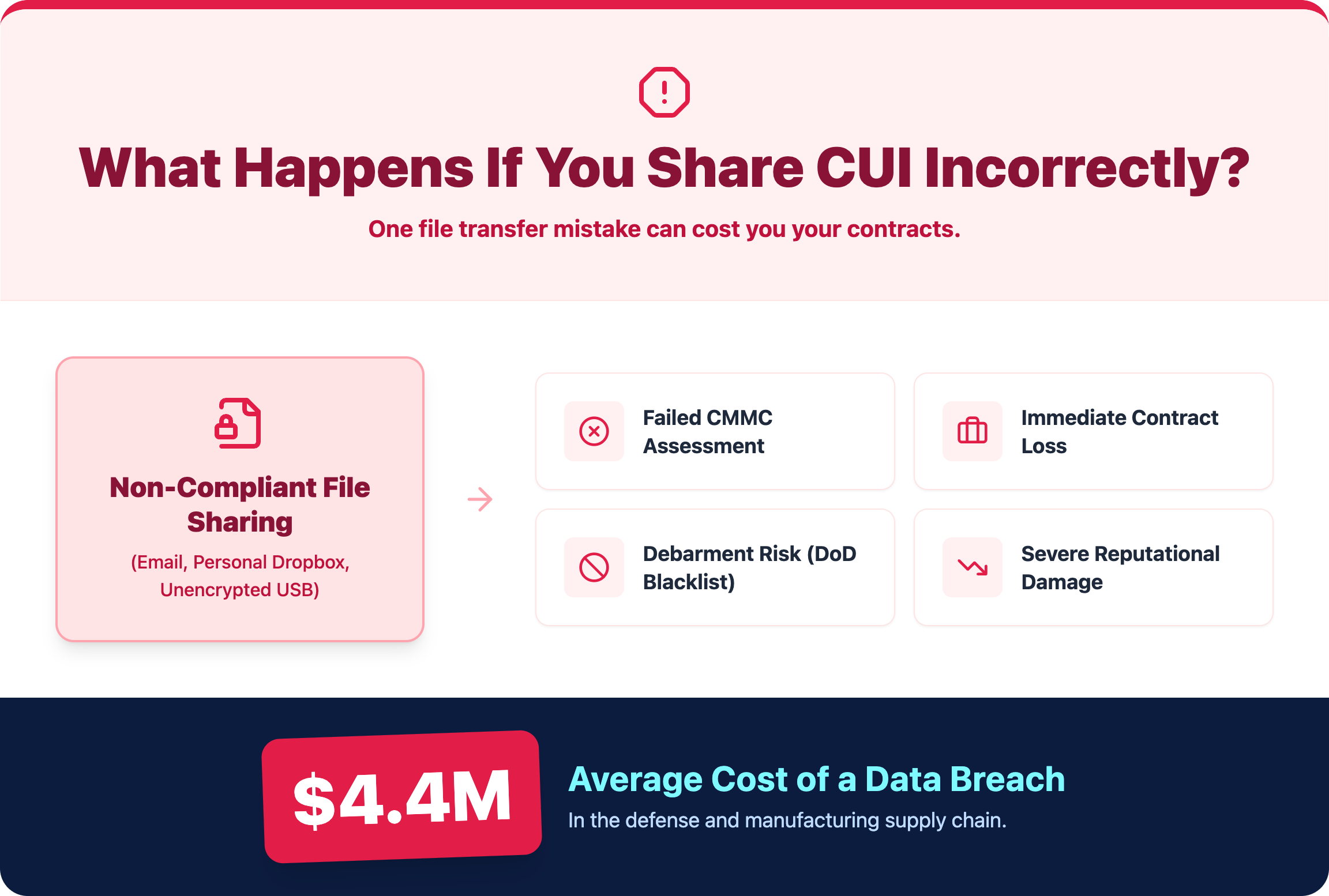
Defense contractors handle sensitive government data every day, and the stakes are high. A compliance failure can result in contract termination, debarment from future government work, and reputational damage that extends into commercial relationships.
Cybersecurity failures in the defense industrial base are not theoretical—they are frequent and costly. According to the Department of Defense, the Defense Industrial Base (DIB) experiences hundreds of thousands of cyber intrusion attempts daily, with many specifically targeting contractors handling CUI.
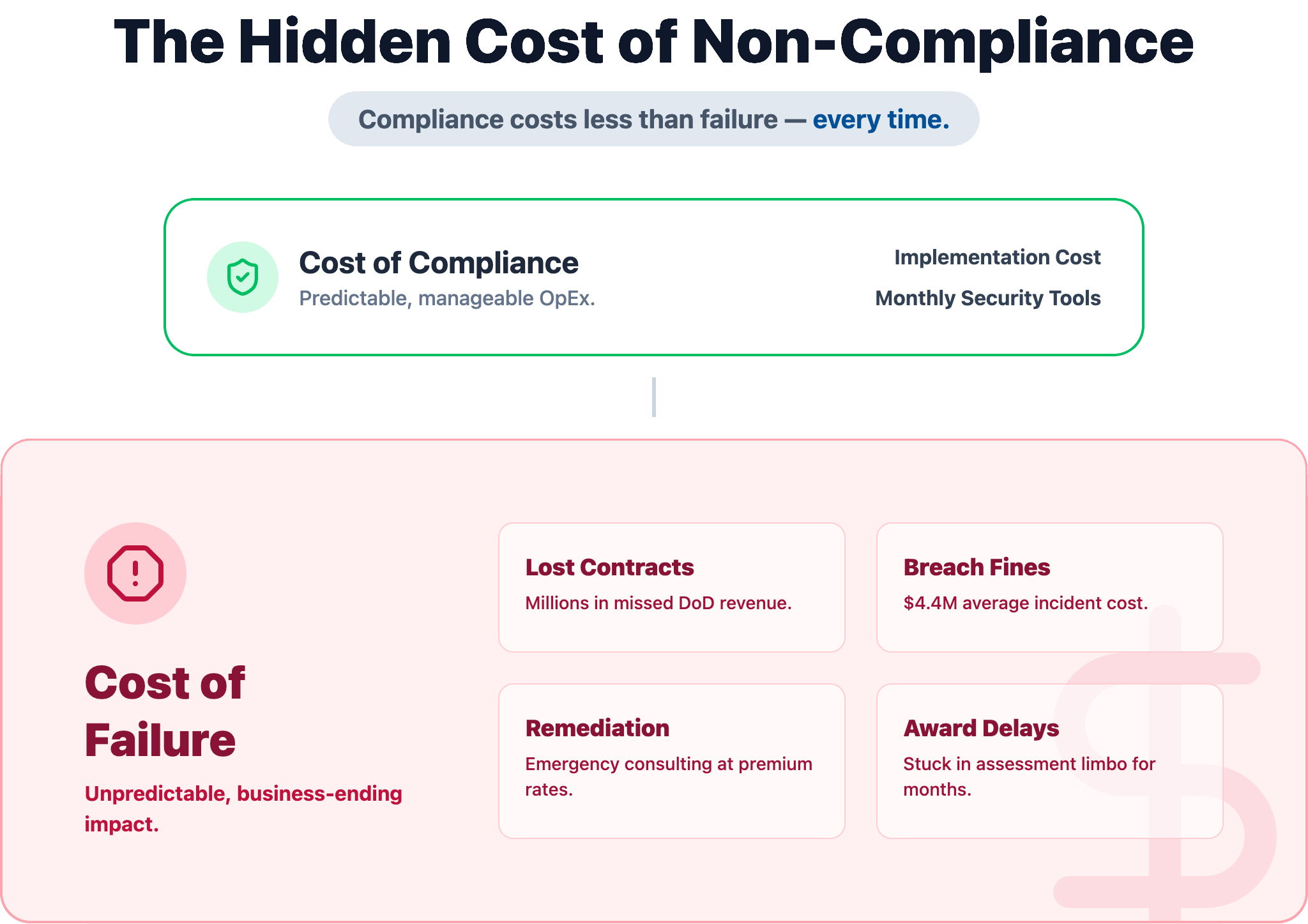
Additionally, IBM’s Cost of a Data Breach report shows the average breach cost exceeds $4.4 million, with higher impacts in regulated sectors like government and defense. For contractors, the financial risk is only part of the equation.
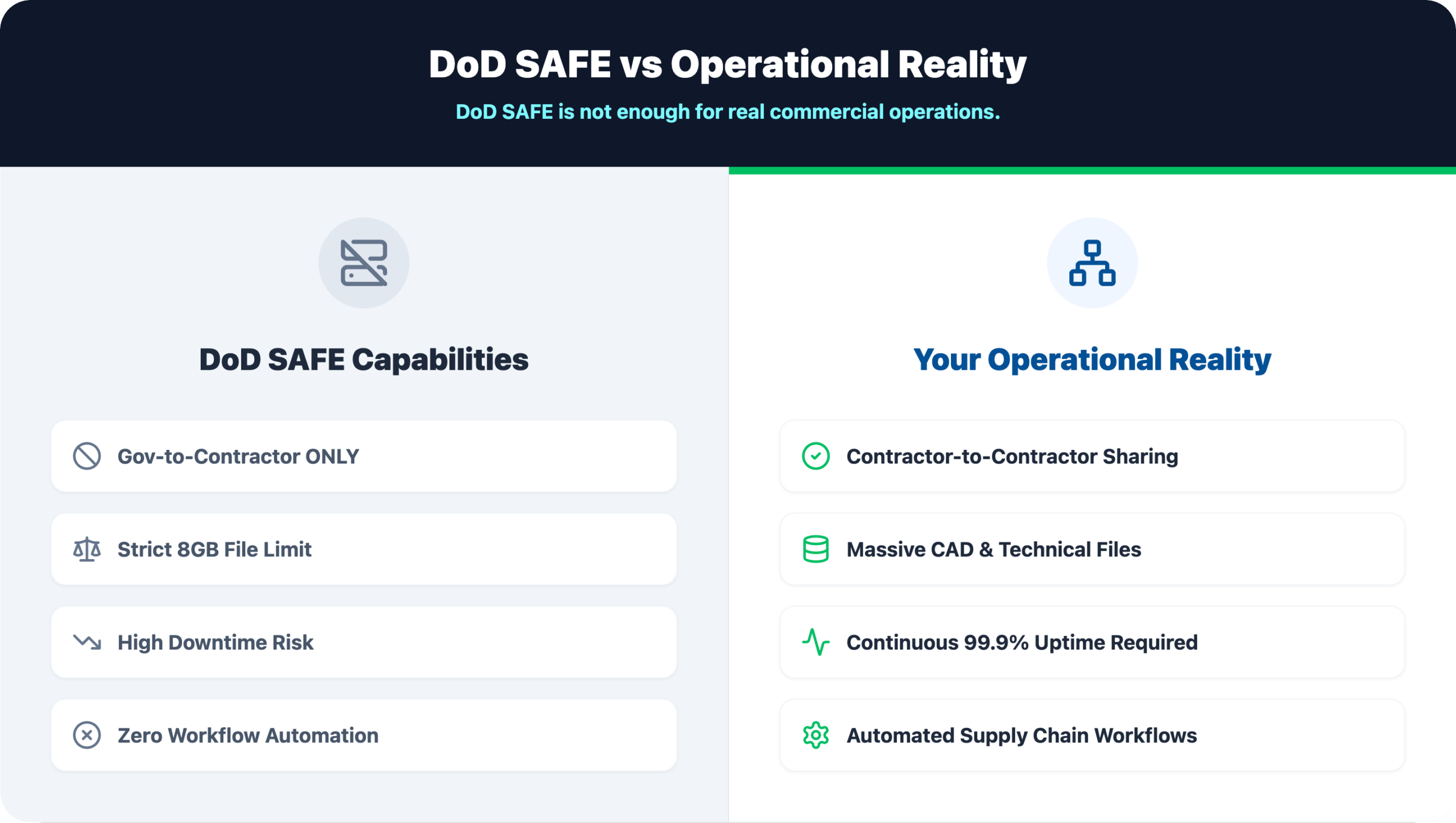
DoD SAFE (Secure Access File Exchange) is the Department of Defense’s official platform for securely transferring sensitive files between authorized users. The platform handles transfers up to 8GB and supports data up to the CUI level, making it the government’s go-to tool for defense-related file sharing.
The process is pretty straightforward. A sender uploads files to the platform, and the recipient gets a secure link via email to download them within a specified timeframe. All files are encrypted using TLS during transit, and you can add AES encryption for files at rest.
Access is limited to authorized personnel with proper credentials. This includes CAC card holders, military personnel, government civilians, and registered defense contractors who have completed verification.
The platform allows transfers up to 8GB per session, which covers most standard document exchanges. However, large engineering files, CAD drawings, or multimedia content often exceed this limit and require alternative transfer methods.
While DoD SAFE works well for its intended purpose, practical challenges often push contractors toward alternative solutions for daily operations.
DoD SAFE undergoes regular maintenance windows that can disrupt time-sensitive file transfers. These outages typically happen during off-peak hours, yet they still create headaches for contractors working against tight deadlines or across different time zones.
During periods of heavy use, the DoD safesite can slow down significantly or become temporarily unavailable. End-of-quarter reporting periods and major contract milestones tend to trigger slowdowns.
Here’s a critical limitation: DoD SAFE is designed for government-to-contractor transfers, not for sharing CUI between contractors. Prime contractors and their subcontractors require separate, compliant solutions for supply chain collaboration.
AMRDEC SAFE was the predecessor to the current DoD SAFE system. Some older government references and documentation still point to this outdated platform, which creates confusion for contractors trying to find the correct file exchange portal.
When DoD SAFE is down or doesn’t fit your specific use case, several DoD-approved options exist.
This DoD-approved method handles secure, unidirectional data transfers in specific classified environments. It’s primarily used to move data from a less secure network to a more secure one.
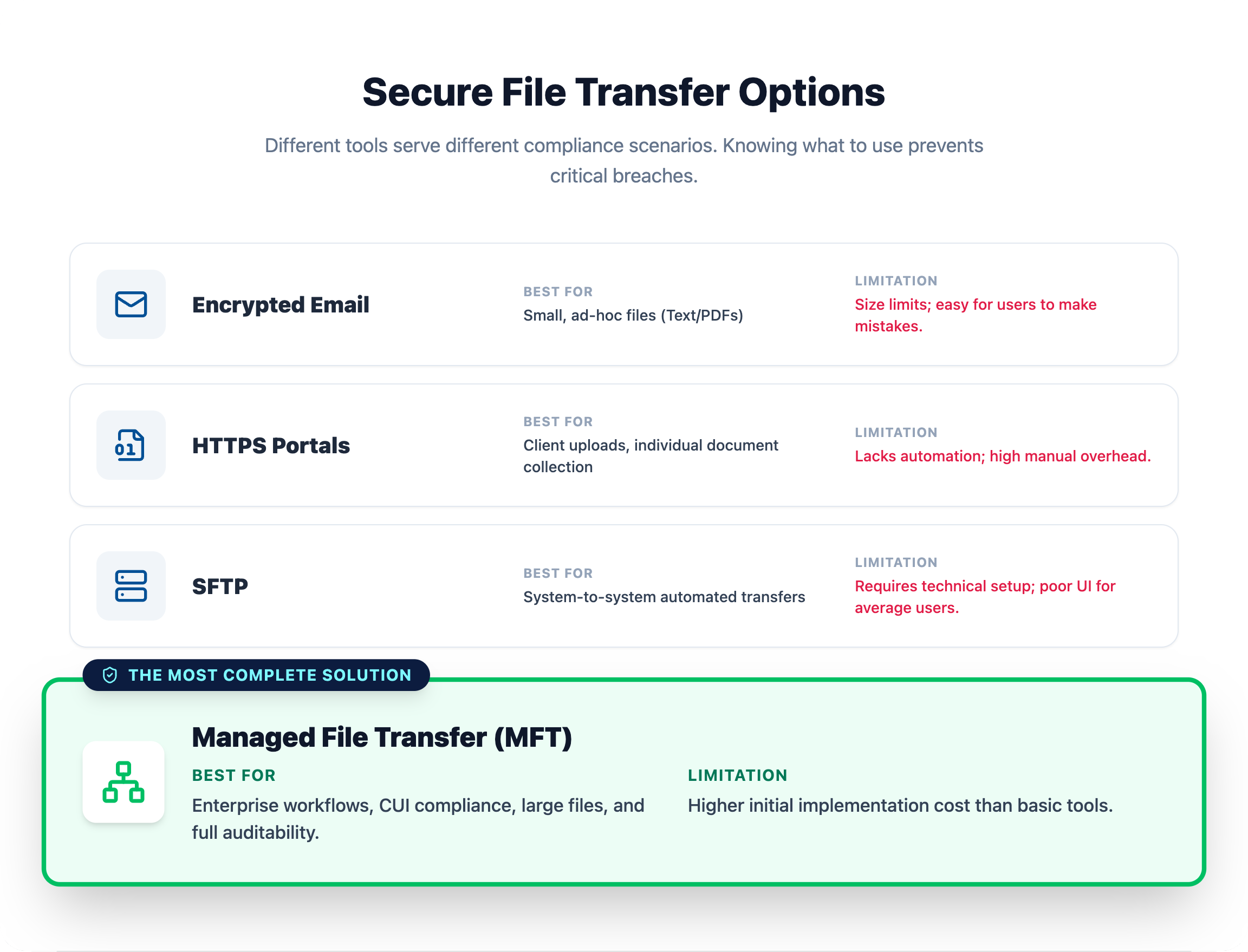
Commercial Managed File Transfer (MFT) solutions that meet CMMC and NIST requirements offer greater flexibility than government-provided systems. MFT platforms provide automation, centralized management, and more robust features for enterprise file workflows.
For smaller file transfers, CMMC-compliant email encryption services and secure client portals work well. These solutions handle routine document exchanges that don’t require the full capabilities of an MFT platform.
The Cybersecurity Maturity Model Certification (CMMC) mandates specific cybersecurity controls for how defense contractors handle, store, and transfer sensitive data. The certification level you require depends on the type of information you handle with advanced requirements extending to Level 3 for certain contracts.
Despite the importance of compliance, most contractors are not fully prepared. Industry assessments estimate that over 70% of defense contractors fail initial NIST SP 800-171 compliance evaluations, particularly in areas like access control, audit logging, and secure data transfer.
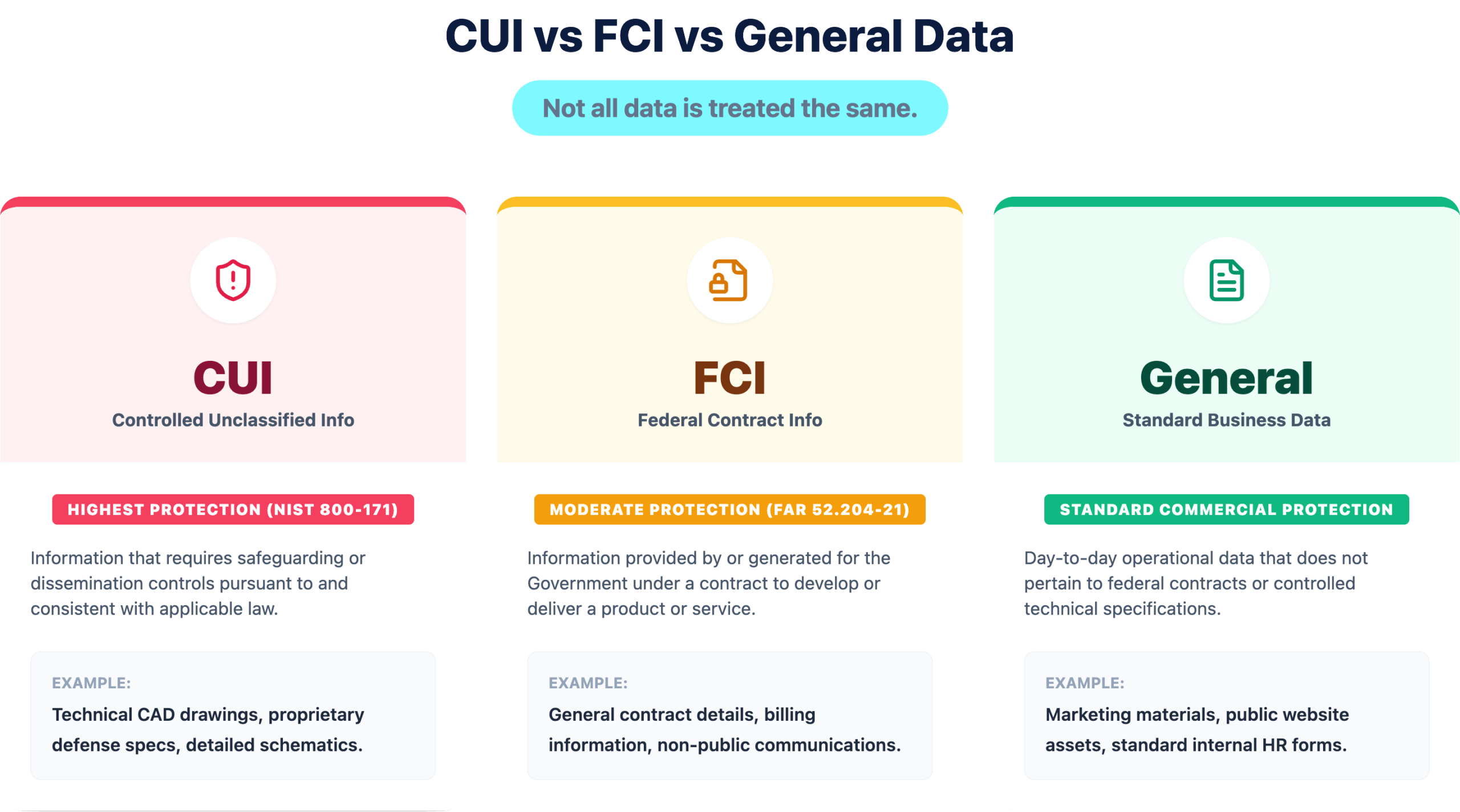
Level 1 focuses on protecting FCI and requires basic safeguarding controls. Contractors at this level implement fundamental access controls and basic data encryption for file transfers.
Level 2 protects CUI and requires full alignment with the 110 security controls outlined in NIST SP 800-171. This includes comprehensive encryption, access management, and incident response capabilities.
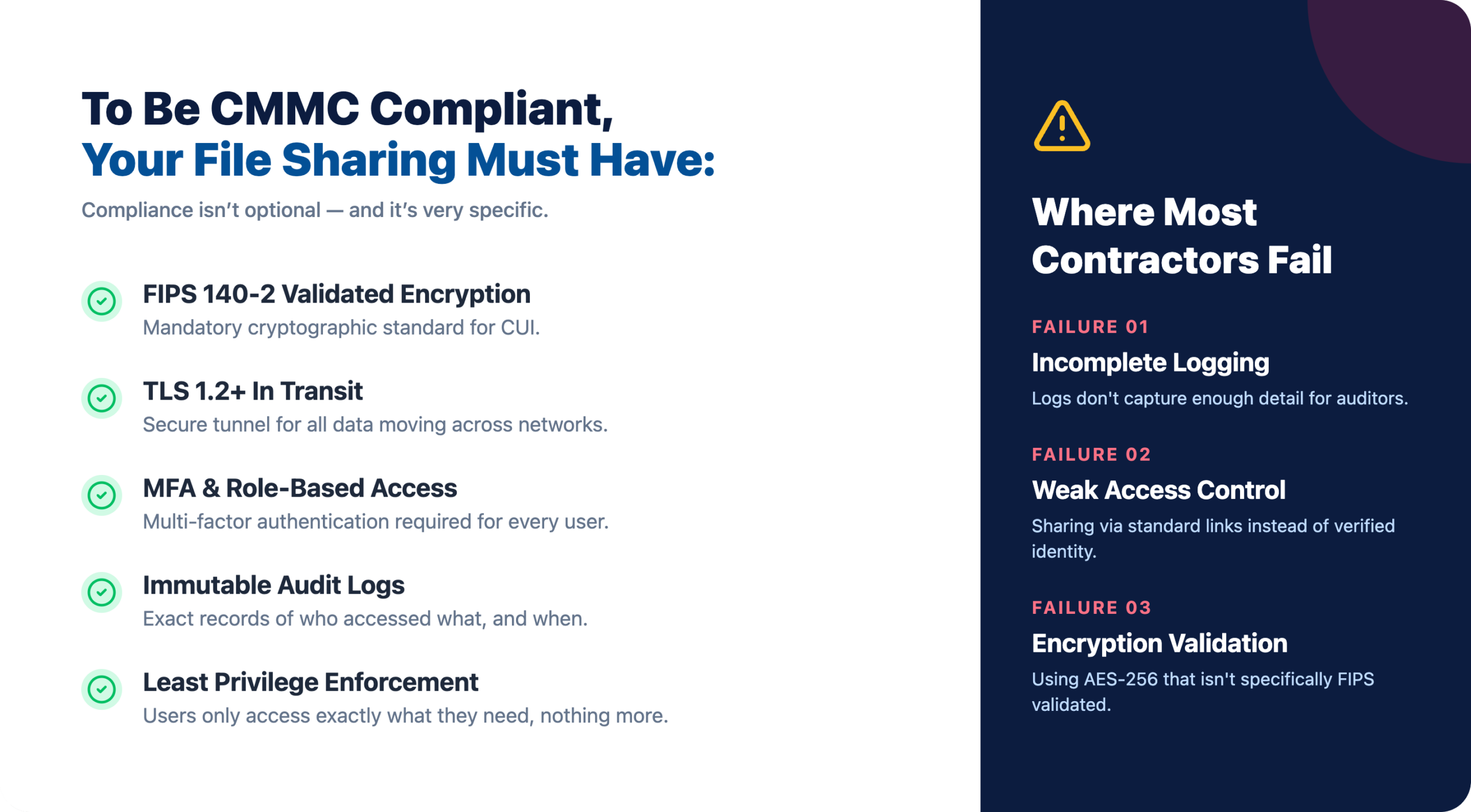
CMMC requires contractors to maintain detailed records of file access and transfers. Logs capture who accessed the data, what was transferred, when the activity occurred, and from which systems.
NIST SP 800-171 provides the foundational technical security controls that CMMC Level 2 builds upon. This framework dictates how CUI is protected during storage and transfer.
Files require protection with FIPS 140-2 validated encryption both during network transfer and when stored on servers or devices. Standard commercial encryption often doesn’t meet this validation requirement, so verify your tools are compliant.
Government compliance standards go beyond general encryption practices. For file sharing systems handling CUI, encryption must meet FIPS 140-2 validation, which is a federal standard for cryptographic modules.
This is a critical distinction because:
Additionally, NIST 800-171 requires secure file transfer systems to enforce:
This means compliance is not just about “turning on encryption”—it’s about using validated and properly configured cryptographic controls.
The framework requires multi-factor authentication (MFA), role-based access controls, and adherence to the principle of least privilege. In practice, this means users can only access the data necessary for their specific job functions.
Comprehensive logging of security-relevant events is mandatory. Logs capture what events occurred, who initiated them, and are retained for a specified period to support incident investigation.
The International Traffic in Arms Regulations (ITAR) imposes additional restrictions on sharing defense-related technical data. These rules apply regardless of whether the data is classified.
Several secure file transfer protocols can be configured to meet CMMC compliance requirements. The right choice depends on your specific workflow and integration requirements.
| Protocol | Encryption | Best Use Case | CMMC Suitable |
|---|---|---|---|
| SFTP | SSH | Server-to-server transfers | Yes |
| FTPS | SSL/TLS | Legacy system integration | Yes |
| HTTPS | TLS | Web portal uploads | Yes |
| MFT | Multiple | Enterprise file workflows | Yes |
SFTP (SSH File Transfer Protocol) uses SSH to encrypt both commands and data, making it highly secure for server-to-server file transfers. Many contractors prefer SFTP for automated, scheduled transfers between systems.
FTPS (FTP over SSL/TLS) adds encryption to the traditional FTP protocol. It’s often used for integrating with legacy systems that were originally built around standard FTP.
Web-based secure upload portals use HTTPS to provide an encrypted, user-friendly way for clients and partners to submit files through a browser. This approach works well for external parties who don’t have direct system access.
Enterprise MFT platforms combine multiple secure protocols with centralized management, automated workflows, and built-in compliance reporting. These solutions streamline CUI handling across complex supply chains.
A significant challenge in the defense supply chain is securely sharing CUI between prime contractors and their subcontractors. Since DoD SAFE doesn’t support contractor-to-contractor transfers, commercial solutions that meet CMMC and NIST 800-171 requirements fill this gap.
Solutions like PreVeil, Kiteworks, and FileCloud offer encrypted cloud storage and sharing specifically designed for contractor-to-contractor CUI exchange. These platforms provide the audit trails and access controls that government-provided tools lack for supply chain collaboration.
Selecting a compliant file sharing platform requires careful evaluation against government requirements and your operational realities.
Look for solutions with FedRAMP authorization for cloud services, FIPS 140-2 validation for encryption modules, and SOC 2 Type II reports for operational security. These certifications provide third-party verification of security claims.
The solution you choose works best when it integrates with your current infrastructure, including ERP systems, project management software, and workflow tools. Poor integration creates workarounds that often introduce security gaps.
For ITAR compliance and rapid issue resolution, a provider with a U.S.-based support team ensures U.S. persons handle any support requests involving sensitive data.
For many contractors, the biggest misconception is that compliance is expensive. In reality, the cost of non-compliance is significantly higher.
A failed CMMC assessment can result in:
By comparison, implementing compliant file sharing and security controls typically represents a fraction of contract value, often falling into predictable monthly operational costs when managed properly.
The following practices strengthen file sharing security and compliance posture.
FIPS 140-2 validated encryption for all file transfers and stored data containing CUI or FCI provides the protection level that government contracts require. Standard commercial encryption doesn’t meet government validation requirements.
Limiting file and system access to personnel who require it for their specific job functions reduces your attack surface significantly. This principle of least privilege is foundational to CMMC compliance.
Logging all file transfer activity, including sender, recipient, timestamp, IP addresses, and file identifiers, creates the documentation trail that auditors expect. Protecting logs from unauthorized modification is equally important.
Periodic reviews, vulnerability scans, and penetration tests of file sharing systems identify weaknesses before they become compliance findings during formal assessments.
Employees who handle sensitive defense information benefit from understanding proper procedures for creating, storing, and transferring CUI and FCI securely.
For contractors navigating the complexity of CMMC, NIST, and ITAR, partnering with a managed IT services provider offers an effective path forward. A security-focused MSP provides access to compliance expertise, proactive system monitoring, and dedicated U.S.-based support to ensure file sharing practices remain secure and compliant.
IT GOAT specializes in helping defense contractors implement and maintain compliant IT environments. Book a consultation to discuss your specific compliance requirements.


