
Running a nonprofit means stretching every dollar toward your mission—and technology expenses can feel like they’re pulling in the opposite direction. When the donor database crashes during your biggest fundraising campaign or a phishing email compromises sensitive client records, the impact goes far beyond IT headaches.
The right IT support partner changes that equation entirely. This guide walks through what nonprofit IT support actually includes, the challenges unique to mission-driven organizations, and how to evaluate providers so you can find a partner who treats your technology as seriously as you treat your cause.
Non profit IT support refers to technology services built specifically for charitable organizations, foundations, and mission-driven groups. Unlike standard business IT, nonprofit IT accounts for tight budgets, grant-funded operations, and the reality that every dollar spent on technology is a dollar not spent on the mission itself.
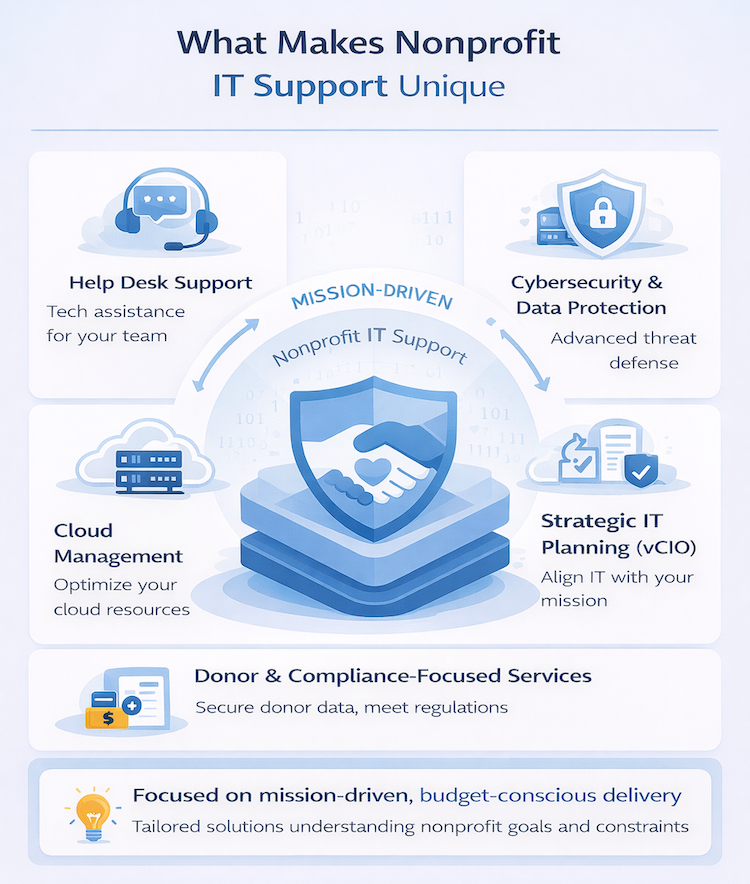
The services typically include help desk support, cybersecurity, cloud management, network maintenance, and strategic technology planning. What sets nonprofit IT apart is the approach—providers who understand this space know how to deliver enterprise-level protection and reliability without enterprise-level pricing.
Nonprofits operate in a different world than for-profit businesses. The challenges are real, and they directly impact how well an organization can serve its community.
When a server fails or a security incident occurs, the financial hit can derail programs for months. Grant funding often comes with strict spending categories, which makes surprise IT expenses particularly painful to absorb and report.
That donated computer from five years ago might seem like a gift, but aging hardware creates compatibility issues, slows down staff, and opens security holes. Replacing equipment feels like taking money from the mission, yet outdated systems often cost more in lost productivity than new machines would cost outright.
Nonprofits handle sensitive donor information, client data, and financial records—often with fewer security resources than commercial businesses. Attackers know this. Phishing attacks and ransomware can devastate an organization’s reputation and erode donor trust overnight.
Many nonprofits operate reactively with technology. Something breaks, someone fixes it. There’s no roadmap, no budget planning, and no connection between technology investments and organizational growth.
High turnover rates lead to knowledge gaps. When the one person who understood the donor database leaves, critical institutional knowledge walks out the door too.
A comprehensive IT provider addresses the full spectrum of nonprofit technology requirements. Here’s what a complete service offering looks like.
Remote and onsite support for daily technical issues forms the foundation of any IT relationship. When staff can’t access donor records or email stops working during a fundraising campaign, fast response times matter.
Threat monitoring, data protection, and compliance support protect both the organization and the people it serves. Compliance means adhering to legal standards and industry best practices for handling sensitive information.
Cloud hosting, migration, and ongoing management reduce reliance on aging physical servers. The scalability of cloud systems means technology can grow alongside the organization without major overhauls.
Data backups and recovery planning ensure mission continuity when things go wrong. A solid disaster recovery planData backups and recovery planning ensure mission continuity when things go wrong. A solid disaster recovery plan can mean the difference between a minor inconvenience and a catastrophic loss of years of donor records.
A vCIO, or Virtual Chief Information Officer, serves as an outsourced technology strategist. This service aligns IT investments with organizational goals, grant cycles, and long-term growth plans—something most nonprofits can’t afford to hire for full-time.
Support for common nonprofit platforms keeps operations running smoothly. Donor management systems like Bloomerang or DonorPerfect, accounting tools like QuickBooks, and collaboration software like Microsoft 365 all require maintenance and integration work to function together properly.
Generic IT providers may not understand nonprofit workflows, compliance requirements, or budget realities. A provider who works primarily with law firms or manufacturing companies will approach your organization the same way—and that approach often doesn’t fit.
Choosing the right IT partner requires evaluating several key criteria. Not every provider will be the right fit for every organization, and that’s okay.
Look for robust cybersecurity measures and relevant certifications. Ask about threat detection approaches, incident response procedures, and ongoing security monitoring practices.
Domestic support teams offer faster communication and cultural alignment. When a crisis hits at 3 PM on a Friday before a major event, you want someone who understands your urgency.
Clear pricing models support nonprofit budgeting cycles. Surprise invoices and hidden fees create exactly the kind of financial unpredictability that grant-funded organizations can’t absorb.
Long-term technology planning delivers more value than reactive fixes. A provider who helps plan for next year’s technology investments is worth more than one who only shows up when something breaks.
Providers who understand nonprofit workflows and tools can hit the ground running. They’ve seen the common challenges and know which solutions actually work in mission-driven environments.
IT services that grow alongside the nonprofit prevent major disruptions during expansion. Adding new staff, opening new locations, or launching new programs shouldn’t require starting over with technology.
Use these questions during the vetting process to identify the right partner.
Ask about case history and familiarity with nonprofit-specific challenges. How many nonprofits do they currently serve? What sizes and types of organizations?
Probe for security solutions that balance protection with affordability. Effective security doesn’t always require enterprise-level spending.
Clarify expectations around emergency support and escalation procedures. What happens when your email server goes down during your annual gala?
Determine if the provider offers long-term guidance beyond break-fix support. Technology strategy matters as much as technical support.
Understand whether pricing is predictable and designed for grant-funded budgets. Ask about contract terms, included services, and what triggers additional charges.
Watch for warning signs that indicate a poor-fit provider.
Providers unfamiliar with nonprofit operations may not understand grant cycles, board reporting requirements, or the unique pressures of mission-driven work.
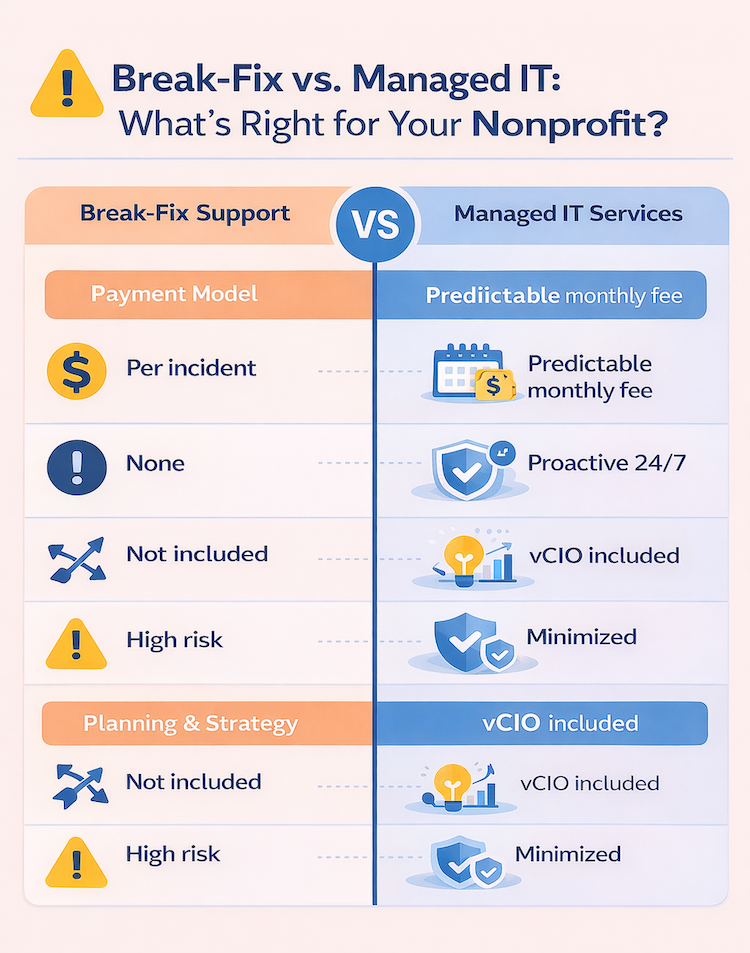
Break-fix support only repairs issues after they happen. Managed services include proactive monitoring to prevent problems before they disrupt operations.
| Break-Fix IT Support | Managed IT Services |
|---|---|
| Pay per incident | Predictable monthly cost |
| Reactive repairs | Proactive monitoring |
| No strategic planning | vCIO guidance included |
| Unpredictable downtime | Minimized disruptions |
Vague pricing or surprise charges create budget problems. If a provider can’t clearly explain their pricing structure, that’s worth noting.
Offshore teams can lead to communication barriers and delayed response times. When technology fails during a critical moment, delays cost more than money—they cost trust.
Security cannot be an afterthought for nonprofits handling sensitive donor and client data. If cybersecurity isn’t a core offering, keep looking.
Managed IT services shift technology management from reactive to proactive. Instead of waiting for problems to occur, a managed services provider monitors systems continuously and addresses issues before they cause disruptions.
This approach transforms IT from a source of frustration into a strategic asset. Staff spend less time troubleshooting technology and more time serving constituents, engaging donors, and advancing the mission.
Associations and membership-based organizations share many IT requirements with traditional nonprofits, though some differ. Member portals, event management systems, and communication platforms require specialized support and integration work.
These organizations often manage larger databases and more complex communication workflows. The right IT partner understands these nuances and can support the unique technology stack that associations rely on.
Start by evaluating your current IT environment. What’s working well? What causes the most frustration? Where are the security gaps?
Then reach out to qualified providers who specialize in nonprofit IT support. Ask the questions outlined above, check references from similar organizations, and look for a partner who treats your mission as seriously as you do.
Ready to simplify your nonprofit’s IT? Book a consultation with IT GOAT to discuss your organization’s technology requirements and explore how the right IT partnership can help you focus on what matters most—your mission.


